Best Time Clock for Staff: Top Picks for Small Businesses
To choose the right time clock for staff, consider how you track hours, whether you need biometric options, and if you prefer on-site or cloud-enabled management. These top picks cover punch-card style, classic 4-in-1 systems, and standalone biometric clocks, each suitable for small teams. The list highlights ideal buyers for each model and why it stands out for payroll accuracy and administrative efficiency.
| Product | Best For | Key Benefit |
|---|---|---|
| TIMOZIA Time Clock | Office teams with multi-time-zone locations | 6 time zones and automatic DST |
| uPunch HN1500 Starter | Small teams needing a complete punch-card bundle | Includes 100 time cards and rack |
| NGTeco 4-in-1 Time Clock | Workplaces needing versatile verification | Face, fingerprint, RFID, PIN |
| Pyramid 2500 Time Clock | Simple, reliable daily tracking | Auto-aligning punches, up to 3 punches/day |
| HapAttend Standalone Clock | Offline operation without internet | No monthly fees, USB export |
TIMOZIA Time Clock For Employees

The TIMOZIA time clock is a compact punch-card system designed for small offices with multiple U.S. time zones. It offers a large 4″ LED display and supports up to six entries per day per card. Dual-color printing flags late or early departures in red, while normal punches print in black. A built-in speaker gives audible alerts for time events. This model suits small to mid-size offices with regional teams seeking clear, fast time tracking across zones.
Best for: Offices with staff spread across Eastern, Central, Mountain, Pacific, Alaska, and Hawaii, who need automated DST adjustment and clear visual/audible cues. Consider for payroll when you rely on punch-card data rather than biometrics.
Caution: The system relies on paper-based cards and ribbons; ongoing supply costs and card handling are required. Ensure you have space for the 4″ display and card flipping for continued records.
uPunch HN1500 Starter Time Clock Bundle

The uPunch HN1500 Starter Bundle is a complete early setup for small teams. It includes the HN3000 AutoAlign time clock, 100 time cards, a card rack, a ribbon, and keys. AutoAlign technology helps ensure accurate card alignment, reducing payroll errors. The bundle is well-suited for businesses that want a turnkey solution without fussy software. It comes with a two-year warranty and straightforward support.
Best for: Small businesses seeking a ready-to-use punch-card system with dependable accuracy and a simple maintenance routine. Choose this if you prefer a traditional method with easy equipment replacement and minimal setup.
Caution: This is a punch-card system; if you want digital data export, you’ll need to adapt to manual card processing or add a compatible digital workflow later.
NGTeco 4-in-1 Time Clock
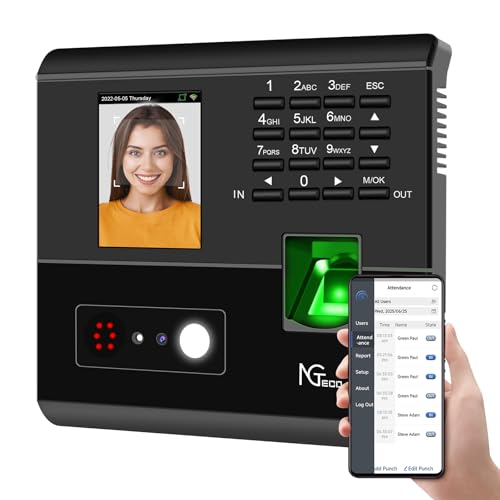
The NGTeco 4-in-1 model integrates facial recognition, fingerprint, RFID card, and PIN verification. This multi-factor approach helps prevent buddy punching and disputes, while auto-calculated work hours streamline payroll. Real-time data can be accessed via the free NGTeco app, enabling shift adjustments and export options. This device is ideal for busy environments needing flexible verification modes and cloud-style data access without complex setups.
Best for: Businesses needing robust anti-buddy-punch features and flexible verification. Better for teams with varied shifts and a need for quick, real-time reporting. Choose this if you want a mix of biometric and card-based access without monthly software fees.
Caution: Requires network setup for remote reports; initial configuration may be more involved than a simple punch-card system.
Pyramid Time Systems 2500 Auto-Aligning Clock

The Pyramid 2500 bundle focuses on reliable, straightforward time tracking. It features auto-aligning punches, a backlit display for easy reading, and automatic Daylight Saving Time adjustments. It supports 12- or 24-hour formats and double-sided printing, letting one card cover up to 31 days. This model is designed for predictable, consistent payroll entries and minimal daily maintenance.
Best for: Small teams prioritizing reliable punch-card timekeeping with simple setup. Choose this if you want a low-friction device that reduces payroll corrections and supports long-term card-based records.
Caution: Double-sided printing can be less cost-efficient if you print extensively; consider card and ribbon costs when planning long-term use.
HapAttend Time Clock

The HapAttend clock is a standalone biometric option with fingerprint verification and no required WiFi. It totals hours automatically, exports via USB, and operates without ongoing software fees. The system emphasizes privacy and offline management, making it suitable for offices prioritizing data control and local payroll processing.
Best for: Businesses needing secure, offline time tracking with biometric options and no monthly fees. Choose this if you want independent data storage and simple USB export for payroll integration.
Caution: No built-in cloud reporting means you’ll manage data locally; consider backup and data transfer needs if you expand to remote HR teams.
Buying Guide: Key Considerations For Your Time Clock Setup
- Data capture method: Punch-card, biometric (fingerprint/face), RFID, or PIN. Choose based on payroll accuracy and security needs.
- Connectivity: Standalone versus cloud-connected. Cloud options enable remote monitoring but may add setup steps and ongoing costs.
- Shift management: Fixed, rotating, flexible, or no-shift options. Ensure the clock supports your team structure and overtime rules.
- Reporting capabilities: Look for easy export to Excel/CSV, automated reports, and real-time visibility for managers.
- Device scale: Ensure capacity for your number of employees and daily punches, plus future growth.
- Maintenance costs: Consider cards, ribbons, batteries, and potential subscription fees when applicable.
Frequently Asked Questions
- What type of time clock is best for a small business?
– It depends on payroll needs. A punch-card system may be cost-effective, while biometric or RFID options offer better security and accuracy for teams with many employees. - Do I need cloud access for time tracking?
– Cloud access provides real-time data and remote management, but standalone devices work with local data storage and USB exports. - Can multiple time zones be supported by a single device?
– Yes, some models support multiple U.S. time zones, which is useful for regional offices or dispersed teams. - Are there ongoing fees with time clocks?
– Some models have no monthly fees (standalone or one-time purchases). Others offer cloud services with subscription options. - What should I consider when choosing for a growing business?
– Look for scalable user capacity, flexible shift rules, and easy data export to ensure payroll remains efficient as staff increases. - Is biometric data secure?
– Modern time clocks use encryption and local storage or secure cloud options. Check data protection standards and compliance features for your region.