Best Touch Screen TVs for Classrooms and Education
Answer: For classrooms and educational spaces, high‑brightness 55–75 inch touch boards or portable smart TVs provide interactive teaching, easy collaboration, and strong device compatibility. The top picks below suit different buyers: teachers seeking permanent installs, administrators needing portable options, and tech-enabled labs or media centers. This guide compares five standout models to help you choose the right fit based on size, onboard OS, portability, and collaboration tools.
Summary Table
| Product | Size | Best For | Key Benefit | Limitations |
|---|---|---|---|---|
| COOLHOOD 65″ | 65″ | Permanent classroom wall-mount or stand | Android 13, 128GB, 20-point touch | Stand sold separately |
| ApoloSign 32″ On Wheels (Gen2) | 32″ | Small rooms, flexible spaces | Portable rolling stand, 6h battery | Smaller display area |
| JASZDOT 55″ | 55″ | Hybrid classrooms, meetings | Android 14, 4K, 20-point touch | Requires wall or stand setup |
| EUNIVON 55″ | 55″ | Office and classroom collaboration | 4K, robust app ecosystem | Open ecosystem may need curation |
| JAV 75″ Pro | 75″ | Large lecture halls, studios | 4K, advanced camera, AI features | Higher cost and footprint |
COOLHOOD 65″ Smart Board: 4K Touchscreen for Classrooms

The COOLHOOD 65-inch interactive whiteboard runs on Android 13 with 128GB storage and a powerful octa‑core processor. It supports 20-point multi‑touch for large groups and smooth annotation, making it best for tech-forward classrooms and collaborative spaces. The device supports wireless screen sharing across devices and platforms (Mac, Windows, iOS, Android) to streamline presentations. Smart voting, screenshots, and a timer aid decision‑making in class or group work.
Who it’s best for: teachers needing a single, wall‑mounted interactive display with robust collaboration tools. Why chosen: large 4K display, open app ecosystem, and multi‑device share features enable dynamic lessons. Caution: the stand is sold separately, which may affect setup flexibility in smaller rooms.
ApoloSign 32″ 4K UHD Smart Portable TV on Wheels

This 32-inch portable touch TV delivers 4K visuals with 10-point touch for interactive demonstrations in classrooms or meeting rooms. It runs Android 16 with Google EDLA certification, providing access to Google Play and apps like YouTube, Zoom, and Drive. A built‑in 15000mAh battery supports up to six hours of cordless use, and the rolling stand adds quick room-to-room flexibility.
Who it’s best for: educators needing a movable, self-contained display for small groups or demonstration setups. Why chosen: portability and extended storage capacity support multi‑tasking. Caution: smaller display size may be limiting for large classes or where visibility is critical from back rows.
JASZDOT 55″ Smart Board: 4K UHD Interactive
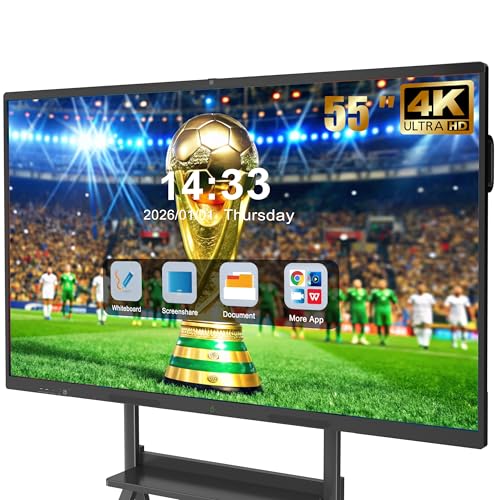
The JASZDOT 55″ combines a true 4K UHD touchscreen with Android 14 and 8GB RAM/128GB storage for responsive performance. It offers wireless screen sharing, real-time annotation, and a built‑in video conferencing hub. This model emphasizes classroom engagement and collaboration with multiple input methods and easy access to apps.
Who it’s best for: hybrid classrooms and studios requiring high‑quality visuals and video conferencing. Why chosen: strong 4K clarity, robust multitasking, and cross‑platform sharing. Caution: while powerful, the device’s size requires secure mounting and adequate space for movement around the classroom.
EUNIVON 55″ 4K UHD Smart Whiteboard

This EUNIVON model provides a 55-inch 4K UHD interactive display with Android-based software and an open ecosystem. It supports screencasting from Mac/Windows/iOS/Android via HDMI and enables annotation and sharing in meetings or classrooms. The ecosystem is designed to fit diverse use cases, from lessons to boardroom briefings.
Who it’s best for: administrators seeking a flexible, app-friendly board for multiple rooms. Why chosen: strong 4K clarity and broad app compatibility. Caution: an open app ecosystem may require careful policy and app management to maintain a clean classroom environment.
JAV 75″ Pro Google EDLA 4K UHD Interactive Board
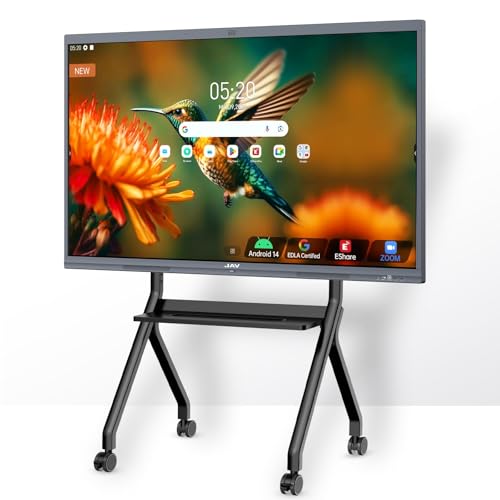
The JAV 75″ Pro pairs a large 4K UHD touchscreen with a high‑end camera and a 100W soundbar. It runs Android 14 with 8+128GB, and includes a wall mount. The system supports Google Drive integration, AI tools for annotation, and cross‑platform wireless sharing with Zoom/Meet/Teams/Webex. It’s designed for large classrooms or studios needing immersive collaboration.
Who it’s best for: large lecture halls or media labs seeking expansive interactive display with advanced conferencing. Why chosen: size and integrated AI/remote collaboration features. Caution: footprint and installation requirements are substantial; verify room dimensions before purchase.
Buying Guide: Key Considerations For Selecting a Classroom Touch Screen
- Display size and room visibility: Choose 32–75 inches based on room size, seating layout, and audience distance. Larger rooms benefit from 65–75 inches with 4K clarity.
- Touch capability: Look for multi‑touch support (8–20 points) for group work and handwriting recognition. Verify touch latency and accuracy if available.
- Operating system and app ecosystem: Android-based boards offer broad app access, while open ecosystems require management. Consider whether Google Play or specific education apps are essential.
- Connectivity and collaboration: Wireless screen sharing, screen annotation, and integration with Zoom/Meet/Teams support hybrid classrooms. Confirm support for Mac/Windows/iOS/Android.
- Portability vs. permanence: Fixed installations deliver stable use; portable rolling stands provide space flexibility but may require more setup time.
- Storage and performance: 128GB or more storage helps store apps and files locally; robust CPUs/GPUs reduce lag during interactive sessions.
- Mounting and space: Wall mounting saves floor space, while stands enable reconfiguration. Check weight capacities and room access for installation.
- Battery life (for portable models): If you choose cordless displays, battery duration affects usage windows and charging needs.
Frequently Asked Questions
- What size is best for a standard classroom?
– A 55″ to 65″ display is commonly effective for most classrooms, providing clear visibility for students seated around the room. - Should I choose Android or a Windows-based board?
– Android boards offer broad app access and easier app management, while Windows-based options may integrate existing school software more smoothly. - Is a rolling stand worth it for a classroom?
– Yes if you need room-to-room flexibility or multi-purpose spaces; otherwise, a wall-mounted board saves space and reduces clutter. - Do these boards require ongoing maintenance?
– Regular software updates and occasional calibration help maintain performance; consider a management plan for apps and users. - Can these boards connect to existing projectors or displays?
– Most offer HDMI input/output and wireless casting, which allows integration with legacy displays or projectors when needed. - How important is 4K for education?
– 4K enhances clarity for text, diagrams, and images, benefitting science and math lessons as well as media projects.