Best TV Mount for 60 Inch TV: Durable Full Motion Options for Large Screens
Find the best wall mount for a 60″ TV by focusing on full-motion options that support large screens securely. This guide covers mounts suitable for 60″ to 70″ televisions, with strong loading capacity, easy adjustability, and compatibility with common wood studs. The top picks are ideal for living rooms, home theaters, or bedrooms where viewing angle and glare reduction matter. Buyers can expect versatile mounting arms, plus tilting and swiveling features to tailor position from seating areas.

Summary table of selected products:
| Product | Best For | Key Benefit | VESA Range |
|---|---|---|---|
| USX MOUNT Full Motion TV Wall Mount | Versatile large TVs | Dual articulating arms, -12°/ +5° tilt, +/- 13.89″ extension | 75x75mm to 400x400mm |
| Mounting Dream MD2380 | Standard 32″-70″ TVs | Full motion with dual arms, easy leveling | 400x400mm |
| PERLESMITH PSLTK1 | Low-profile tilting installs | Up to 600x400mm VESA, heavy-duty | Up to 600x400mm |
| Pipishell PILFK1 | 45° swivel, mid-to-large TVs | Full motion, strong dual arms | Up to 600x400mm |
| Pipishell PILFK1 (Alternative) | Wide compatibility | +/-45° swivel, +/ -15° tilt | Up to 400x400mm |
USX MOUNT Full Motion TV Wall Mount
Best for flexible viewing of 32″–70″ TVs up to 99 lbs. This mount supports VESA patterns from 75x75mm to 400x400mm and can be mounted on 12″ or 16″ wood studs, concrete, or brick walls. It tilts -12°/ +5° and swivels left or right to fit seating positions. The dual articulating arms offer up to 13.89″ extension and 2.59″ retraction, enabling responsive movement for glare reduction and better sightlines. The design prioritizes safety with a sturdy cold-rolled steel frame that supports up to 99 pounds.
Who it’s best for: households needing robust full-motion capability for larger TVs with clear extension and tilt range. Caution: verify stud spacing and VESA compatibility with your specific TV model before installation.
IWORKBOARD 50 55 65 Inch Full Motion Mount
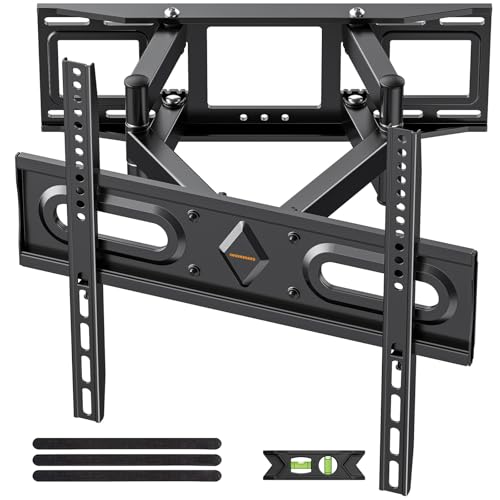
Best for most 32″–70″ TVs with a secure 8″–16″ stud spread. The 30% thicker dual articulating arms deliver strong support up to 110 pounds and accommodate VESA patterns from 75x75mm to 400x400mm. It tilts +5°/-15°, swivels ±45°, and allows leveling within ±4° after installation, enhancing comfort and reducing glare. It is designed for wood studs and equally supports concrete or brick walls.
Who it’s best for: homeowners seeking solid, straightforward full-motion performance with a high weight tolerance. Caution: ensure your wall structure and cable paths avoid obstructions at the required extension range.
Mounting Dream MD2380 Full Motion Mount

Best for 32″–70″ TVs up to 99 lbs with a max 400mm x 400mm VESA. This mount uses standard 16″ studs and provides tilt +5°/ -15°, plus +/-45° swiveling, with outstretched reach up to 17.5″ and a compact 3.4″ retraction. Easy post-install leveling helps perfect alignment. Includes clear instructions and labeled hardware for straightforward installation.
Who it’s best for: buyers wanting easy installation and flexible viewing angles. Caution: check stud spacing and potential obstructions before mounting to avoid interference with cables or wall features.
PERLESMITH PSLTK1 Tilting Wall Mount

Best for 37″–85″ TVs up to 132 lbs, with VESA compatibility across 200x100mm to 600x400mm. The PSLTK1 is a low-profile tilt mount suitable for 16″ wood studs. It includes a robust all-metal construction and anti-drop edges, along with a locking mechanism for secure mounting. Tilt down up to 7° to minimize glare and improve line of sight.
Who it’s best for: home theaters or living spaces needing a slim mount with strong weight capacity. Caution: verify that your TV’s VESA pattern matches the 200x100mm to 600x400mm range and that your wall supports the load.
Pipishell PILFK1 Full Motion Mount

Best for 37″–84″ TVs up to 132 lbs, with VESA 200x100mm to 600x400mm. The PILFK1 uses dual articulating arms to extend up to about 14.84″ and retract to 3″ for a low-profile look. It offers +5°/-15° tilt and +/-45° swivel, plus ±3° leveling after installation for precise alignment. Compatible with 12″ and 16″ wood studs as well as concrete or brick walls.
Who it’s best for: users who value strong motion and a deep range of positions for corner walls. Caution: ensure your wall has the required stud spacing and no hidden obstructions behind the mounting surface.
Buying Guide
- TV size and weight compatibility: Confirm that the mount supports at least your TV’s size (often 32″–70″ or 37″–85″) and weight (typically 99–132 lbs). A higher weight rating provides extra safety for larger TVs.
- VESA pattern: Match the back of your TV to the mount’s VESA range (e.g., 75x75mm to 400x400mm or wider like 600x400mm). If your TV uses an uncommon VESA, choose a mount with a broader range.
- Stud compatibility and wall type: Most mounts support 12″, 16″ (and sometimes 8″ or 18″ configurations) wood studs, concrete, or brick. Verify your wall can accommodate the required mounting pattern and weight.
- Movement and distance: Full-motion options provide extension, tilt, and swivel. Consider whether you need a mount that can move the TV away from the wall for cables, ventilation, or glare reduction.
- Installation ease: Look for pre-labeled hardware, leveling adjustments, and clear templates. Some models include locking mechanisms for added security.
- Minimal profiling versus clearance: Low-profile mounts sit closer to the wall, while full-motion mounts extend more. Choose based on seating layout and room lighting.
Frequently Asked Questions
- What is VESA compatibility, and why does it matter? VESA is the standard mounting hole pattern on the back of a TV. A mount must match or accommodate your TV’s VESA size to install securely.
- Can I mount a 60″ TV on drywall? Most full-motion mounts require studs for safety. If mounting on drywall alone, reinforce with studs or use appropriate anchors recommended by the mount manufacturer.
- Is a full-motion mount better than a fixed mount? Full-motion offers adjustable tilt and swivel for glare reduction and flexible viewing, while fixed mounts are simpler and often more compact.
- How do I avoid TV sag or wobble? Use a wall mount with a solid steel frame and verify that the hardware is tightened correctly after installation. Level the TV after hanging.
- What should I check before purchasing? Confirm TV size, weight, VESA pattern, stud spacing, and wall type, plus whether you need extra extension or tilt for glare control.
- Do these mounts support corner installations? Some models offer wide swivel ranges that work in corners, but confirm the exact angle limits and room layout before buying.