Best Universal Remote for Visually Impaired TV Viewing
Answering the need for simple, high-contrast controls, these universal remotes are designed to assist visually impaired or dexterity-challenged viewers. Each option prioritizes large buttons, tactile feedback, and clear color cues to simplify TV navigation. The top picks here are best for seniors, low-vision users, or anyone seeking an uncomplicated, non-streaming remote for major TV brands. The following brief table highlights the core strengths of the four chosen products to help you compare quickly.
| Product | Best For | Key Benefit |
|---|---|---|
| Big Button Universal TV Remote (Black) — EZClicker | Seniors with limited dexterity | Extra-large enter button and tactile feedback |
| EZclicker Big Button Universal TV Remote (Orange) | Users needing high-contrast visuals | Bold color choice and simple programming |
| QFX REM-115 8 in 1 Jumbo Universal Remote | Users appreciating dedicated media shortcuts | Glow-in-the-dark, Netflix/Prime/YouTube shortcuts |
| GE BigEZ OneTouch Universal TV Remote | People who want multi-device control | Backlit, color-differentiated buttons for visibility |
Big Button Universal TV Remote for Seniors — EZClicker (Black)

The EZClicker Big Button Remote emphasizes ease of use for seniors and those with limited vision or dexterity. It features an extra-large enter button, big universal controls, and tactile feedback designed to reduce mispresses. It works with major TV brands but is not compatible with cable boxes or streaming devices. Best for: seniors who want a straightforward, one-remote solution for living-room TVs. Caution: not suitable for anything beyond TV control; check compatibility before purchase.
EZClicker Big Button Universal TV Remote — Orange
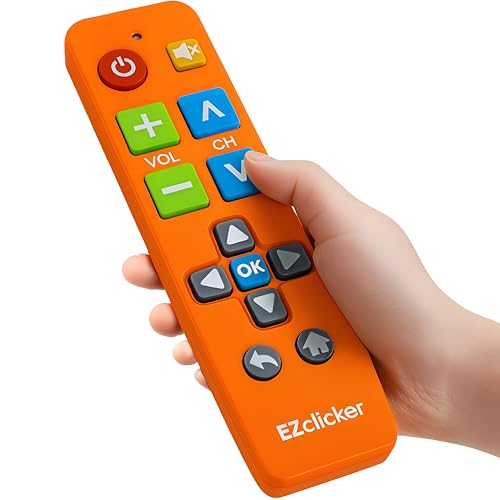
This orange variant mirrors the same accessible design with a high-contrast, oversized button layout intended for users needing obvious tactile cues. It is a universal remote compatible with major TV brands and advises users to avoid use with cable boxes or streaming sticks. Best for: viewers who prioritize high-visibility controls and simple programming steps. Caution: the setup requires pointing the remote at the TV and holding Mute/Volume+ as directed to complete pairing.
QFX REM-115 8 in 1 Jumbo Universal Remote

The QFX REM-115 offers an eight-device capacity with jumbo controls and glow-in-the-dark buttons. It includes dedicated shortcut buttons for popular streaming services, direct from the remote. Best for: users who want quick access to streaming apps and broader device compatibility. Choose this if you regularly switch between TV apps and external devices. Limitation: it targets multiple devices, which can be unnecessary if you only need TV control on a single set.
GE BigEZ OneTouch Big Button Universal TV Remote

The GE BigEZ OneTouch combines large, backlit buttons with color-differentiated controls to aid visibility. It supports Samsung, LG, Vizio, Sony, and Roku TVs, plus one additional device such as a Blu-ray player or streaming box. Best for: households with more than one device type or seniors who benefit from backlit, color-guided navigation. Caution: only one extra device control beyond TV power and volume; not a full universal for every brand in every setup.
Buying Guide
Key considerations help buyers match the right remote to their needs. The following questions address practical scenarios and trade-offs.
Which features matter most for visual accessibility?
Prioritize oversized buttons, high-contrast colors, backlighting, tactile feedback, and minimal button clutter. Remote models with white or bold-colored buttons against a dark body are easier to locate and depress accurately.
Do I need to control multiple devices?
If you only need TV control, consider remotes labeled as “for TVs only” to avoid unnecessary complexity. If you have a soundbar, Blu-ray player, or streaming box, look for multi-device compatibility with clearly labeled mode selectors.
Is setup simple?
Look for models that require minimal steps: power on the TV, point the remote, and perform a brief pairing sequence. Short, straightforward instructions reduce setup errors for first-time users.
What about compatibility and limitations?
Confirm the remote supports your TV brand and models. Some listings warn against cable boxes or streaming devices, which is crucial for non-TV use. Consider “not for streaming” models if you do not need app control.
What is best for night viewing or low light?
Backlit buttons are beneficial for evening viewing. Glow-in-the-dark features or high-contrast button legends help maintain visibility in dark rooms without straining eyes.
Which option best balances cost and simplicity?
For a straightforward, reliable TV-only experience, the EZClicker black remote or the GE BigEZ may offer the most direct paths to easy use with minimal bells and whistles. If you desire streaming shortcuts or more device types, the QFX REM-115 or GE BigEZ variant may be preferred, though with added complexity.
FAQ
Are these remotes compatible with all major TV brands?
Each model lists compatible brands; verify against your TV to ensure full functionality before purchase.
Can these remotes control streaming devices?
Most listed are designed for TVs; some offer limited extra device control, but avoid assuming compatibility with streaming sticks unless specified.
Do the remotes require batteries?
Yes. Most use AA or AAA batteries, which are not included in the listings.
Is programming difficult for seniors?
Programming guidance emphasizes single-button actions and quick pairing steps, designed to be intuitive for users with limited experience.
What should I do if the remote doesn’t work after setup?
Check line-of-sight to the TV, ensure batteries are fresh, and re-run the simple pairing steps described in the product features.