Best Unmanaged Gigabit Switches for Fast Home and Office Networking
Choosing an unmanaged gigabit switch helps expand wired network connectivity without complicated setup. The following picks focus on plug-and-play reliability, silent operation, and compact designs suitable for desktops, shelves, or wall mounting. Each model supports straightforward connectivity for desktops, consoles, NAS devices, and media players, delivering steady performance for home offices and small networks. The table below highlights the key attributes of five solid options to match diverse spaces and usage needs.
| Product | Ports | Multi-Gig Support | Best For |
|---|---|---|---|
| TP-Link TL-SG108S-M2 | 8 | Yes, 2.5G ports | High-speed multi-device setups |
| TP-Link TL-SG105S-M2 | 5 | Yes, 2.5G ports | Compact multi-Gig small offices |
| NETGEAR GS308 | 8 | No | Budget-friendly, simple expansion |
| NETGEAR GS324 | 24 | No | Larger desks or small setups needing many ports |
| TP-Link TL-SG116 | 16 | No | Medium-scale expandability, energy efficiency |
TP-Link TL-SG108S-M2: 8-Port 2.5G Unmanaged Switch

The TL-SG108S-M2 brings eight 2.5-Gigabit ports to a compact, silent desktop or wall-mountable form. Auto-negotiation detects link speeds (100Mb/1G/2.5G) for seamless compatibility with a wide range of devices, including 2.5G-capable Wi‑Fi 6 access points, NAS, PCIe adapters, servers, gaming rigs, and 4K streams. It offers up to 40 Gbps of switching capacity, making it a strong choice for multimedia workloads and small workstations that require fast, reliable connections without extra software or configuration.
TP-Link TL-SG105S-M2: 5-Port 2.5G Unmanaged Switch

The TL-SG105S-M2 expands networks with five 2.5-Gigabit ports, delivering up to 25 Gbps of switching capacity. Auto-negotiation automatically selects the fastest common speed (100Mb/1G/2.5G) for all connected devices, facilitating smooth operation for 2.5G Wi‑Fi 6 systems, NAS units, game consoles, and high-resolution streaming. This compact, desktop-friendly unit maintains a quiet profile and requires no management software, making it ideal for small offices or home setups that need reliable multi-Gig connectivity without complexity.
NETGEAR GS308: 8-Port Gigabit Unmanaged Switch

The GS308 focuses on straightforward, plug-and-play expansion with eight Gigabit Ethernet ports. It requires no software installation and supports desktop or wall mounting. This model is a practical choice for users who want reliable wired connectivity for everyday devices like printers, set-top boxes, desktop PCs, and smart home hubs—without managing settings or dealing with downtime.
NETGEAR GS324: 24-Port Gigabit Unmanaged Switch
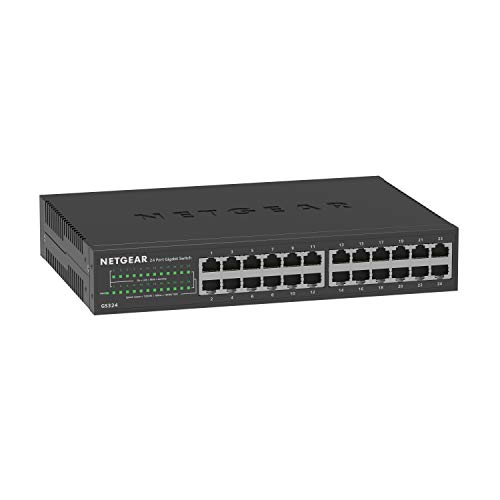
The GS324 provides a larger port count for expanding networks across multiple rooms or a small office. Like other unmanaged switches in this lineup, it offers plug-and-play operation with no configuration needed and supports desktop, wall, or rack mounting. This makes it suitable for users who need to connect many wired devices simultaneously while keeping network management simple and centralized in a single location.
TP-Link TL-SG116: 16-Port Gigabit Unmanaged Switch

The TL-SG116 pairs sixteen Gigabit ports with energy-efficient performance and quiet operation thanks to a fanless design. It supports Auto Negotiation and Auto MDI/MDIX for easy, auto-configuring connections, making it a dependable expansion option for larger home networks or small offices seeking scalable, unmanaged switching without extra noise or maintenance.
Buying Guide
Key factors to consider when selecting an unmanaged gigabit switch include port count, speed, form factor, and placement flexibility. Multi-Gig options like 2.5G ports are ideal if you have devices that support faster than Gigabit Ethernet, ensuring higher sustained throughput for NAS drives, game consoles, and access points.
- port count vs. space: Choose a model that fits your available desk, shelf, or wall space while providing enough downstream ports for future devices.
- speed and compatibility: If you have a 2.5G-enabled PC, NAS, or wireless access point, a 2.5G switch can unlock higher performance. For standard desktops, a Gigabit switch may suffice.
- noise and cooling: Fanless designs deliver silent operation, which matters in quiet offices or living rooms.
- mounting options: Wall-mountable or desk-friendly units help integrate the switch into varied setups.
- management: Unmanaged switches require no configuration, which simplifies setup but offers no advanced features like VLANs. If you anticipate needing network segmentation later, plan for a managed switch.
- duration and warranty: Look for sturdy metal housings and manufacturer warranties to ensure long-term reliability in daily use.
Across these options, you’ll find a balance between port density, speed, and simplicity. For homes with mixed devices and multi-Gig potential, models with 2.5G ports provide faster uplinks without compromising plug-and-play usability. For larger spaces or growing offices, higher port counts offer room to connect printers, cameras, and workstations while maintaining straightforward operation. The right choice depends on current devices, future expansion plans, and the importance of a quiet, compact design.