Best Unmanaged PoE Switches for Small Business and Home Office Networks
Unmanaged PoE switches provide plug-and-play power and data to IP cameras, access points, and VoIP phones without needing complex configuration. Below is a curated list of reliable unmanaged PoE switches that balance port count, power budgets, and compact form factors. Each product is evaluated on build quality, ease of use, and compatibility with standard PoE devices. Use the buying guide to compare options and pick the right one for your network setup.
| Product | Ports | PoE Budget | ||
|---|---|---|---|---|
| NETGEAR GS308PP | 8 (PoE+) | 83W | Desktop/Wall | High PoE capacity in compact 8-port model |
| NETGEAR GS305P | 5 (PoE+) | 63W | Desktop/Wall | Budget-friendly option with PoE+ coverage |
| NETGEAR GS324P | 24 (PoE+) | 190W | Desktop/Rack | Scales for larger small offices |
| NETGEAR GS316PP | 16 (PoE+) | 183W | Desktop/Wall | Good balance of ports and power |
| TP-Link LS108GP | 8 (PoE+) | 65W | Desktop/Wall | Extend Mode and PoE Auto Recovery |
NETGEAR GS308PP 8-Port PoE+ Unmanaged Switch
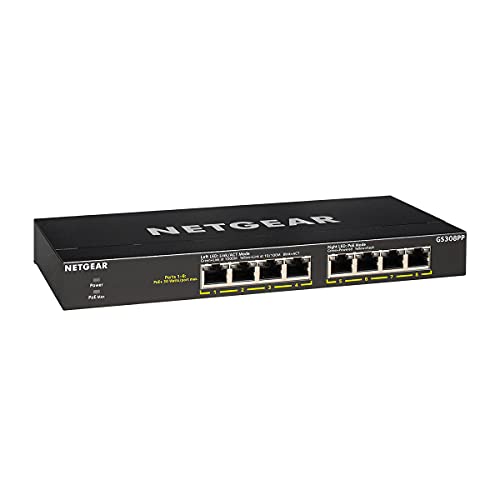
The NETGEAR GS308PP delivers eight Gigabit ports, all PoE+, with a total power budget of 83W. Designed for simple plug-and-play deployment, it requires no software or configuration, making it ideal for small offices or home setups that need immediate PoE to cameras or IP phones. Its compact desktop or wall-mount form factor helps you optimize space while keeping cabling tidy. The switch supports straightforward power management and reliable PoE delivery for network devices that rely on consistent power over Ethernet.
NETGEAR GS305P 5-Port PoE Switch

The GS305P offers five Gigabit ports, with four PoE+ ports and a 63W budget. Its plug-and-play capability means zero configuration, making it a practical upgrade for single-camera installations, access points, or VoIP phones that require reliable PoE power. The compact footprint fits on a desk or shelf, and wall-mount compatibility helps keep spaces clean. This model is particularly appealing for small deployments that need moderate PoE power without extra features.
NETGEAR GS324P 24-Port PoE+ Unmanaged Switch

Designed for mid-sized deployments, the GS324P provides 24 Gigabit ports with 16 PoE+ ports and a 190W total budget. This switch is well-suited for offices with multiple PoE devices such as cameras, APs, and IP phones. The plug-and-play design keeps setup simple, while its desktop or rack-mount options add flexibility for expanding networks. This model balances a large port count with robust PoE power for scale without complexity.
NETGEAR GS316PP 16-Port PoE+ Unmanaged Switch

The GS316PP sits in the mid-to-high range of unmanaged PoE switches, offering 16 Gigabit ports with 16 PoE+ ports and an 183W budget. It’s a practical option for networks that require more PoE ports without stepping up to a fully managed switch. The compact desktop or wall-mount design helps integrate into small office spaces, while the generous PoE budget supports multiple devices simultaneously.
TP-Link LS108GP 8-Port PoE Switch

The TP-Link LS108GP provides eight PoE+ ports with a 65W total budget, and extended features like Extend Mode, PoE Auto Recovery, and a quiet, fanless operation. It’s ideal for deployments that require long-distance PoE transmission and reliability for cameras or wireless access points. Extend Mode increases reach for remote devices, while Auto Recovery helps ensure continuous operation after a brief outage or device reboot.
Buying Guide
- PoE Budget and Port Count: Assess the total watts needed by your PoE devices and ensure the switch’s budget covers it. Higher port counts are helpful if you plan to expand with more cameras or APs.
- Form Factor and Mounting: Desktop, wall-mount, or rack-mount options affect placement. In tighter spaces, wall-mount or compact desktops save room.
- Plug-and-Play Simplicity: Unmanaged switches shine when no setup is required. If you expect to need VLANs or QoS features later, consider future plans that may require a managed switch.
- Extend Mode and Range: Some TP-Link models offer Extend Mode to push PoE signals farther, which is useful for remote cameras or APs.
- Noise and Cooling: Fanless designs are ideal for quiet environments, while higher-power units may include cooling requirements in rack spaces.
- Build Quality and Longevity: Look for switches with solid metal housings and reputable warranties. Reliability is critical for devices powered over Ethernet.
- Future Scalability: If you anticipate rapid growth, choose a switch with more PoE ports and a larger budget to avoid immediate upgrades.
- Management Needs: Unmanaged switches are simple; for devices requiring VLANs, QoS, and monitoring, plan an upgrade to a managed switch.
When selecting an unmanaged PoE switch, map your current device inventory to the port and power budgets and leave a small margin for future devices. The models listed here cover a range of needs from compact home offices to small-to-medium office deployments, offering dependable PoE delivery without complex configuration.