Best USB 3.0 Switches for Efficient Multi-Device Sharing
For productivity and clutter-free desks, a USB 3.0 switch helps you share keyboards, mice, printers, scanners, and other peripherals between two or more computers. The following selections focus on reliability, plug-and-play setup, and broad OS compatibility, without video transmission. Each option supports fast 5 Gbps data transfer and multiple USB-A and USB-C devices, making it easier to switch between work and personal systems. The table below highlights five strong choices to consider.
| Product | Brand | Ports | Key Benefit |
|---|---|---|---|
| UGREEN 2-In-4-Out USB Switch | UGREEN | 4 USB-A, 1 USB-C | Shares multiple devices across two PCs |
| UGREEN 2-In 7-Out USB Switch | UGREEN | 7 ports (4×USB-A + 3×USB-C) | Max device compatibility for mixed setups |
| Cable Matters 4-Port USB 3.0 Switch | Cable Matters | 4 USB-A ports | Remote/Wireless control and RF option |
| BENFEI 2-In-4-Out USB 3.0 Switch | BENFEI | 4 USB-A ports | Driver-free, broad OS support |
| UGREEN 2-In-2-Out USB Switch | UGREEN | 2 USB-A ports | Simple, compact dual-PC sharing |
UGREEN 2-In 4-Out USB Switch for 2 PCs

UGREEN’s 2-In-4-Out USB switch lets two computers share up to four USB devices, including keyboards, mice, printers, and USB cameras. It includes one USB-C port and three USB-A ports to support mixed device setups. This model emphasizes a simple, driver-free experience and 5 Gbps data transfer, while noting that it does not support monitor or video transmission. A powered USB supply is recommended when multiple devices operate simultaneously to avoid disconnection due to power constraints.
- 2 PCs, 4 USB devices shared
- 1 USB-C plus 3 USB-A outputs
- 5 Gbps data transfer; backward compatible with USB 2.0
- Plug-and-play; supports Windows, macOS, Linux, Chrome OS
UGREEN 2-in 7-Out USB Switch

This higher-capacity UGREEN model supports two computers sharing up to seven devices (four USB-A and three USB-C). It is designed for mixed port environments, letting you connect keyboards, mice, printers, USB drives, and more without needing extra hubs or docks. It remains a USB 3.0 switch with 5 Gbps transfer rates and broad OS compatibility, and it includes a USB-C to USB-A adapter for seamless cross-compatibility.
- 2 computers, 7 shared ports (4×USB-A + 3×USB-C)
- 5 Gbps transfer; USB 2.0 backward compatible
- Plug-and-play; works with Windows, macOS, Linux, Chrome OS
- Includes USB-C to USB-A adapter
Cable Matters 4 Port USB 3.0 Switch

The Cable Matters USB 3.0 switch supports four hosts sharing up to four USB peripherals, with one-button switching or RF remote control for quick changes. It’s designed to reduce cable clutter and make shared devices readily available to multiple desktops or laptops. The setup emphasizes USB 3.0 speeds, backward compatibility with USB 2.0, and the option to connect monitors only with compatible USB-C adapters in Windows setups.
- Four hosts, four USB peripherals
- One-button or RF remote control switching
- USB 3.0 with USB 2.0 compatibility
- Compact, space-saving design
BENFEI USB 3.0 Switch Selector

BENFEI’s 2-in-4-out USB 3.0 switch is designed for quick, driver-free operation across Windows, macOS, Linux, and Chrome OS. It enables two computers to share 4 USB devices, such as keyboards, mice, USB drives, printers, and scanners. The device uses a straightforward LED indicator and button switch to change the active host, with backward compatibility for USB 2.0 devices. A USB A-to-A cable is required for operation in some setups.
- 2 computers, 4 shared USB ports
- Driver-free; broad OS support
- LED indicators and a one-button switch
- USB 3.0 speeds; USB 2.0 compatible
UGREEN 2-In 2-Out USB Switch

UGREEN’s compact 2-in-2-out USB switch enables sharing of two USB devices between two computers. It emphasizes straightforward plug-and-play setup, fast USB 3.0 data transfer, and broad compatibility with Windows, macOS, Chrome OS, and Linux. It’s a practical option for reduced desk clutter when only two peripherals need to be shared between PCs.
- 2 computers, 2 USB outputs
- 5 Gbps data transfer; USB 2.0 backward compatible
- Driver-free; plug-and-play on major OSes
- Ideal for compact setups with limited peripherals
SABRENT USB 3.0 Sharing Switch
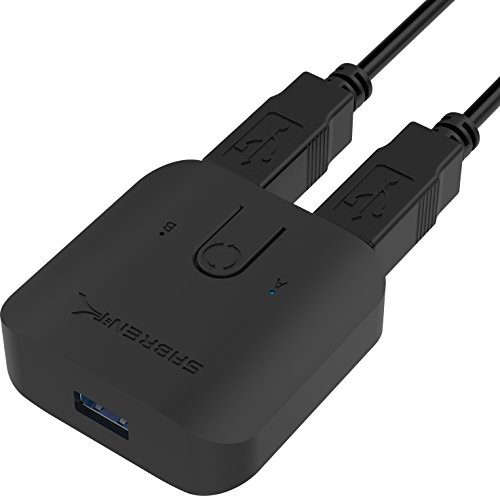
SABRENT’s USB 3.0 sharing switch provides easy plug-and-play sharing across multiple peripherals with LED indicators to show active connections. It is designed for simple swaps between computers without installing drivers. The switch is positioned as a practical, low-friction solution for basic USB peripheral sharing, suitable for office desks with several devices that need to be shared between two or more PCs.
- Plug-and-play with LED indicators
- Single-button swap between computers
- Hub-compatible for multiple peripherals
Buying Guide: Key Considerations for Choosing a USB 3.0 Switch
-
<li Number of devices and ports: Evaluate how many USB peripherals you need to share and ensure the switch provides enough ports across USB-A and USB-C to accommodate current and near-future needs.
<li Computer count: If you only need to swap between two computers, a 2-in/4-out or 2-in/2-out model may suffice. For mixed environments with many devices, higher port counts (4 to 7 ports) can reduce extra hubs.
<li Port types and adapters: Look for devices that support both USB-C and USB-A, and check if adapters are included. Mixed setups benefit from adapters included in the package.
<li Data speed and compatibility: All models listed support USB 3.0 with up to 5 Gbps transfer, and are generally backward compatible with USB 2.0. Ensure your devices don’t require USB-C-only power to function reliably.
<li Power requirements: Some switches recommend external power when many devices are connected concurrently. Consider a powered model if you frequently hit power-related disconnects.
<li Video and KVM considerations: Note that these devices are not KVM switches and do not transmit video. If you need video sharing, you’ll require a true KVM with video routing.
<li Control method: Decide between physical button switches and RF remotes. RF remotes can simplify switching when the switch sits in a rack or out of immediate reach.
<li Plug-and-play and driver support: Most models advertise driver-free operation across Windows, macOS, Linux, and Chrome OS. This reduces setup time and compatibility concerns in mixed environments.
<li Size and cable management: Consider the physical footprint and whether included cables (USB-A or USB-C) fit your desk arrangement or require additional cable management.
<li Reliability and brand support: Prefer models from reputable brands with clear return policies and documentation to help with troubleshooting or future replacements.