Best USB C Adapters for PC: Fast Data, Power, and Expandable Connectivity
Answering the common buyer question, these USB C adapters convert and expand USB-A ports into modern USB-C connections for PCs and laptops. They’re best for users who want quick data transfers, convenient charging, and broader device compatibility without replacing existing chargers or hubs. The top picks below focus on 10 Gbps data transfer, durable builds, and cross-device compatibility, including laptops, tablets, and smartphones. The following table summarizes five strong options and why they suit different needs.
| Product | Why It Stands Out | Best For |
|---|---|---|
| UGREEN USB to USB C Adapter 3Pack | Three adapters, 10 Gbps data transfer, robust build for frequent plugging | Users needing multiple adapters for home and travel |
| Acer USB C Hub, 7 in 1 | Versatile port mix including HDMI 4K, USB PD, SD/MicroSD | Laptops needing multiple peripherals and charging |
| UGREEN USB to USB C Adapter & USB C to USB Adapter Combo 4-Pack | Two converter directions in one kit, durable aluminum housing | Those who want flexible port conversion at once |
| Acer 5 in 1 USB C Hub | 4K HDMI, 100W PD, USB A data, and USB-C pass-through | Presentations and daily multi-device use |
| XAOSUN 2-Pack USB C to USB A Adapter | 10 Gbps data, 100W fast charging, aviation-grade aluminum | Power users needing quick transfers and charging |
UGREEN USB to USB C Adapter 3Pack

This kit converts USB A chargers and ports into USB-C connections. Data transfer reaches up to 10 Gbps, and charging can reach up to 3A, with Android devices supporting up to 18W and Apple devices up to 7.5W. The design emphasizes a stable fit and long life, with claims of up to 10,000 plug-unplug cycles. Best for users who want a simple, compact adapter to adapt existing USB-A ports for USB-C devices. A potential limitation is that some devices may require higher power delivery than the adapter can provide in certain USB-C configurations.
Who it’s best for: Students or professionals who need extra USB-C ports while traveling or at a desk, and who don’t require high-power PD charging on every device.
Why chosen: It delivers fast data transfer in a compact form factor and includes multiple adapters for different scenarios, making it a flexible value choice.
Acer USB C Hub, 7 in 1

This aluminum multi-port hub expands a USB-C port into seven ports: HDMI 4K@30Hz, two USB 3.1, USB-C, PD charging, MicroSD, and SD card slots. It supports 4K output to HDMI and provides up to 100W power delivery when used with a compatible charger. Note that the HDMI output is 4K at 30Hz (not 4K at 60Hz), and the PD port is primarily for charging the host device rather than data transfer. Best for: home office setups and classrooms where a single hub can connect displays, storage, and peripherals.
Who it’s best for: Professionals who need a single, portable hub for presentations and everyday tasks on a USB-C laptop.
Why chosen: The 7-in-1 feature set covers most common needs with a robust PD charging option, simplifying desk setups.
UGREEN USB to USB C Adapter & USB C to USB Adapter Combo 4-Pack

This pack provides two USB-C male to USB-A female adapters and two USB-A male to USB-C female adapters. It supports up to 10 Gbps data transfer and up to 3A charging. The aluminum housing increases durability and resistance to wear. Best for users who frequently swap devices or need both directions of conversion in one kit. Limitation: PD charging behavior may vary by device and charger compatibility.
Who it’s best for: Power users who connect a mix of USB-A and USB-C devices, especially on MacBooks or Windows laptops that frequently dock peripherals.
Why chosen: The dual-direction design adds flexibility without needing separate adapters, helping streamline workspaces.
Acer 5 in 1 USB C Hub

This compact hub features a 4K HDMI output, 100W PD charging, USB A data port, and two USB 2.0 ports. It’s designed to extend a USB-C laptop’s capabilities while keeping charging concurrently. Note: The USB-C port must support DP Alt Mode and PD for full function, and PD charging typically charges the host device rather than passing data. Best for: presenting, streaming, or extending USB-C laptops with essential peripheral connections.
Who it’s best for: Professionals who need a simple, reliable hub for work and travel, with basic display and data needs.
Why chosen: The 5-in-1 layout covers common needs in a single, portable package, with a strong emphasis on charging and display support.
XAOSUN [10Gbps] USB C Female to USB Male Adapter
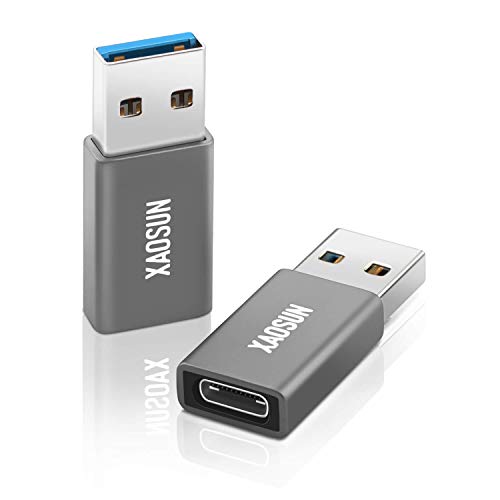
This 2-pack provides high-speed USB 3.1 Gen 2 data transfer up to 10 Gbps and supports fast charging up to 100W. It uses aviation-grade aluminum for a durable build and a matte finish for grip. Caution: The adapter’s PD functionality may not support all high-power chargers, and PD charging might not apply to all devices. Best for users who need fast data transfers and strong construction for frequent on-the-go use.
Who it’s best for: Power users, content creators, and students who transfer large files quickly and require dependable hardware for daily use.
Syntech USB C to USB Adapter Pack of 2

The Syntech adapters are built with anti-interference zinc alloy housings and are designed for up to 10,000 plug-unplug cycles. They emphasize compatibility with iPhone 17/17 Pro devices and various MacBook Pro/Air models. Best for: those who value a rugged, long-lasting connector with broad compatibility across devices that use USB-C and USB 3.0 connections. Caution: Some devices may require specific USB-C alt modes to fully utilize all features.
Mepsies USB to USB C Adapter

Mepsies offers a USB-A to USB-C adapter, enabling USB-C port access from standard USB-A connections. It supports USB 3.1 Gen 2 speeds up to 10 Gbps and is widely compatible with a range of devices including iPhones, MacBooks, and many Android devices. Best for: users who need a straightforward USB-A to USB-C conversion for data transfer and peripheral attachment. Limitation: Some devices with unique power or PD requirements may not optimize charging through this adapter.
Buying Guide
Key considerations help buyers choose the right USB-C adapter for their PC setup.
- Data transfer speed: If you frequently move large files, prioritize 10 Gbps or higher adapters. Look for Gen 2 USB-C or USB 3.1 compatibility.
- Power delivery: Consider whether PD charging is important. Some adapters support up to 100W, while others offer charging in a more limited range.
- Port variety: For desks with multiple peripherals, a hub with HDMI, SDXC, USB-A, and USB-C ports can reduce the need for additional dongles.
- Build quality: Aluminum housings and durable connectors generally last longer and resist wear from frequent plugging.
- Device compatibility: Ensure the adapter supports your devices’ DP Alt Mode, PD, and power requirements. Some hubs require specific host capabilities for full functionality.
- Port directions: Some kits offer adapters in both USB-A to USB-C and USB-C to USB-A directions. If you frequently swap devices, a dual-direction kit adds value.
FAQ
- Do USB-A to USB-C adapters support video output?
Most USB-A to USB-C adapters do not transmit video unless the USB-C port supports DP Alt Mode. Check the product details for HDMI or DisplayPort capabilities. - Can I use these adapters with a PC and a MacBook?
Yes, most USB-C adapters are cross-compatible with PCs and Apple devices, but PD charging performance and data speeds can vary by device and port. - Will these adapters charge my laptop?
Some adapters offer USB-C PD charging up to high wattage; others may only support low-power charging. Verify the PD rating and charger compatibility for your device. - Do these adapters support USB-C data transfer rates on Windows?
Many provide up to 10 Gbps data transfer, which is widely supported on Windows when paired with compatible cables and devices. - Are aluminum adapters more durable than plastic?
Yes, aluminum housings generally offer greater durability and heat dissipation for frequent use. - Is it better to buy a hub or individual adapters?
Hubs consolidate multiple ports in one device, which reduces clutter. Individual adapters can be cheaper if you only need one or two port types.