Best USB C Laptop Chargers for Powering Laptops on the Go
This guide helps buyers choose reliable USB‑C laptop chargers that deliver safe, adequate power for a wide range of laptops. The top picks below are suited to different needs: fast charging for premium devices, compact travel chargers, and high‑watt options for power‑hungry laptops. The following table summarizes the featured products to compare at a glance.
| Product | Brand | Wattage | Best For |
|---|---|---|---|
| Anker Laptop Charger | Anker | 100W | Fast charging across many devices; MacBook Pro/Air and USB‑C laptops |
| ELECBRAIN 100W USB‑C Charger | ELECBRAIN | 100W | Wide device recognition; strong safety protections |
| Sunveza 118W USB‑C Charger | Sunveza | 118W | High‑end MacBook Pro and USB‑C devices with fast charging |
| VJYUIJAY 65W USB‑C Laptop Charger | VJYUIJAY | 65W | Budget‑friendly option; compatible with many ThinkPad, Yoga, Chromebook models |
| PIOEVTKA 130W USB‑C Charger | PIOEVTKA | 130W | High‑watt Dell/XPS/Precision style laptops |
Anker Laptop Charger, 100W USB‑C Charger

Best for: Users who need fast, broad compatibility across laptops and mobile devices. Anker’s 100W USB‑C port supports high‑speed charging for MacBook Pro 16″ and many other USB‑C laptops, phones, and tablets with PowerIQ 3.0 for broad device recognition. This makes it a solid all‑around choice for mixed device ecosystems. A compact design with a foldable plug adds to travel convenience. A limitation is that some older or non‑USB‑C devices may not benefit from the higher wattage or may require a compatible cable for full performance.
ELECBRAIN 100W USB‑C Power Adapter
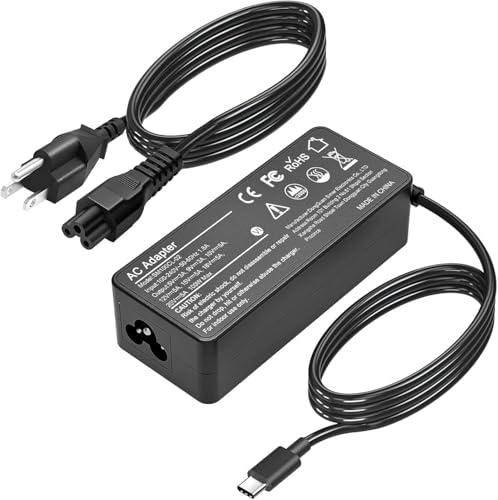
Best for: Readers who want automatic device recognition and high efficiency with PD 3.0 support. ELECBRAIN states output options including 20V 5A and multiple PD profiles, making it suitable for Lenovo, Acer, Dell, Asus and many USB‑C devices. It includes safety protections and a longer USB‑C cable, which can be a practical add. A potential limitation is the abundance of output configurations; users should verify their device’s required PD profile to ensure optimal performance.
Sunveza 118W USB‑C Charger

Best for: Power users with MacBook Pro and other USB‑C devices who want high efficiency and fast charging. With an advertised 118W output and compatibility with a wide range of USB‑C devices, this charger supports high‑demand laptops. A caveat is potential heat under sustained high loads; ensure airflow and avoid covering the vent while charging continuous heavy workloads.
VJYUIJAY Universal 65W USB‑C Laptop Charger

Best for: Budget‑conscious buyers who still need reliable USB‑C charging for a wide list of laptops, including ThinkPad, Yoga, Chromebook, and many Chromebooks. The charger supports multiple PD profiles and 65W output, which is adequate for many ultrabooks and 2‑in‑1s. A limitation is that some high‑demand laptops may prefer higher wattage for faster charging or sustained performance; check the specific device’s power requirements before purchase.
PIOEVTKA 130W USB‑C Charger

Best for: users with high‑power laptops like certain Dell XPS, Precision, Latitude models and other USB‑C 130W capable devices. The 5V/9V/15V/20V output range and 130W total power make it a strong choice for power users who need fast, reliable charging on resource‑heavy devices. A caution: confirm that your device supports the 130W PD profile to avoid underpowered charging in some scenarios.
Buying Guide
- Power needs: Match wattage to your laptop’s input requirement. Laptops often need 45W–100W; 130W adapters are best for XPS/Precision class machines, while 65W is common for many ultrabooks.
- Port features: All items here are USB‑C with PD. If you use multiple devices, consider a charger with a single high‑wattage port or multiple ports and a detachable cable.
- Compatibility: Check device compatibility lists. Some chargers advertise broad compatibility but work best with devices within a specific wattage range.
- Safety protections: Prioritize models with over‑current, over‑voltage, over‑heating, short‑circuit, and auto recovery protections to protect your devices.
- Cable and plug design: Foldable plugs and included cables enhance travel convenience. For desktop use, consider longer cables to reach outlets comfortably.
- Portability vs. power: Higher wattage units tend to be bulkier. Choose based on travel frequency, where you’ll use the charger, and whether you need lightweight options.
Frequently Asked Questions
- What is USB‑C PD and why does it matter for laptop charging? USB‑C Power Delivery (PD) enables higher power transfer and faster charging for compatible laptops, phones, and accessories. It ensures devices receive the appropriate voltage and current automatically.
- Can one charger power multiple devices at once? Yes, many USB‑C PD chargers support multi‑device charging. The device with the highest wattage typically takes priority on the main port.
- Is a higher wattage charger always better? Not necessarily. Your laptop’s input rating determines what it can safely accept. Using a charger with a higher wattage than required does not charge faster than the device supports.
- Do I need a specific type of cable? Using a certified USB‑C to USB‑C cable is recommended. Some devices require cables rated for higher wattage to achieve full PD performance.
- What safety features should I look for? Look for over‑current, over‑voltage, over‑temperature, short‑circuit protection, and auto recovery to prevent damage during charging.
- How do I verify compatibility with my laptop? Check the charger’s supported wattage range and listed laptop models. If in doubt, confirm your device’s power input requirement and compare with the charger’s specs.