Best USB C Switches for Docking Stations
When you need to share a single USB-C monitor or dock between two or more devices, a USB-C switch can simplify the workflow. This guide highlights five top options that support 20 Gbps data, 8K/4K display modes, and power delivery, making them suitable for office professionals, gamers, and developers who rely on fast, reliable docking stations. The right switch helps you switch inputs quickly without software, and keeps peripherals accessible. The table below summarizes each product’s core strengths and best-fit scenarios.
| Product | Best For | |
|---|---|---|
| Alxum 20Gbps USB C Switch | Power users who need remote switching | Remote control plus 20Gbps data with 8K/4K video and 140W charging |
| Cable Matters 20Gbps USB C KVM Switch (2 Computers) | Two-device setups requiring high-resolution displays | Clear USB4/Thunderbolt 4 compatibility with 8K@30Hz support |
| Caniifoto 20Gbps USB C Switch for 2 Computers | Monitors connected to two laptops with 8K/4K output | 8K@30Hz/4K@144Hz, includes two USB-C cables for easy setup |
The five selections below were chosen for broad compatibility (USB-C and Thunderbolt 4), strong data throughput, and clear, practical usage notes for buying decisions. Each section describes who should consider the product, why it’s selected, and a brief caution to help avoid common setup pitfalls.
Alxum 20Gbps USB C Switch
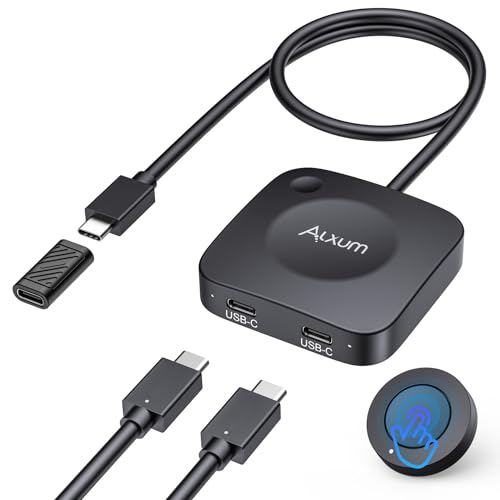
Best for professionals who need seamless control between two hosts and a shared display. The Alxum switch supports up to 20Gbps data transfer, 8K@30Hz and 4K@144Hz video, and PD 3.1 140W charging. It includes a wireless remote and a switch button, enabling quick device changes without software. The device works best when all connected USB-C devices support DP Alt Mode. A key caveat is that if you’re docking with a pigtail, you may need the included USB-C female-to-female adapter, and keep docking/hub length under 50 cm to maintain performance. Choose this if you want a robust, remote-controllable switch for a high-end workstation or gaming setup.
Who this is for: Office pros, content creators, and gamers who frequently switch between two laptops and a shared dock or monitor.
Limitation: Requires DP Alt Mode compatibility on all connected devices for best results; the docking setup can be sensitive to cable length when using adapters.
Cable Matters 20Gbps USB C KVM Switch (2 Computers)

Best for users who want a straightforward two-computer sharing solution with explicit display-rate expectations. This model supports 8K@30Hz on Windows and 4K@60Hz on macOS when sharing a USB-C monitor or docking station, with up to 140W PD available. It includes the necessary USB4 cables and emphasizes compatible cables (do not substitute with Thunderbolt cables). A practical caution is that bandwidth may limit resolution or the number of monitors compared with a direct dock connection. Choose this if you prioritize clear Windows-optimized 8K/4K performance and a simple two-computer workflow.
Who this is for: Windows-centric users needing high-bandwidth switching with a single display dock.
Limitation: May be bandwidth-limited compared with a direct dock connection; ensure you use the included USB4 cables for best results.
Caniifoto 20Gbps USB C Switch for 2 Computers

Best for users needing 8K/4K flexibility with two hosts and straightforward wiring. The Caniifoto switch supports 8K@60Hz/4K@144Hz output ranges and 20Gbps data transfer, plus 140W charging. It’s compatible with USB-C/Thunderbolt 4 devices and includes two USB-C cables. A limitation is that for multi-monitor setups or displays with DisplayPort/HDMI, a true USB-C docking station may be required instead of this single-monitor switch. This is a strong pick when you want to push high resolutions from two laptops to a single USB-C monitor.
Who this is for: Users who need high-end video output from two laptops to a single USB-C/Thunderbolt monitor.
Limitation: Not ideal for multi-monitor setups without a docking station.
Lemorele USB-C KVM Switch for 2 USB-C DP Alt Mode Devices

Best for users needing reliable switching between two USB-C devices with a single HDMI display. The Lemorele KVM switch supports DP Alt Mode and 4K@60Hz output. It requires proper direct connections to each host and a monitor-based HDMI display, avoiding daisy-chaining through docking hubs. The setup note highlights ensuring all cables connect to their proper ports before powering on. If you rely on HDMI for video, this is a practical option for simple two-device sharing. Choose this if you want a compact, HDMI-tied KVM solution with straightforward setup.
Who this is for: Users with two USB-C devices and a single HDMI display who want a compact, direct-switching solution.
Cable Matters 20Gbps USB C KVM Switch (3 Computers)

Best for setups needing to share a single USB-C or Thunderbolt 4 monitor across three computers. The switch supports up to 20 Gbps bandwidth and offers 8K@30Hz/4K@144Hz on Windows, with 4K@60Hz on macOS when connected to a single display. It is designed to work with USB4 and Thunderbolt 4 docks, not docks with captive cables. A caution is that macOS supports only one external display in some configurations; ensure your display and cables align with macOS expectations. This is a good choice for a small office or lab where three machines need access to one dock or monitor.
Who this is for: Small teams or users who need to share a single dock or monitor across three laptops.
Buying Guide
What is a USB-C switch for docking stations?
A USB-C switch (or KVM switch) lets you share a single monitor, dock, or other USB-C devices between multiple computers. It preserves USB data paths, supports video output, and can deliver power to devices via USB-C PD in many configurations. The best models support high data rates (20 Gbps), high-resolution video (8K/4K), and reliable USB-C/DP Alt Mode compatibility.
How to choose the right switch
- Device compatibility: Confirm all devices support DP Alt Mode or Thunderbolt 4/USB4 as needed.
- Video requirements: Decide if you need 8K, 4K, or multi-monitor support and ensure the switch can handle the resolution and refresh rate.
- Power delivery: If you rely on charging laptops, verify PD support and watts (e.g., up to 140W) for your hosts.
- Ports and cables: Check whether cables are included, and ensure the cables match your monitor/dock specifications (avoid captive cables if your setup requires flexibility).
- Number of hosts: Choose 2-port, 3-port, or more depending on how many devices you switch between.
Setup considerations
- Direct connections often yield the best performance; adapters and length can affect signal integrity.
- Use the recommended cables (USB4/20 Gbps cables) to avoid compatibility issues.
- Power users with gaming setups may benefit from models with a remote or quick-switch button for fast input changes.
Common limitations to expect
- Bandwidth limits: Some switches cap at 20 Gbps vs. 40 Gbps on higher-end docks, which may affect extreme multi-monitor setups.
- macOS display support: macOS may limit external displays to one or require specific configurations for higher refresh rates.
- Display compatibility: Not all USB-C docks support the same display standards; verify DP Alt Mode and monitor compatibility.
FAQ
- What is the main purpose of a USB-C switch for docking stations?
To share a single monitor or dock between multiple computers without software and with minimal setup. - Can I use a USB-C switch with a Windows PC and a Mac?
Yes, but verify display and USB compatibility; Windows often supports higher video modes, while macOS may limit to one external display in some configurations. - Do these switches require drivers?
Most do not require software drivers; they are hardware-based switchers. - Will using a switch affect gaming performance?
High-bandwidth switches with 20 Gbps data lanes and 8K/4K video support are designed to minimize lag, but ensure your host and monitor configurations align for best results. - Is power delivery always included?
PD support is common, but wattage varies; confirm it matches your devices’ charging needs. - Can I switch between more than two computers?
Yes, some models support three or more hosts, but verify the maximum port count and input switching method.