Best USB WiFi Adapters for PC Gaming: Faster, Stable Connections for Smooth Play
Looking for a USB WiFi adapter that enhances PC gaming performance? The right USB wireless adapter can deliver lower latency, higher speeds, and better stability on your gaming rig. The following picks cater to gamers who want reliable connections, easy setup, and compatibility with Windows 10 and 11. Each option targets different needs—from ultra-fast WiFi 6 to solid WiFi 5 for budget builds. The buyer’s guide afterward helps you compare features like speeds, dual-band performance, and driver requirements.
| Product | Best For | Key Benefit |
|---|---|---|
| TP-Link Archer TX30U Plus | Gamers seeking WiFi 6 speed | Ultra-fast dual-band with beamforming and Push-Button upgrade |
| NETGEAR Nighthawk A8000 | High-speed gaming on Windows | AXE3000 tri-band capability for strong performance |
| WAVLINK AX1800 USB WiFi 6 Adapter | Stable gaming with MU-MIMO | Four high-gain antennas and OFDMA support |
| UGREEN AX900 USB WiFi 6 Adapter | Excellent value for WiFi 6 | AX900 speeds with built-in driver for Windows 10/11 |
| TP-Link Archer T3U AC1300 | Budget-friendly gaming upgrade | MU-MIMO and USB 3.0 for solid performance |
TP-Link Archer TX30U Plus — AX1800 WiFi 6 Dual-Band

The Archer TX30U Plus delivers next-gen WiFi 6 performance in a compact USB 3.0 form factor. It switches intelligently between high-speed 5 GHz for gaming and 2.4 GHz for everyday tasks, aiming to reduce lag during online play. Best for gamers who want solid throughput on a desktop or laptop and benefit from beamforming and two high-gain antennas. A potential limitation is that real-world speeds depend on your router’s capabilities and distance from the router.
NETGEAR Nighthawk WiFi 6E USB 3.0 Adapter (A8000)

The Nighthawk A8000 provides fast AXE3000 performance with access to newer WiFi 6E bands for gaming, conferencing, and streaming. It’s best for players who want the latest WiFi standard and strongest signal in areas with congested networks. A caution is that 6E performance depends on router compatibility and available 6 GHz spectrum in your location.
WAVLINK AX1800 USB WiFi 6 Adapter
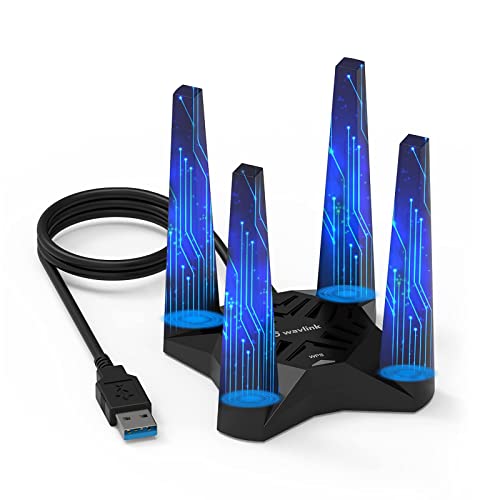
The WAVLINK AX1800 adapter offers dual-band performance with MU-MIMO and OFDMA for more efficient network use. It ships with four high-gain antennas to improve coverage and stability in multi-room or multi-story setups. Best for gamers who want robust coverage at a reasonable price. A limitation is that actual speeds may vary by router capabilities and house layout.
UGREEN AX900 USB WiFi 6 Adapter

The UGREEN AX900 adapter provides WiFi 6 speeds with built-in drivers for Windows 10/11, simplifying setup on desktops. It’s a good pick for those seeking easy installation and reliable performance without additional software. Best for users who want AX speeds with minimal driver hassle. Note that MacOS or older Windows versions aren’t supported.
TP-Link Archer T3U AC1300 USB WiFi Adapter

The Archer T3U AC1300 is a budget-friendly dual-band adapter with MU-MIMO and USB 3.0. It’s best for gamers on a tight budget who still want steady performance and easy USB upgrade. A potential limitation is that it won’t match the peak speeds of WiFi 6 adapters in crowded networks.
Buying Guide
- What speeds do you need? If you want core gaming throughput, prioritize WiFi 6 (AX) adapters for higher data rates and better stability in busy networks. WiFi 5 (AC) options are still viable for older routers or budgets.
- Is your router WiFi 6 or 6E? For best results, match your adapter to your router’s standard. 6E users should consider AXE adapters for access to the 6 GHz band.
- Do you need MU-MIMO and OFDMA? These features help multiple devices share bandwidth more efficiently, reducing lag during gaming sessions with many connected devices.
- Wired or wireless latency considerations? Some USB adapters support features like soft AP mode, which can turn a wired connection into a wireless hotspot for other devices.
- Driver and OS compatibility? Look for adapters with built-in drivers for Windows 10/11 to avoid manual installations. Mac and Linux support varies by model.
Frequently Asked Questions
- Can a USB WiFi adapter really improve gaming performance? Yes, by providing faster speeds, lower latency, and more stable connections on suitable networks.
- What is MU-MIMO and why does it matter for gaming? MU-MIMO allows multiple devices to receive data simultaneously, reducing contention and improving responsiveness in busy home networks.
- Is WiFi 6 essential for gaming now? It’s not essential, but it offers noticeable gains in throughput and stability on congested networks, especially with modern routers.
- Do USB 3.0 ports matter for adapters? USB 3.0 supports higher data transfer rates, helping you realize the adapter’s peak performance.
- Should I choose a dual-band or tri-band adapter? Dual-band covers most homes; tri-band is beneficial if your router and network environment support additional 6 GHz band (WiFi 6E) for less interference.
- Are there driver-free options? Some adapters provide built-in drivers for Windows, but others may require driver installation for optimal performance.