Best Video Cables for Monitor: Top DisplayPort Cables for 8K, 4K, and Gaming
For buyers seeking reliable, high-bandwidth DisplayPort cables to drive modern monitors, these five picks stand out for supporting high resolutions, fast refresh rates, and robust construction. This guide helps you choose the right cable based on your setup—gaming PCs, workstations, or home theater rigs. Below is a quick buy table to compare core specs at a glance.
| Product | Length | Max Resolution / VRR | Best For |
|---|---|---|---|
| IVANKY 8K DisplayPort Cable 1.4 | 6.6 ft | 8K@60Hz, 4K@240Hz, HDR, FreeSync/G-Sync | Premium gaming and graphics work |
| IVANKY DP Cable 1.2 6.6 ft | 6.6 ft | 4K@60Hz, 2K@165Hz | 4K gaming and standard setups |
| Highwings 80Gbps DP 2.1 Cable | 6.6 ft | 16K@60Hz, 8K@120Hz, 4K@240Hz | Ultra-high-refresh gaming and future-proofing |
| IVANKY DP Cable 2.1 80Gbps | 6.6 ft | 16K@60Hz, 8K@240Hz, 4K@540Hz | Extreme gaming setups and multi-monitor rigs |
| Silkland DP 2.1 Cable | 6.6 ft | 8K@240Hz, 4K@960Hz | High-end gaming and professional visualization |
IVANKY 8K DisplayPort Cable 1.4

This VESA-certified DisplayPort 1.4 cable supports 8K@60Hz and 4K@240Hz, with HDR and HDCP 2.2 to deliver sharp, dynamic images for high-end gaming and graphics work. Best for users with DP-enabled graphics cards and monitors who want maximum bandwidth and anti-tearing performance. The braided jacket and 24K gold-plated connectors help with durability and signal stability. A limitation is that it does not support HDMI inputs, so ensure your devices use DisplayPort ports only.
Who it’s best for: gamers and professionals seeking top-tier 8K/4K performance on DisplayPort-only setups. Why selected: unmatched bandwidth and robust construction for long-term reliability.
IVANKY VESA Certified DisplayPort Cable 6.6ft (1.2)
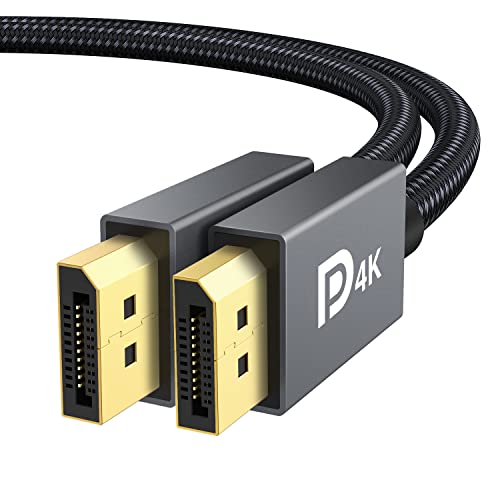
This VESA-certified DisplayPort to DisplayPort cable (DP to DP) supports 4K@60Hz and up to 165Hz at 2K resolutions, making it a solid choice for smoother gaming and desktop multitasking. The nylon braid adds durability, while 24K gold-plated connectors reduce corrosion and improve signal integrity. Not compatible with HDMI, so use with DP-only devices.
Who it’s best for: users upgrading a 4K or high-refresh-rate 2K display who want a durable, affordable option. Why selected: reliable DP-to-DP performance with high refresh rates and long-term wear resistance.
Highwings 80Gbps DisplayPort Cable 2.1

Designed for extreme bandwidth, this DP 2.1 cable handles up to 16K@60Hz and 8K@120Hz, with 32-bit audio and HDR10 support. It includes features like dynamic HDR, VRR, ALLM, and DSC 1.2a for smoother gameplay and richer visuals. Better for multi-monitor setups and future-proof gaming rigs. A potential limitation is its higher cost and emphasis on 2.1 features that may exceed current monitor support for some users.
Who it’s best for: enthusiasts building gaming towers or multi-monitor rigs that push beyond 4K. Why selected: exceptional bandwidth and gaming-focused features for the latest GPUs.
IVANKY 80Gbps Displayport Cable 2.1
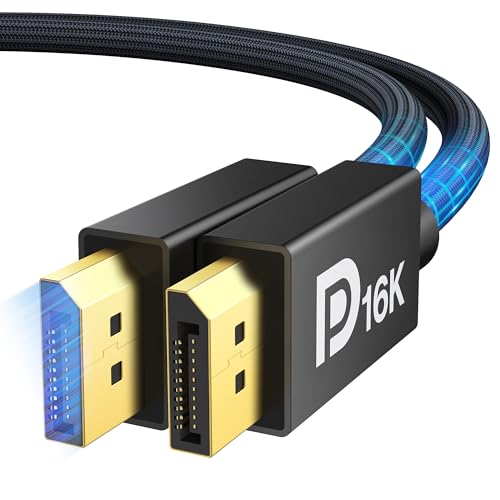
This DP 2.1 cable is built for the next decade, offering 16K@60Hz and 8K@240Hz with backward compatibility to 1.4/1.3. It supports HDR10, DSC 1.2a, FreeSync/G-Sync, and 32-bit audio. Its latch-free design reduces wear during disconnects. Best for future-proof high-end systems. Limitation: requires compatible DP 2.1 capable devices to realize full 16K/8K capabilities.
Who it’s best for: high-end PC builders and gamers who want long-term compatibility with the latest DP standards. Why selected: ultra-high bandwidth and broad compatibility across DP generations.
Silkland 80Gbps DisplayPort Cable 2.1

Silkland’s DP 2.1 cable is VESA-certified and supports up to 16K@60Hz, 8K@240Hz, and 4K@960Hz with DSC enabled. It uses 28AWG tinned copper, triple shielding, and a nylon exterior for durability, plus 24K gold-plated connectors. This cable is designed for demanding gamers and visual professionals who require top-tier bandwidth and color fidelity. Limitation: no latch design means more care needed during insertion to ensure a secure connection.
Who it’s best for: users pursuing extreme refresh rates and ultra-high resolutions in gaming or professional visualization. Why selected: best-in-class bandwidth and robust build for future-ready setups.
Buying Guide: Key Considerations
- Compatibility: Confirm your monitor and graphics card support the cable’s DP version (1.2, 1.4, or 2.1) and the desired resolutions/refresh rates.
- Bandwidth and HDR: Higher bandwidth enables higher refresh rates and HDR. If you don’t need 8K or 16K, a DP 1.4 or 2.1 may still offer ample headroom.
- Cable construction: Look for nylon braiding, shielding, and gold-plated connectors for longevity and reduced interference.
- Durability features: Latch-free designs are easier on equipment but require careful disconnects; braided jackets with ferrite cores can reduce EMI.
- Future-proofing: If you plan multi-monitor setups or future GPUs, DP 2.1 cables provide the highest bandwidth ceiling.
FAQ
- What is the difference between DP 1.4 and DP 2.1 cables?; DP 2.1 offers much higher bandwidth (up to 80 Gbps) for 16K/8K at high refresh rates, plus broader HDR and DSC support, while DP 1.4 targets 4K/8K in many cases.
- Can a DP cable work with HDMI devices?; No, DP cables connect DisplayPort ports only and are not compatible with HDMI inputs.
- Is a longer cable worse for signal quality?; Longer cables can introduce more signal loss; choose the shortest cable that fits your layout and consider certified high-quality cables for longer runs.
- Do I need HDR support on my DP cable?; HDR support improves contrast and color in supported content, but ensure your monitor and GPU also support HDR and the data path supports HDR metadata.
- Are latch-free cables risky to use?; Latch-free designs reduce connector wear but must be handled carefully to avoid accidental disconnections.
- What should I choose for a dual-monitor setup?; Look for DSC, VRR, and MST (multi-stream transport) support to ensure smooth multi-monitor operation and synchronization.