Best Voice Recorder for Lectures: Clear Audio for Classes and Meetings
Answering the common question: which voice recorder is best for lectures? This guide highlights five reliable options that balance long recording time, clear audio, and easy playback for students, educators, and professionals. Each pick focuses on capturing spoken content in classroom or lecture hall environments, with features like voice activation, noise reduction, and strong battery life. The top picks emphasize suitability for back‑to‑back classes, interviews, and note-taking workflows.
Summary Table — Selected Products
| Product | Best For | Key Benefit | Memory |
|---|---|---|---|
| Tonfarb 136GB Digital Voice Recorder | Long days of lectures | Massive storage and long battery life | 136GB + 1100mAh |
| EVIDA 128GB Digital Voice Recorder | Front‑row lectures & meetings | High‑capacity, multiple formats | 128GB |
| Tonfarb 64GB Digital Voice Recorder | Portable, quick notes | Compact with strong battery | 64GB |
| Sunlan 16GB Voice Recorder | Budget-friendly classrooms | Simple operation and playback | 16GB |
| EVISTR 64GB Digital Voice Recorder | Balanced features for everyday use | Voice activation + PCM up to 1536kbps | 64GB |
Tonfarb 136GB Digital Voice Recorder With Playback

Brand: Tonfarb
Features: PCM recording at 1536 kbps with automatic noise reduction and voice activation. Includes dual noise‑reduction microphones. 136GB total memory with 8GB built‑in and a complimentary 128GB TF card. Long battery life up to 68 hours on a single charge. One‑click recording and save with USB‑C transfer.
Best for: Students or journalists who need long, uninterrupted recording during full‑length lectures or interviews. This model is chosen for its expansive storage and extended battery life, reducing the need to swap cards often.
Caution: Large space footprint means slightly heavier device; ensure your charging routine matches your class schedule to avoid mid‑session power issues.
EVIDA 128GB Digital Voice Recorder For Lectures

Brand: EVIDA
Features: 128GB capacity, 9296 hours of recording, 6 decibel levels for voice activation, and multiple file formats (mp3 128kbps, 192kbps, or wav 1536kbps). Includes playback and password protection; designed for lectures, meetings, and conversations.
Best for: Learners and professionals who value flexible playback formats and active noise reduction in a classroom setting. The password feature adds a layer of privacy for sensitive notes.
Caution: Higher data rates require more storage and processing; consider battery and transfer routines if you record long sessions frequently.
Tonfarb 64GB Digital Voice Recorder With Playback

Brand: Tonfarb
Features: One‑click recording and saving, 64GB internal storage, up to 4600 hours of recording, and a 600mAh battery lasting up to 48 hours continuous use. PCM up to 1536kbps with noise reduction.
Best for: Students who need a compact device with quick start and robust playback for daily lectures, seminars, and field notes.
Caution: Lower memory than the 136GB model; ensure you queue or offload files regularly for long terms projects.
Sunlan 16GB Voice Recorder With Playback
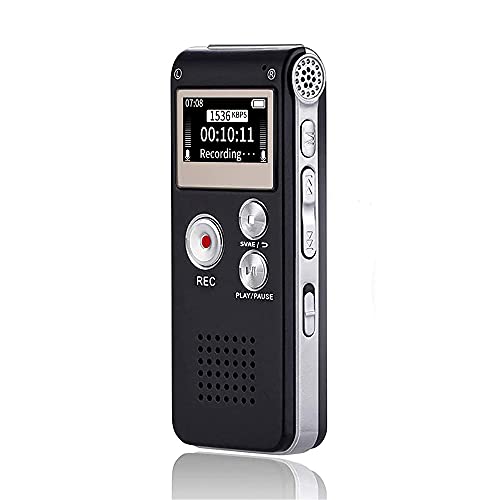
Brand: Sunlan
Features: Simple one‑button operation, playback with internal speaker and optional external speaker, noise reduction for clearer voices, and 16GB memory with USB interface for transfers.
Best for: Budget‑minded students or temporary note‑takers who need a straightforward device for lectures and quick reviews.
Caution: Fewer hours of raw recording compared to higher‑capacity models; plan for frequent offloading during long terms.
EVISTR 64GB Digital Voice Recorder

Brand: EVISTR
Features: 64GB storage, 360° dynamic noise reduction microphone, PCM 1536kbps high‑quality stereo sound, 3 hours charging for about 32 hours of recording and 35 hours of playback. A‑B repeat, auto record schedule, and multiple formats (wav/mp3) available.
Best for: Everyday classroom use with a focus on rich, clear audio and flexible playback options during lectures and interviews.
Caution: Despite strong features, some users may prefer larger memory for extremely long sessions or higher‑resolution formats.
Buying Guide
What to prioritize for lecture capture
Look for long battery life, reliable voice activation, and robust noise reduction to minimize ambient noise during lectures. A larger memory helps if you record multiple sessions without swapping cards.
Which format should you choose?
WAV offers higher fidelity, while MP3 saves space. For most lectures, PCM or WAV at 1536 kbps provides clear, classroom‑friendly audio, but MP3 128–192 kbps can be enough for note‑taking or quick reviews.
How important is playback and navigation?
Fast playback, A‑B repeat, and easy file management help you skim and locate important sections. A built‑in speaker is convenient for solo review, while USB transfers boost workflow efficiency.
Storage and battery life considerations
For lengthy courses, prioritize devices with 64GB or more and a battery that can cover back‑to‑back sessions. If you frequently record field notes, consider models with a larger memory or removable cards.
Security and privacy features
Some devices offer password protection for stored files. If you record sensitive sessions, prefer models with password or encryption options to protect your notes.
What if you’re on a tight budget?
Budget models can still deliver clear audio with basic playback. Choose a device with at least one‑button recording, reliable playback, and decent noise reduction to maximize value per dollar.
Quick FAQ
- What’s the best recorder for long lectures?
– Models with 128GB or more storage and extended battery life are ideal for long sessions without frequent offloads. - Do I need noise reduction for classrooms?
– Yes, it helps reduce ambient noise and improve intelligibility in lecture halls. - Is voice activation essential?
– Helpful for saving time and storage by recording only when speech is detected, especially in meetings.