Best WiFi Booster for PC: Fast, Stable USB Adapters for Desktop Use
Answering the common search question, these USB WiFi adapters boost a PC’s wireless performance by adding newer standards, higher speeds, and stronger signals. They’re best suited for gamers, streamers, remote workers, and anyone upgrading an older desktop or laptop. This guide highlights five top USB adapters, explains who they’re best for, and what to watch out for.
| Product | Why It Stands Out | Best For |
|---|---|---|
| TP-Link AC600 USB WiFi Adapter (Archer T2U Plus) | Long range, dual-band, 2.4GHz up to 200 Mbps and 5 GHz up to 433 Mbps | Distance-friendly setups and budget upgrades |
| Nineplus Wireless USB WiFi Adapter (AC1300) | Dual-band with two 5dBi antennas, 1300 Mbps total throughput | Desktops needing stronger signal in challenging rooms |
| TP-Link WiFi 6 USB Adapter (Archer TX20U Plus) | AX1800, faster 6-stream performance, dual-band, WPA3 | Gaming and streaming on newer routers |
| TP-Link USB 3.0 WiFi Adapter (Archer TX30U Plus) | Wi-Fi 6, dual-band, two high-gain antennas, MU-MIMO | Future-proof upgrade with solid range |
| WAVLINK AX1800 USB WiFi Adapter | AX1800 dual-band, four high-gain antennas, MU-MIMO | Large homes or offices with multiple devices |
TP-Link AC600 USB WiFi Adapter for Desktop PC (Archer T2U Plus)

The Archer T2U Plus delivers a compact USB solution that supports 802.11ac for faster wireless speeds. It offers dual-band connectivity with up to 200 Mbps on 2.4 GHz and 433 Mbps on 5 GHz, providing a straightforward upgrade path for desktops lacking modern WiFi. This option is best for budget-conscious users who want reliable everyday browsing, video calls, and light gaming. A potential limitation is that real-world performance depends on router capability and environmental factors.
Who it’s best for
- Users with older desktops or laptops needing simple, affordable upgrade
- Families and home offices seeking steady streaming and browsing
Why selected
Value-friendly dual-band performance with easy setup fits many home networks, especially when upgrading from older wireless N adapters.
Caution
May experience reduced speeds in very congested environments or far from the router; placing the adapter closer to the router improves results.
Nineplus Wireless USB WiFi Adapter (AC1300)

The Nineplus adapter delivers up to 1300 Mbps combined throughput across dual bands, with two 5dBi antennas to boost reception. It’s a solid pick for users who want better performance than basic USB adapters and need stronger signal penetration in rooms with signal loss. The product emphasizes long-range stability for streaming, browsing, and online gaming, though actual speeds depend on environment and router capability.
Who it’s best for
- Desktop users needing improved stability in rooms with weak signals
- Budget-conscious buyers seeking a visible upgrade over basic adapters
Why selected
High total throughput and dual antennas help overcome typical wireless dead zones without complex setup.
Caution
As with other USB adapters, performance benefits rely on router proximity and network congestion.
TP-Link WiFi 6 USB Adapter (Archer TX20U Plus)

This AX1800 adapter supports WiFi 6 for faster throughput, with dual-band capability and a 2.4 GHz/5 GHz configuration. It emphasizes reduced network congestion and faster gaming, streaming, and downloads. Compatibility notes include ensuring a supported Windows OS and USB 3.0 port for optimal performance. Real-world gains depend on router capabilities and home layout.
Who it’s best for
- Gamers and streamers using a modern router who want lower latency
- Users upgrading from older USB adapters to WiFi 6
Why selected
AX1800 class speed with dual-band flexibility makes it a strong mid-range upgrade for demanding tasks.
Caution
On older PCs with older USB ports or drivers, driver installation may require system checks or updates.
TP-Link USB 3.0 WiFi Adapter (Archer TX30U Plus)

The TX30U Plus takes WiFi 6 to the desk with quick dual-band performance and two high-gain antennas. MU-MIMO support helps improve throughput for multiple devices on the same network. It’s best for users who want a future-ready USB adapter with strong coverage. A potential limitation is that wireless gains require a compatible AX router and appropriate drivers on Windows.
Who it’s best for
- Performance-focused users needing reliable gaming and streaming
- Home offices with several devices competing for bandwidth
Why selected
High-gain antennas and MU-MIMO provide improved range and efficiency compared with basic USB adapters.
Caution
USB 3.0 performance depends on the host computer’s USB port speed and driver support.
WAVLINK AX1800 USB WiFi Adapter
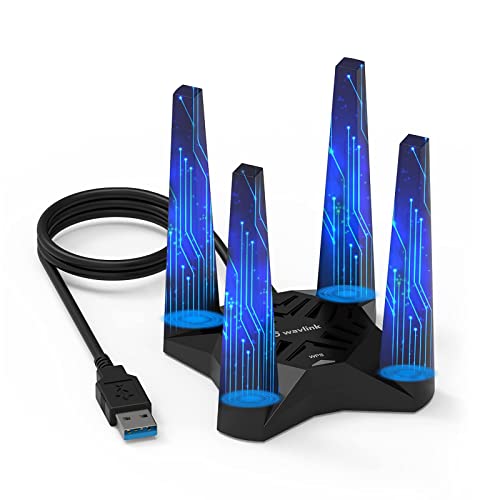
The WAVLINK AX1800 delivers 600 Mbps on 2.4 GHz and 1200 Mbps on 5 GHz, supported by four 3dBi high-gain antennas and MU-MIMO. It’s designed for gaming, streaming, and online meetings with reduced latency and improved coverage. Consider network environment, as thick walls and interference can limit gains.
Who it’s best for
- Users in larger homes or offices with multiple devices
- Those needing robust network performance without upgrading the router
Why selected
Four high-gain antennas and MU-MIMO help maximize throughput and coverage for demanding tasks.
Caution
Environments with heavy interference may still experience variability in speeds.
Buying Guide: Key Purchase Considerations
- Speed and standards: Look for AX (WiFi 6) adapters for future-proof performance, or AC adapters for solid dual-band reliability.
- Antenna design: External high-gain antennas improve range; multiple antennas help with stability in larger spaces.
- USB interface: Prefer USB 3.0/3.1 ports for maximum throughput; older USB 2.0 ports cap speeds.
- Router compatibility: Adapter gains depend on router capabilities; pairing with a modern router yields the best results.
- Windows compatibility: Most adapters support Windows 10/11; check driver availability if you use older OS versions.
- Terrain and layout: Consider placement to minimize walls and interference; a short USB extension can help optimize signal.
- Security features: WPA3 support provides stronger network protection on newer adapters.
FAQ
- Do USB WiFi adapters improve gaming latency? Yes, many AX/AC adapters reduce latency and improve stable throughput when connected to a compatible router.
- Is USB 3.0 necessary for best performance? USB 3.0 port helps avoid bottlenecks; USB 2.0 can limit achievable speeds on high-end adapters.
- Can these adapters work with macOS? Some adapters include Windows-focused drivers; check compatibility with macOS and the manufacturer’s notes before purchase.
- Will a USB extender help with signal? Yes, placing the adapter away from interference via a USB extension can boost performance in some rooms.
- Do I need a new router to use WiFi 6 adapters? A WiFi 6 adapter benefits if paired with a WiFi 6 router; otherwise, it still works with older routers at compatible speeds.
- Are USB adapters easier than PCIe cards? Yes, USB adapters are plug-and-play and don’t require internal installation, making them ideal for laptops and desktops alike.