Best WiFi Extender for Gaming: Fast, Stable Links for Online Play
For gamers, a reliable WiFi extender can reduce lag, stabilize hotspots, and keep you in the action. This guide profiles five top extenders suited for gaming, compares coverage, bandwidth, and ease of setup, and helps you pick the right model for your home network. Best for: households with multiple devices, consoles, and streaming boxes seeking smoother online play and lower latency.
| Product | Coverage | Devices | Key Benefit |
|---|---|---|---|
| TP-Link AC1200 RE315 | Up to 1500 sq ft | Up to 32 | Strong dual-band performance with EasyMesh |
| TP-Link AC1900 RE550 | Up to 2100 sq ft | Up to 32 | High speed, robust coverage |
| JoyLantern AX3000 | Up to 18999 sq ft | 150+ devices | WiFi 6 with very wide reach |
| GEYILO Dual Band Extender | Up to 12880 sq ft | 105 | Strong long-range and wired option |
| TP-Link AX3000 RE715X | Up to 2400 sq ft | 64 | WiFi 6 with reliable mesh features |
TP-Link AC1200 WiFi Extender RE315

Best for small-to-medium homes with a mix of gaming consoles and streaming devices. The RE315 provides dual-band speeds up to 1.2 Gbps total, with 867 Mbps on 5 GHz and 300 Mbps on 2.4 GHz. External antennas optimize coverage and reduce dead zones, while One-Touch Connection simplifies setup. Best for rooms where a single Ethernet connection can stabilize a gaming PC or console. Limitations: wireless speeds are lower than newer WiFi 6 extenders, which may matter in very dense networks.
TP-Link AC1900 RE550 Range Extender

Choose this if you need stronger overall coverage and higher speed for an entertainment hub. The RE550 delivers up to 1300 Mbps on the 5 GHz band and 600 Mbps on 2.4 GHz, with a maximum range of about 2100 sq ft. Three external antennas support stable connections for multiple devices. Best for households with several gaming devices and 4K streaming. Caution: higher price and larger footprint than entry-level extenders.
JoyLantern AX3000 WiFi 6 Extender

Best for households with many devices and thick-walled spaces. The AX3000 extender offers up to 2400 Mbps on the 5 GHz band and 600 Mbps on 2.4 GHz, supporting 150+ devices. Its long-range design targets large homes while remaining suitable for gaming and streaming. Limitation: claims to cover very large areas may depend on wall materials and interference.
GEYILO Dual Band WiFi Extender
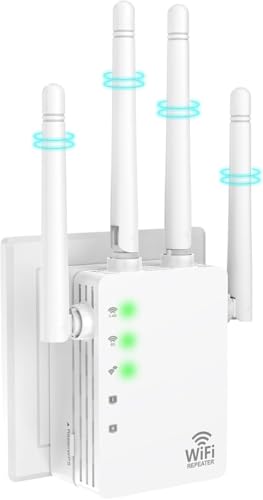
Best for long-range needs and wired reliability. It covers up to 12,880 sq ft and supports 105 devices. The dual-band design balances speed and penetration, while a built-in Ethernet port offers wired connections for a desktop or console. Choose this if you need extended reach in a large home or a basement gaming setup. Caution: real-world speeds may vary with distance and obstacles.
TP-Link AX3000 RE715X

Best for modern homes seeking robust WiFi 6 performance at a mid-range price. The RE715X provides dual-band speeds up to 2594 Mbps (5 GHz) and 688 Mbps (2.4 GHz), with four antennas and Beamforming technology for improved range. Its EasyMesh compatibility helps to create a cohesive mesh network. Limitation: actual mesh performance depends on router compatibility and placement.
Buying Guide
What should you look for in a gaming-focused WiFi extender?
- Coverage vs. device count: larger homes require broader coverage and more antennas.
- WiFi standard: WiFi 6 offers lower latency and better multi-device handling; WiFi 7 represents the latest but may cost more.
- Ethernet port availability: wired connections for consoles or PCs reduce variance in latency.
- Mesh compatibility: EasyMesh or similar features help create stable whole-home networks with multiple extenders.
- Security: look for devices with up-to-date security features and frequent firmware updates.
Choosing by room layout and device mix helps. If you game in a single living area with several wireless devices, a mid-range extender with strong 5 GHz performance may suffice. For large homes or multi-room setups with many players, a WiFi 6 model with broad coverage and multiple external antennas often performs best. Consider also whether you prefer a simple one-device solution or a full mesh system for future expansion.
Practical setup tips:
- Place the extender halfway between router and gaming area, avoiding walls or metal appliances that block signals.
- Use the 5 GHz band for gaming when distance is moderate; switch to 2.4 GHz for far rooms if needed.
- Enable QoS features if available to prioritize gaming traffic on the extender or router.
- Regularly update firmware to maintain performance and security.
Frequently Asked Questions
- Do I need a WiFi extender specifically for gaming?
- What’s the difference between a repeater and a range extender?
- Is WiFi 6 worth the upgrade for gaming?
- How can I reduce latency with a gaming extender?
- Should I buy a dedicated gaming router instead of an extender?
- How many devices can a typical extender support?
Answers: A gaming-focused extender reduces dead zones and stabilizes connections for consoles and PCs. A repeater relays the signal from the router; a true range extender reinforces the signal with dedicated channels. WiFi 6 generally improves latency and handling of multiple devices, useful for gaming with many concurrent users. Reducing latency involves placing the extender optimally, prioritizing gaming traffic if possible, and using wired connections for the most critical devices. A dedicated gaming router can offer more consistent performance but at a higher cost, while extenders balance price and coverage for many homes. Device capacity varies by model and network conditions.