Best Wireless Conference Room Webcams for Clear, Cable-Free Meetings
Looking for a wireless webcam that fits every conference room layout? This guide highlights top wireless-or-easily wireless-enabled options that support smooth video and clear audio for small to medium meeting spaces. The best picks are chosen for different needs: flexible placement, easy plug-and-play setup, advanced auto-tracking, and robust microphone performance. Ideal buyers include remote teams, small business conference rooms, education spaces, and live-stream presenters who want minimal cabling and quick setup.
Summary table of selected products:
| Product | Best For | Key Benefit | Limitations |
|---|---|---|---|
| TOALLIN 1080P HD Wireless Webcam | Small to mid-size meetings | 2.4G wireless with 20m range; simple USB plug-and-play | Requires USB receiver; 1080p only |
| SynthMeet 1080P Wireless Webcam | Flexible placement; live streaming | Wide 92° FOV; 360° rotation; noise-reducing mic | No battery; powered by USB |
| TONGVEO Wireless AI PTZ Camera | Presenter-heavy rooms; medium spaces | AI auto-tracking; 5.8GHz wireless; 1080p60 | Requires USB/HDMI outputs; setup dependent |
| TONGVEO All-in-One Conference Camera System | All-in-one rooms; simple setups | HD camera + Bluetooth speaker; AI tracking options | Higher price; many features require setup |
| WYRESTORM 4K AI Tracking Webcam | Small conference rooms; hybrid meetings | AI auto framing; dual mics; USB plug & play | Compact room coverage; 4K output but 1080p intermediate |
TOALLIN 1080P HD Wireless Webcam for PC

The TOALLIN webcam uses 2.4G wireless connectivity with up to 20 meters indoor range, plus a wide 70-degree field of view. Best for: small to mid-size meeting spaces where cable routing is challenging. Why selected: it offers plug-and-play operation with a pre-paired USB receiver, reducing setup time for quick conference room deployment. Limitation: wireless range can be affected by walls and interference, and 1080p resolution is standard rather than ultra-high.
Who this is for
Best for buyers who want a simple, cord-free placement without sacrificing standard 1080p video quality. Ideal for ad-hoc rooms or spaces where power outlets and USB ports are plentiful but cable clutter must be minimized.
SynthMeet 1080P Wireless Webcam for PC

SynthMeet’s wireless webcam emphasizes flexible placement with a wide 92-degree field of view and 360-degree rotation plus 90-degree downward tilt. Best for: meetings where framing against multiple participants or presenters who move around the room matters. Why selected: it offers a wide-angle lens and built-in noise-reducing microphone for clearer audio in a dynamic room. Limitation: distance between the USB receiver and camera maxes out around 65 feet, and there is no internal battery—needs USB power.
Who this is for
Great for teams needing hands-free camera positioning and broad room coverage without wires tying the camera to a fixed spot. Suitable for classrooms, training spaces, and casual boardrooms where attire or speaker movement varies widely.
TONGVEO All-in-One Conference Room Video Camera System

This is an all-in-one solution combining a 1080p HD conference camera with a Bluetooth conference speaker. Best for: small-to-medium conference rooms that want an integrated solution with both video and audio in one unit. Why selected: the integrated Bluetooth speakerphone and AI-friendly design help streamline setup and reduce additional devices. Limitation: as an all-in-one, it may be bulkier and pricier than separate camera and speaker options.
Who this is for
Choose this if you prefer a compact, single-box system that minimizes cable management while delivering reliable video and audio in a budget-conscious but feature-driven package.
TONGVEO Wireless AI PTZ Camera
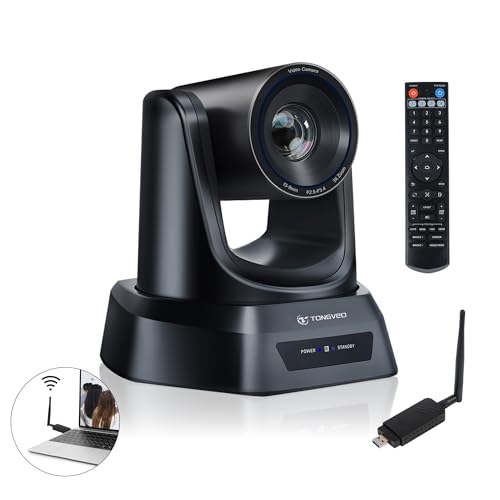
Equipped with a built-in 5.8GHz wireless receiver, this camera emphasizes motion tracking and AI-based presenter following. Best for: presenter-centric meetings, church services, or classrooms that require freedom of movement without trapping the camera with wires. Why selected: AI auto-tracking and USB3.0/HDMI outputs enable precise framing and easy integration into existing displays. Limitation: the wireless range and interference potential depend on room layout and Wi-Fi congestion.
Who this is for
Ideal for venues where the speaker moves across the stage or room, and consistent framing is critical for effective communication or livestreams.
WYRESTORM 4K AI Tracking Conference Webcam

Designed for small conference spaces, this WYRESTORM webcam emphasizes AI auto-framing and presenter tracking with dual noise-cancelling mics. Best for: hybrid meetings and spaces where clear presenter visibility is essential. Why selected: Zoom certification for Teams helps compatibility with popular meeting platforms. Limitation: 4K output is supported but the effective framing in smaller rooms usually benefits from 1080p streaming, so consider room size and bandwidth when choosing.
Who this is for
Choose this for rooms with limited seating that still require adaptive framing and strong vocal clarity during presentations or trainings.
Buying Guide: How to Choose The Right Wireless Conference Room Webcam
What should you ask before buying? Consider room size, movement, power availability, and platform compatibility. The following questions help target the right match:
- What is the room size and seating layout? If the room is tight, a wide-angle or auto-tracking PTZ camera helps cover everyone without repositioning.
- Is wireless setup essential? If yes, prioritize models with built-in receivers or simple plug-and-play USB receivers to minimize cables.
- What about audio quality? Look for cameras with noise-reducing mics or compatible speakerphones to ensure clear voices across the room.
- Which platforms must be supported? If you use Zoom, Teams, or WebEx, choose models with official compatibility or optimized drivers.
- Do you need a single all-in-one solution or separate camera and audio devices? All-in-one kits reduce cabling, but may limit customization.
- What is your budget and upgrade path? Consider features like AI auto-tracking, 4K vs 1080p, and future room expansion.
Practical tips for setup and use
- Test wireless distance in the room before finalizing placement to ensure stable transmission.
- Position the camera at or just above eye level for natural meeting framing.
- Ensure microphones are unobstructed and within optimal range of speakers.
- Keep firmware updated to access improvements in AI tracking and compatibility.
Comparison snapshot
- Best for cable-free flexibility: TOALLIN or SynthMeet—ease of setup and standard 1080p quality.
- Best for presenter-heavy rooms: TONGVEO AI PTZ or WYRESTORM for auto-framing and tracking.
- All-in-one convenience: TONGVEO All-in-One provides integrated audio and video in a single setup.
FAQ
- Do wireless webcams have latency? Some delay is possible with wireless transmission, but most modern models minimize lag to be suitable for live meetings.
- Can I use these webcams with meeting apps? Yes, most listed products are designed to work with Zoom, Teams, WebEx, and other popular platforms.
- Are these webcams compatible with Mac and Windows? They generally support both, though drivers or software may vary by model.
- Is 4K necessary for conference rooms? Not always; 1080p is often sufficient for most meetings, while 4K can help in larger rooms or for archival uses.
- What about security and privacy? Look for products with privacy covers or simple deactivation options for cameras when not in use.
- Do I need a wired power supply? Most wireless models still require USB power; battery-free designs rely on USB power or computer connections.