Best Kids Computer Mice for Easy Learning and Fun
Answering the need for kid-friendly, safe, and reliable mice, these models are designed for small hands, short attention spans, and classroom or home use. The top picks below suit different buyers: parents seeking durable wired mice for younger children, families needing wireless options for clutter-free desks, and educators wanting reliable devices for classroom use. The summary table helps compare key points at a glance.
| Product | Connection | Best For | Notes |
|---|---|---|---|
| Clevy Kids Mouse (Wired) | USB | Young children, at home or school | Colorful, small size, durable |
| SOONGO Kids Mouse | USB | Portable school use, quick setup | Ergonomic, plug-and-play |
| TECKNET Wireless Kids Mouse (Mint Green) | 2.4G USB Receiver | Desk clutter-free setups | Compact, quiet click |
| Clevy Bluetooth Kids Mouse | Bluetooth | Wireless flexibility for tablets and laptops | Designed for ages 3-10 |
| seenda Wired Mouse (Purple) | USB | Students and travelers | Ambidextrous, RGB option |
Clevy Kids Mouse — Colorful Ergonomic USB Mouse

Best for: Young children who need an approachable, durable USB mouse for school and home use. The design emphasizes kid-friendly aesthetics with an ergonomic shape that fits small hands. Features highlight a smaller form factor to reduce strain during prolonged use, and a durable build to withstand daily classroom activity. Choose this if you want a dedicated first mouse that is simple to use and visually appealing.
Limitations: Wired connection means a direct USB port is required and there is no Bluetooth pairing flexibility. Suitable for desktops and laptops with available USB ports.
SOONGO Kids Mouse for Laptop — Ergonomic Optical Blue
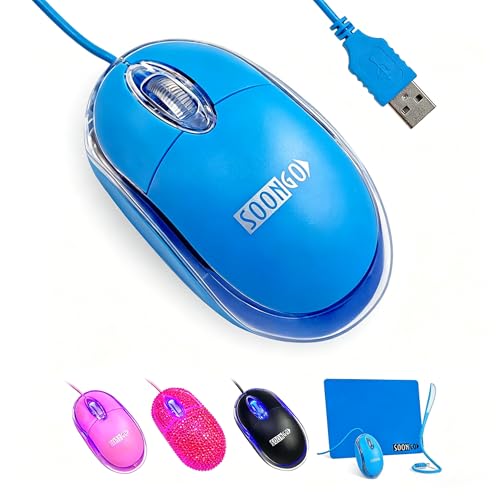
Best for: Families seeking a lightweight, plug-and-play option for kids on laptops. The ergonomic design supports comfortable use, while the straightforward USB setup minimizes setup time for teachers and parents. It’s well-suited for home schooling and school computer labs where quick deployment matters.
Limitations: The blue color and lightweight design may be less robust for rough handling in very young environments. No built-in kid-specific safety features beyond general durable construction.
TECKNET Wireless Mouse (Mint Green) — 2.4G Quiet

Best for: Kids who need a tidy desk with no cables and a compact, portable mouse. The mint green model is sized for small hands and includes quiet buttons, making it suitable for shared computers in classrooms or quiet home study spaces.
Limitations: Bluetooth versions vary in compatibility; ensure the device supports your child’s computer ecosystem. Battery life is device-dependent and not guaranteed to last weeks without replacement.
Clevy Bluetooth Kids Mouse — Wireless for Windows, Mac, Chromebook

Best for: Families with multiple devices across platforms. The Bluetooth connection reduces desk clutter and offers compatibility with Windows, macOS, Chromebook, iPad, and tablets. It’s designed for children between roughly ages 3 and 10, promoting easy, safe use.
Limitation: Bluetooth pairing can require an initial setup step and may occasionally require device-specific permissions or settings adjustments.
seenda Wireless Mouse — Mint Green or Other Colors

Best for: Students and travelers who need a portable wireless option with a wide color selection. The 2.4G wireless connection provides straightforward plug-and-play use without drivers, and an ultra-light, compact design helps fit into bags easily.
Limitation: It is not specifically a kid-focused product, so durability and size may vary for younger children compared to models designed for youth use.
BENGOO Gaming Mouse — Wired RGB Backlit (Black)

Best for: Kids or teens who enjoy gaming or more dynamic, visually engaging peripherals. The USB wired connection and multiple DPI settings (up to 3600) provide game-like responsiveness. The RGB lighting adds a playful element that may appeal to older kids.
Limitation: Designed with gaming features that may be more than needed for basic learning tasks; simpler models can be easier for younger children to master.
Buying Guide
- Connection type: Wired mice are straightforward and reliable for younger children, with no batteries to replace. Wireless options reduce desk clutter but may require pairing and occasional battery changes.
- Size and ergonomics: Look for small-footprint mice designed for little hands. An ergonomic curve helps prevent fatigue during longer sessions or homework blocks.
- Durability: Choose models with reinforced buttons and sturdy housings. Kids can be rough with devices, so a robust build matters.
- Safety and materials: Non-toxic materials and smooth edges reduce risk during play. Straightforward controls minimize accidental clicks.
- Platform compatibility: For households with multiple devices, consider Bluetooth or cross-platform USB receivers that work with Windows, macOS, Chromebook, and tablets.
- Noise level: Quiet-click options are helpful for shared spaces like libraries or open-plan homes, reducing distractions.
- Color and design: Bright, friendly designs can increase engagement and encourage children to use the device more consistently.
FAQ
- What size is best for a child’s first mouse? Choose a small, compact model designed for kids, with an ergonomic shape that fits a child’s hand without forcing a grip that could cause strain.
- Is a wireless mouse better for kids than a wired one? Wireless mice reduce desk clutter and cable tangling, but wired mice offer consistent performance and no battery concerns for younger children.
- Are Bluetooth mice compatible with tablets? Many Bluetooth mice work with tablets, but verify device compatibility and software settings on the tablet prior to purchase.
- What safety features should I look for? Smooth edges, non-toxic plastics, and simple buttons help ensure safe handling for kids.
- How durable should a kids mouse be? A durable shell, reinforced click mechanisms, and a design that can withstand daily school or home use are ideal.
- Do kids need special software for a mouse? Most kid-focused mice are plug-and-play and do not require extra software, simplifying setup.