Best Electronic Signature Pads for Laptops: Fast, Clear, and Reliable
When shopping for an electronic signature pad for a laptop, you want devices that deliver accurate handwriting capture, simple USB connectivity, and clear display options for verification. This guide focuses on five proven options that cater to different needs—from professional document signing to on-the-go portability. The top picks below are best for office workers who sign PDFs and Word documents, students and teachers who annotate on-screen, and IT teams seeking straightforward integration. A quick buyer’s table follows to help you compare key traits at a glance.
| Product | Best For | Key Strength |
|---|---|---|
| Topaz T-S460-HSB-R USB Electronic Signature Capture Pad | Professional signers needing reliable capture | High-quality capture techniques |
| SMAJAYU FP430S 4.3 Inch Color LCD Backlit Pad | Signatures on PDFs and documents with on-device preview | Color LCD display and backlit screen |
| HavaPen Signature Pad ePaper SignPad | Visual display of signatures alongside the document | Battery-free stylus and live display |
| Topaz SigLite T-L460-HSB-R USB Pad | Compact, portable signing on the go | LCD display for on-device customization |
| Interlink Electronics ePad VP9801 (Renewed) | Budget-friendly, real-time signature display | Real-time LCD display and simple USB setup |
Topaz T-S460-HSB-R USB Signature Pad
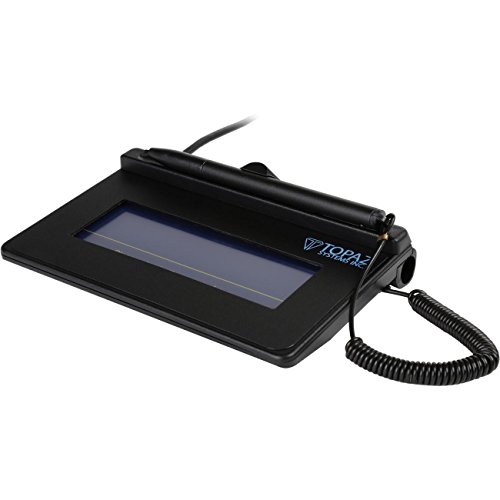
The Topaz T-S460-HSB-R is a compact USB signature pad designed for straightforward signature capture without backlighting. It suits professionals who need reliable handwriting input for forms and contracts, particularly in environments where lighting is controlled. Best for office workflows where a non-backlit device keeps costs down but capture quality remains high.
Best for: Legal, HR, and sales teams requiring accurate, distraction-free signing. Why selected: It emphasizes high-quality capture techniques in a compact form factor. Limitation: No backlit display can make viewing captured strokes harder in low-light settings.
SMAJAYU FP430S 4.3 Inch Color LCD Backlit Pad

The SMAJAYU FP430S adds a 4.3-inch color LCD with backlighting, enabling on-device preview of signatures and format decisions before saving. It supports PDFs, Word, and Excel through the SMAJAYU tools, and offers an SDK for integration with websites or apps. This model is ideal for users who value on-device visibility and easy document signing, including remote workers and students who regularly fill forms.
Best for: Professionals who want immediate visual feedback on signatures. Why selected: The color LCD and backlit display improve accuracy and ease of use during signing. Limitation: Uses a dual-tool approach, which may require a learning curve and setup time for full features.
HavaPen Signature Pad ePaper SignPad
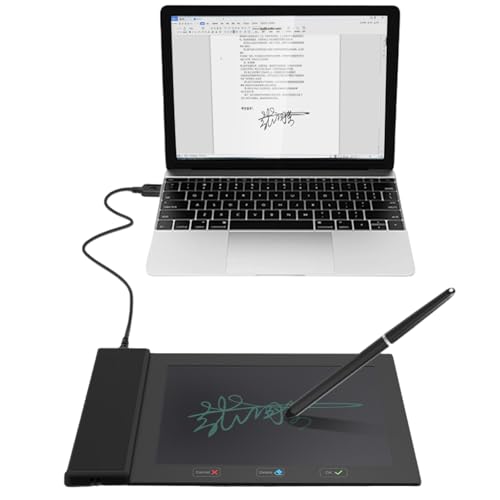
The HavaPen ePaper SignPad uses an e-paper display to render signatures alongside documents. It ships with a battery-free stylus and works across Microsoft Office apps, a practical choice for teachers, presenters, and remote workers who want clear, visible results on screen. Best for: Users prioritizing a natural drawing feel without battery management. Limitation: The device emphasizes on-screen display, which may not suit users seeking rapid on-device signature previews.
Topaz SigLite T-L460-HSB-R USB Pad

The Topaz SigLite T-L460-HSB-R is a non-backlit, compact USB pad featuring an LCD display for on-device customization. Its small footprint makes it well suited for mobile or desk setups where space is at a premium. Best for: Professionals who need portability without sacrificing display options. Limitation: Non-backlit display may be harder to read in dim environments.
ePadlink VP9801 ePad-ink Signature Pad
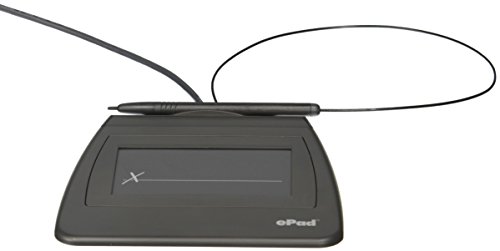
The ePadlink VP9801 offers USB connectivity with a simple, plug-and-play approach. It has a practical package size and provides real-time signature display. Best for: Budget-conscious buyers needing straightforward USB signing. Limitation: Feature set is basic compared to more advanced displays, which may limit on-device approval workflows.
Buying Guide
- What setting will you use it in? Office environments benefit from non-backlit, compact pads for everyday contracts, while classrooms or training settings may prefer color LCD or e-paper displays for visibility.
- Is on-device preview important? If yes, choose models with LCD or e-paper displays (SMAJAYU FP430S, HavaPen, Topaz SigLite T-L460-HSB-R).
- How critical is portability? For on-the-go signing, smaller footprints (Topaz SigLite T-L460) help maintain desk space and mobility.
- Do you need software integration? Some pads offer SDKs or document toolkits (SMAJAYU FP430S). Consider it if you plan to embed signing into apps or workflows.
- Battery management? Battery-free styluses (as in HavaPen) reduce maintenance and interruptions during signing sessions.
- Display type preference? LCD backlit displays provide visibility in dim lighting (SMAJAYU FP430S) whereas non-backlit LCDs (Topaz T-S460-HSB-R, T-L460) are cheaper but require proper lighting.
FAQ
- What is an electronic signature pad used for? It captures handwritten signatures digitally for documents like PDFs, Word, and Excel files.
- Do these pads require special software? Some models integrate with document tools or offer SDKs; others work as standalone capture devices using standard USB input.
- Can I use a signature pad with Windows and Mac? Windows compatibility is common; macOS compatibility may vary—check driver and software support for your OS.
- Is a backlit display important? Backlit displays improve visibility in low light; non-backlit units are often more affordable and compact.
- Do signature pads display the signature in real time? Many models feature either LCD or e-paper displays that show the signature as you write, improving accuracy and user confidence.
- Are renewed or refurbished pads reliable? Renewed models can provide dependable performance at lower cost, but verify return policies and warranty terms.