Best Alarm Systems for Homes: Simple, Wireless Security for Modern Living
Answering your home security needs starts with reliable, easy-to-manage alarm systems. This guide highlights five popular, wireless options that work well for apartments, small homes, and larger residences alike. Each pick emphasizes easy setup, app control, and smart home compatibility. Best for tech-savvy renters, best for DIY homeowners, and best all-around options are covered so you can compare quickly and decide with confidence.
| Product | Best For | Key Benefit | Notes |
|---|---|---|---|
| PGST Wireless Alarm System | Renters and small homes | WiFi+GSM/4G with instant alerts | Expandable with accessories |
| tolviviov WiFi Door Alarm Kit | Budget-friendly apartments | Expandable up to 20 sensors | 2.4GHz WiFi only |
| RenseCum 4.3” Touchscreen System | Families needing a color display | Big touchscreen and multi-language support | No monthly fee option |
| PGST 22-Piece Wireless System | Large rooms or multi-room setups | 2K HD camera included | Supports many sensors |
| Ring Alarm Kits (8- and 14-Piece) | Homes needing scalability | Popular ecosystem with 24/7 monitoring option | Ring-specific accessories sell separately |
PGST Wireless Alarm System Kit
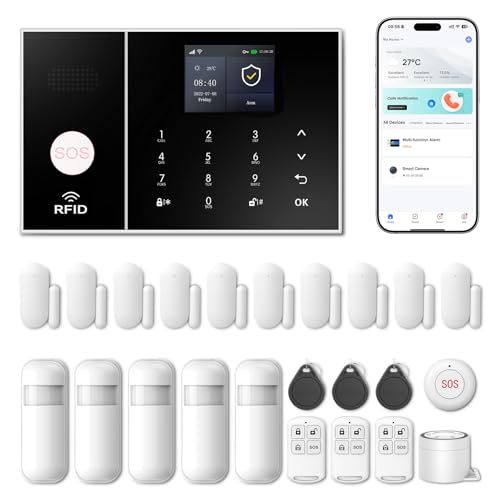
This system is designed for DIY enthusiasts who want broad control via Smart Life or Tuya apps. It supports remote operation, customizable sensor naming, and expands with additional PGST sensors. Voice control and a color display help users monitor status, weather, and date in up to 10 languages. It also includes tamper protection and multi-channel alerts via phone, SMS, and app to maintain around-the-clock security.
Best for: Renters or small homes seeking easy app-based management and strong expandability without monthly fees.
Why chosen: It combines app-driven security, remote control, and physical tamper protection with scalable sensor options.
Caution: Ensure your area supports the required 2.4GHz network for optimal connectivity and consider potential expansion costs for full coverage.
tolviviov WiFi Door Alarm Kit

This affordable kit emphasizes straightforward control via a mobile app, notifying you instantly of door and window events. It supports expansion up to 20 sensors and 5 remotes, making it flexible for growing security needs in apartments or smaller homes. Note that it operates on 2.4GHz WiFi, which is compatible with most home networks but not with 5GHz routers.
Best for: Value-focused buyers who want a scalable, app-driven system for apartments or compact homes.
Why chosen: Strong expandability and clear app alerts make it practical for first-time security buyers.
Caution: Requires a 2.4GHz WiFi network; 5GHz networks are not supported.
RenseCum 4.3-Inch Touchscreen Alarm System

The RenseCum model offers a large 4.3-inch color touchscreen for quick status checks and control. It supports multiple languages and easy arming/disarming through a central keypad. The system provides real-time alerts via an app and phone calls, with Alexa and Google Assistant compatibility for voice control. It is suitable for both homes and small businesses seeking an intuitive interface and 24/7 alert capabilities.
Best for: Families who want a visually clear, user-friendly interface and strong voice assistant integration.
Why chosen: The touchscreen and multi-language menu improve accessibility for all household members.
Caution: While it emphasizes ease of use, verify the included accessories fit your space before purchase.
PGST 22-Piece Wireless Home Security

This kit pairs WiFi and 4G connectivity with a 2K HD camera for visual monitoring. It pairs motion detectors and door/window sensors for comprehensive coverage, and it supports remote monitoring without monthly fees. The color display on the base unit shows system status, weather, and date, making it a smart choice for multi-room homes or apartments that require a visual overview and reliable alerts.
Best for: Medium-to-large homes or apartments needing integrated video with motion sensing.
Why chosen: The included camera adds a visual layer to standard sensor alerts, enhancing awareness.
Caution: Ensure adequate WiFi coverage for the HD camera stream in larger spaces.
Ring Alarm 8-Piece Kit

The Ring 8-piece kit is a compact starter system with a base station, keypad, four contact sensors, a motion detector, and a range extender. It’s designed for 1- to 2-bedroom homes, offering easy setup and scalable expansion with additional sensors and accessories available separately. The included keypad simplifies arming and disarming, while the Ring ecosystem supports optional 24/7 monitoring.
Best for: Small homes or apartments seeking a well-known ecosystem with easy expansion options.
Why chosen: Simple setup and a clear path to growth with Ring accessories and monitoring options.
Caution: Ring products and add-ons may require ongoing monitoring services for certain features or capabilities.
Buying Guide
What should you consider when choosing a home alarm system?
- Connectivity: Look for dual connectivity options (WiFi plus cellular) when available to ensure alerts even if WiFi is down.
- Expansion: If you plan to add sensors over time, prioritize systems with easy, plug-and-play expansion.
- App and automation: Ensure the system works with your preferred smart home apps (Smart Life, Tuya, Alexa, Google Assistant).
- Display and interface: A touchscreen or clear status display can make daily use simpler for all household members.
- Professional monitoring: Decide whether you want monthly monitoring or a no-monthly-fee DIY setup with local alerts only.
- Privacy and data: Consider how alert data is stored and how remote access is controlled within your household.
What are common trade-offs among these kits?
- Feature-rich kits with cameras tend to be more capable but may involve higher upfront costs and ongoing monitoring decisions.
- 2.4GHz-only devices offer broad compatibility but may miss compatibility with newer routers or networks; check your home network before buying.
- Systems with color displays and touchscreens are user-friendly but check for language options and accessibility in your home.
Installation and setup considerations
- Plan sensor placement in high-traffic entry points and near potential blind spots for the best coverage.
- Verify that your WiFi and cellular networks are stable in areas where sensors and the hub will be placed.
- Label sensors and zones to simplify future troubleshooting and expansions.
FAQ
- Do these systems require ongoing monthly fees?
- Can I expand a system after the initial setup?
- Are these compatible with Ring, Alexa, or Google Assistant?
- What happens if WiFi goes down?
- Is professional monitoring necessary for basic protection?
- How do I manage user access for family members?