Best Cheap Computer Mice for Everyday Use and Home Office
Finding a reliable, affordable mouse doesn’t have to be a trade-off between performance and price. This guide highlights five budget-friendly options that cover wired and wireless preferences, ambidextrous designs, and ergonomic basics. Each pick balances comfortable handling, accurate tracking, and broad compatibility for Windows, macOS, and Chromebooks.
Summary of selected products:
- Logitech B100 Wired Mouse — USB corded, ambidextrous, 800 DPI
- TECKNET Wireless Mouse — 2.4G, 2600 DPI, ergonomic with five DPI levels
- Logitech M185 Wireless Mouse — 2.4 GHz, ambidextrous, 1000 DPI, long battery life
- Lenovo 100 Wired USB Mouse — slim, ambidextrous, 3 million click life
- Rii Wired Mouse — RGB LED, 4 buttons, ergonomic design
Logitech B100 Wired Mouse For Computers

The Logitech B100 is a simple, reliable wired option designed for budget-conscious buyers. Its ambidextrous shape supports both left- and right-handed users, making it a versatile choice for shared laptops. With 800 DPI sensitivity, it delivers precise cursor control for everyday document editing, web navigation, and spreadsheet work. Built by Logitech, a long-standing leader in computer peripherals, this mouse prioritizes dependable performance without extra features that drive up cost. The corded connection ensures a steady signal and doesn’t depend on battery life, which is ideal for classrooms, offices, and home setups.
TECKNET 2.4G Ergonomic Wireless Mouse

The TECKNET wireless option emphasizes portability and comfort with an ergonomic contoured shape and rubberized side grips. It’s designed to fit naturally in the hand and reduce fatigue during long work sessions. The mouse offers five adjustable DPI levels (800/1200/1600/2000/2600) for responsive cursor control across diverse surfaces, though glass surfaces are not included. It operates on a 2.4 GHz wireless connection, avoiding USB dongle obsolescence. This model is well-suited for laptops, Chromebooks, and compact workspaces where a smaller footprint matters.
Logitech M185 Wireless Mouse

The M185 provides a compact, ambidextrous design with 2.4 GHz wireless connectivity and a reliable one-year battery life supported by a smart sleep mode. It ships with an included AA battery and is compatible with Windows, macOS, and laptops, making it a versatile option for mixed device ecosystems. The USB mini receiver ensures a simple plug-and-play setup, while its everyday 1000 DPI optical tracking covers typical office tasks, navigation, and light graphic work without complexity or extra features.
Lenovo 100 Wired USB Mouse

The Lenovo 100 emphasizes a slim, comfortable grip with ambidextrous use, ideal for users who value portability alongside a full-size feel. Designed for durability, it claims up to 3 million clicks, ensuring longevity for daily computing tasks. It connects via a 1.7-meter USB-A cable, providing a reliable, wired connection that avoids wireless interference and battery concerns. The full-size form factor supports longer sessions without finger fatigue, making it suitable for students and home offices that prioritize simplicity and dependability.
Rii Wired RGB Optical Mouse
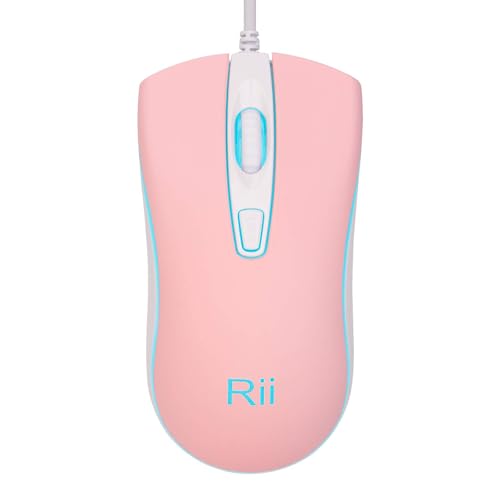
The Rii wired model adds a touch of style with blue LED backlighting and a five-button layout that supports productivity-heavy tasks. Its four-button ergonomic design aims to reduce fatigue during extended use, while a basic plug-and-play setup makes it accessible for Windows, Mac, and Chromebooks. Its simple wired connection eliminates the need for batteries and potential wireless interference, offering predictable response and compatibility for everyday office work, school tasks, and home computing.
Buying Guide
- Connection type: Wired mice provide consistent performance and no battery concerns, while wireless models offer greater freedom of movement. Consider your desk setup and whether USB ports are plentiful or if you prefer to minimize cable clutter.
- Sensor and DPI: Most budget mice use optical sensors with DPI ranges from 800 to 2600. Higher DPI is beneficial for precision tasks and high-resolution displays, while lower DPI suits casual navigation.
- Ergonomics and ambidextrous design: If you share devices or have long work sessions, an ambidextrous shape provides flexibility. Ergonomic contours can reduce fatigue during extended use.
- Buttons and customization: Extra buttons can boost productivity, especially for document editing, browser navigation, and gaming. DPI switches allow quick sensitivity adjustments without software.
- Durability and build quality: Look for models with reliable button life ratings and sturdy cabling. Wired mice generally last longer under heavy use, while wireless options rely on battery longevity and receiver reliability.
- Compatibility: Most budget mice work with Windows, macOS, and Chrome OS. Check for plug-and-play simplicity if you don’t want to install drivers.
- Portability: Compact mice suit travel and small workspaces, while full-size and ergonomic options suit long sessions at a desk.
These selections provide dependable, affordable options across wired and wireless categories, prioritizing compatibility, basic ergonomics, and straightforward use for home offices, classrooms, and everyday computing tasks.