Best Monitors for Photography: Color-Accurate Displays for Professionals
Photographers rely on monitors that render accurate colors, wide color gamuts, and sharp detail. This guide highlights five top picks that balance color fidelity, resolution, and ergonomic features. Each option is Calman verified or US-based color-capable, ensuring dependable results from editing to printing.
Summary of chosen products
| Product | Brand | Resolution | Key Color Features |
|---|---|---|---|
| ASUS ProArt PA248QV | ASUS | 1920×1200 (16:10) | 100% sRGB/Rec.709, ΔE < 2, Calman Verified |
| ASUS ProArt PA278QV | ASUS | 2560×1440 (WQHD) | 100% sRGB/Rec. 709, Calman Verified |
| LG 27US500-W Ultrafine | LG | 3840×2160 (4K) | HDR10, DCI-P3 coverage, Onscreen Control |
| BenQ GW2790 | BenQ | 1920×1080 (FHD) | 99% sRGB, Anti-Glare, Low Blue Light |
| MSI PRO MP272PMG | MSI | 1920×1080 (FHD) | IPS, 120Hz, built-in webcam options |
ASUS ProArt PA248QV 24″ WUXGA: Calibrated Color

The ASUS ProArt PA248QV is designed for accurate color work with 100% sRGB/Rec.709 coverage and a 1920×1200 resolution that provides extra vertical space for editing timelines. Its ΔE value below 2 indicates precise color reproduction, essential for portrait and product photography workflows. The monitor supports Calman verification, ensuring consistency across calibrations and sessions. Ergonomic adjustments help maintain a comfortable editing posture during long sessions, while anti-glare coating minimizes reflections in bright studio setups.
ASUS ProArt PA278QV: Sharp WQHD Color Reference

The PA278QV expands to a 27-inch WQHD panel with 2560×1440 resolution, providing a tighter pixel grid for detail-oriented editing. With 100% sRGB/Rec.709 coverage and Calman Verified color accuracy, it’s well-suited for photographers who require precise skin tones and faithful color in landscapes and studio shots. A frameless design aids multi-monitor setups, and ergonomic options simplify long editing sessions. Factory calibration minimizes drift, offering a reliable baseline for post-processing workflows.
LG 27US500-W Ultrafine: 4K Clarity For Editing

The LG 27US500-W brings 4K UHD resolution to the table, delivering detailed imagery and wide color possibilities with HDR10 support. Its IPS panel helps maintain color accuracy across viewing angles, which is beneficial when collaborating with clients or sharing proofs. Onscreen Control enables quick workspace adjustments without diving into menus, while the expansive color gamut supports editing and color grading tasks. The monitor is designed for long sessions, with a focus on color fidelity and sharpness for photography work.
BenQ GW2790: Balanced Color and Comfort

The BenQ GW2790 focuses on color balance and user comfort, offering 99% sRGB coverage and an anti-glare coating that reduces reflections in bright editing spaces. Its 27-inch screen size provides ample room for detailed photo editing, while adaptive brightness helps maintain consistent visibility in varying lighting conditions. The low blue light and eye-care features support extended editing sessions, making it suitable for photographers who work long hours on color-critical projects.
MSI PRO MP272PMG: IPS Panel For Color Consistency
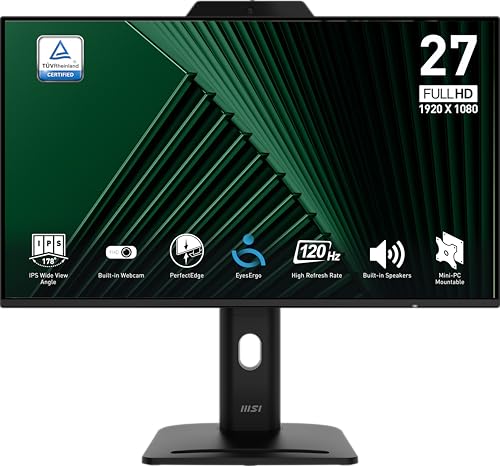
The MSI PRO MP272PMG combines an IPS panel with a 1080p resolution and a 120Hz refresh rate. While not a 4K option, its IPS glow-free consistency and digital tools support color-critical tasks in a budget-friendly package. Features such as tilt and height adjustment help tailor the viewing angle for precise editing. Built-in webcam options vary by model, offering flexible use for creative teams needing video collaboration alongside color-sensitive work.
Buying Guide: Key Purchase Considerations
- Color accuracy and coverage: Look for 100% sRGB and 100% Rec.709 support, and consider monitors with Calman verification or factory calibration for dependable color fidelity.
- Resolution and aspect ratio: Higher resolutions (4K or WQHD) provide more detail and screen real estate for editing, while 16:10 aspects offer extra vertical space beneficial for photo cropping and timeline work.
- Panel type: IPS panels provide broader viewing angles and more accurate color reproduction, essential for consistent edits across clients and devices.
- Calibration options: Consider built-in calibration tools, hardware LUTs, or compatibility with calibration devices to maintain color consistency over time.
- Ergonomics and connectivity: Adjustable stands (height, tilt, pivot) and a balanced mix of HDMI/DisplayPort inputs support varied work setups. Flicker-free and low blue light features reduce eye strain.
- HDR and color gamut: For photographers working with high dynamic range content, HDR support and wide color gamuts (DCI-P3, Adobe RGB) can enhance realism, though ensure color accuracy remains a priority.
- Workspace integration: Onscreen control and thin borders enable clean multi-monitor arrangements, useful for comparison work and proofing.
- Budget considerations: Prioritize color accuracy and panel quality over unused features. A balanced setup with a capable calibration workflow often yields the best long-term results.
Choosing a monitor for photography hinges on reliable color representation, suitable resolution, and ergonomic comfort. The options listed above provide a range of sizes, color capabilities, and features to match different editing styles and work environments. When evaluating candidates, verify color accuracy measurements and plan a calibration schedule to preserve results across projects.