Best GPU Support Bracket Solutions for Heavy Graphics Cards
Maintaining GPU integrity is crucial for long-term system stability and performance. A reliable GPU support bracket can prevent sag, protect the PCB and connectors, and keep airflow unobstructed. Below are five top-rated brackets designed for different chassis styles, heights, and fan configurations. Each option highlights solid build materials, adjustable fits, and easy installation, helping you choose the best solution for your setup.
| Product | Brand | Compatibility | Key Benefit |
|---|---|---|---|
| GPU Support Bracket, Graphics Card Support, Adjustable Anti Sag | JOYJOM | Heavy GPUs, 35-120mm thickness | Strong support with dual orientation and low-residue adhesive |
| Graphics Card GPU Brace Support, Sag Holder Bracket | nkomax | Long GPUs, 74-120mm length | All-aluminum body; screw-adjustment; hidden mag.net base |
| California JOS GPU Support Bracket | California JOS | Large GPUs | Durable all-aluminum; anti-sag protection |
| acer GPU Support Bracket with Magnet & Non-Slip Base | acer | Large GPUs; 70-120mm | Magnetic bottom; silicone pads; adjustable height |
| EZDIY-FAB GPU Holder Brace | EZDIY-FAB | Nvidia RTX 3000 / AMD RX6000 series | Universal design; sturdy aluminum; fits 7+ PCI slots |
Note: All products listed are consumer-grade GPU brackets designed to reduce sag, protect hardware, and offer versatile mounting options. Material quality, adjustability, and mounting compatibility vary; review your case and card dimensions before purchasing.
JOYJOM GPU Support Bracket

The JOYJOM GPU Support Bracket is designed to protect heavy graphics cards from sagging. It provides robust support that helps maintain card alignment over time, potentially extending the GPU’s effective lifespan. The bracket supports horizontal and vertical orientation, giving users installation flexibility. A strong double-sided adhesive helps secure the unit to the chassis, reducing wobble, with minimal residue for cleanup or reuse. The model fits a range of card thicknesses and supports up to 75mm in thickness, making it suitable for high-end GPUs.
nkomax Graphics Card GPU Brace Support

The nkomax GPU Brace is crafted from all-aluminum metal, offering a sturdy, durable alternative to plastic supports. Its screw-adjustment design accommodates various chassis configurations, including traditional and long power supply bays, ensuring broad compatibility. The base features a hidden mag.net mechanism, which simplifies installation and enhances stability within the chassis. This bracket emphasizes long-term reliability for systems with heavier or taller cards, reducing sag-related risks.
California JOS GPU Support Bracket

This large black GPU support bracket from California JOS ships in an ESD-protected package for quality, long-term storage. It focuses on sag prevention to shield both GPU and motherboard from cumulative weight-induced damage. The all-aluminum build delivers durable strength and resistance to wear, offering a stable upgrade for high-end graphics cards in demanding builds. The product’s straightforward design supports easy installation and dependable operation across many PC cases.
acer GPU Support Bracket

The acer GPU Support Bracket emphasizes a magnetic design and silicone pads to prevent card damage. It uses an anodized aluminum alloy for corrosion resistance and durability, with a detachable design allowing precise height adjustments in 0.5mm increments. A large 14.7mm diameter supports thicker cards, and the magnet bottom helps secure the unit to the chassis, providing a double safeguard against movement. The bracket supports a range of cases, and the installation is designed to be user-friendly for various build configurations.
EZDIY-FAB GPU Holder Brace
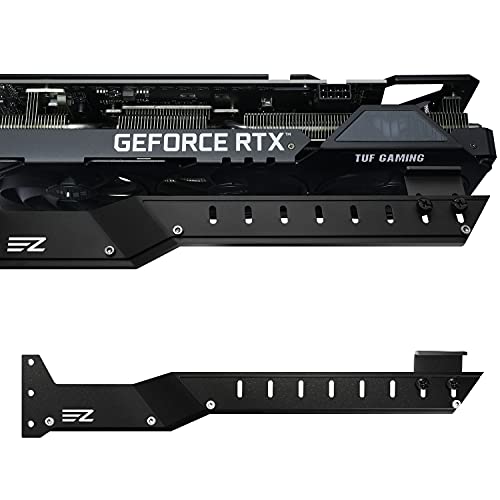
EZDIY-FAB offers a robust GPU holder brace designed for Nvidia RTX 3000 and AMD RX6000 series cards. Built from sturdy aluminum alloy, it provides reliable support for large GPUs, with a universal design that fits PC cases with 7 or more PCI slots. The bracket helps prevent bending and sagging during prolonged use and is adjustable to accommodate various card lengths and case layouts. The design emphasizes compatibility and ease of installation, making it a practical option for mixed GPU builds.
JOYJOM Adjustable Anti Sag GPU Stand

JOYJOM’s anti-sag stand features aluminum construction with a fan-mounting capability. It is designed to support graphics cards while not obstructing fan air outlets, making it suitable for systems with bottom-mounted fans. The design supports multiple fan sizes (9cm, 12cm, 14cm) and includes two mounting screws for fan compatibility. The bracket length is adjustable (from 10 to 129mm) to accommodate various case widths and card thicknesses. Users should verify compatibility with their specific card and cooling setup before purchasing.
JOYJOM CNC Aluminum GPU Bracket

This JOYJOM model focuses on a CNC-machined aluminum design with a full aluminum structure, providing strong support for heavy graphics cards. The height is adjustable from 0.63 to 6.3 inches, and the unit can be detached into two parts for flexible installation. A non-slip rubber pad under the base and on the arm enhances stability and protects the card from scratches. It is compatible with a wide range of chassis sizes and configurations, including ITX, MATX, and ATX builds.
Buying Guide: Key Considerations for Choosing a GPU Support Bracket
- Card dimensions and case compatibility: Measure your GPU length, thickness, and the internal clearance of your chassis. Some brackets support up to 75mm thickness or 120mm height, while others are tailored for specific form factors.
- Material and durability: All-aluminum brackets offer greater rigidity and longevity than plastic. Anodized finishes provide corrosion resistance and a clean, long-lasting appearance.
- Installation and stability: Look for magnetic bases, hidden magnets, or strong adhesive options that minimize movement. A non-slip base or rubber pads helps protect the card and chassis.
- Adjustment range: Consider whether the bracket offers micrometer-like height adjustments or simple presets. Fine-tuned height control helps accommodate different GPUs and fan setups.
- Orientation options: Some models support horizontal and vertical mounting. Your choice may affect airflow, cable routing, and motherboard layout.
- Impact on cooling and airflow: Ensure the bracket does not obstruct fan intakes or exhaust paths. Brackets that sit above or beside fans should still allow adequate air circulation.
- Long-term maintenance: Choose brackets with easily removable bases or minimal adhesive residue for reuse or repositioning across builds.
- Warranty and compatibility notes: Verify compatibility with your GPU model, PSU clearance, and motherboard layout. Manufacturers’ documentation and user reviews can provide real-world fit insights.
Overall, selecting a GPU bracket involves balancing rigidity, adjustability, and ease of installation with your case design and graphics card specifications. For high-end or heavy GPUs, prioritize all-aluminum construction and a robust mounting solution to minimize sag and protect component integrity over time.