Best Image Projector for Tracing: Top Picks for Artists and Crafters
If you’re searching for an image projector for tracing, you want clarity, ease of use, and reliable connectivity. This guide highlights five models that balance projection size, image quality, and practical features for beginners and seasoned artists alike. The top picks cater to crafters, muralists, and teachers who trace designs onto canvases, walls, or desks. Each product section explains who it’s best for and why, plus a practical caveat to consider before buying.
| Product | Best For | Why It Stands Out |
|---|---|---|
| Caydo S1 LED Art Projector | Beginner to intermediate trace artists | Optical magnification with no bulbs to replace; 20″–80″ projection range |
| Caydo P2 Art Projector | DIY artists and mural planners | Rotating base, 1080P drawing-ready, in-app tools |
| GIKUCNZL Draw/Tracing Projector with Stand | Adults doing cake/cookie art and canvas tracing | Dual-use for tracing and movie projection, large 31.4″ max |
| Magcubic HY300Pro Mini Projector | Travelers and outdoor enthusiasts | Ultra-compact, 180° rotation, WiFi + Bluetooth |
| AKIYO Mini Projector | Mobile tracing and portable viewing | 5G/2.4G dual-band WiFi, easy one‑tap screen mirroring |
Caydo S1 LED Art Projector for Tracing
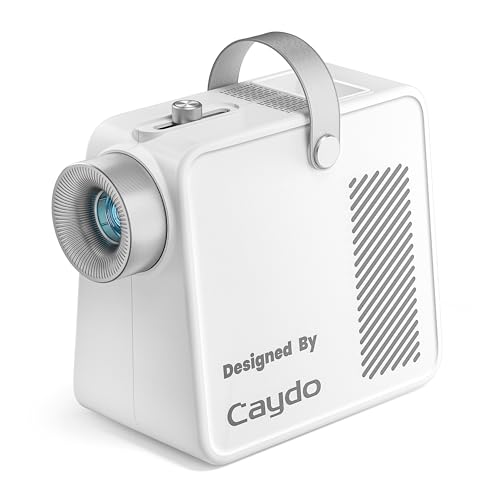
The Caydo S1 uses pure optical magnification for easy tracing without wireless or app setup. It enlarges sketches from 2.5X to 11X and projects images from about 20″ to 80″. Best for sketching, wall murals, and quilting patterns where a quick, reliable trace is needed. The unit emphasizes a quiet, bulb-free operation with a long LED life, reducing maintenance worries. Limitations include a fixed LED brightness and a reliance on a well-lit environment for best results. Choose this if you want simple setup and quiet performance.
Caydo P2 Art Projector with Rotating Base

The Caydo P2 offers a bright, true-to-life 1080P image with rotating base, multiple artistic modes, and 0–200% zoom for precise scaling. Its rotating base helps artists trace at different angles and surfaces, including walls and ceilings. It supports USB input and in-app drawing tools, aiming to streamline the workflow from reference to canvas. Best for artists who want versatile projection angles and built‑in drawing aids, but note that higher brightness may be needed in lighter rooms.
GIKUCNZL Drawing Projector With Stand
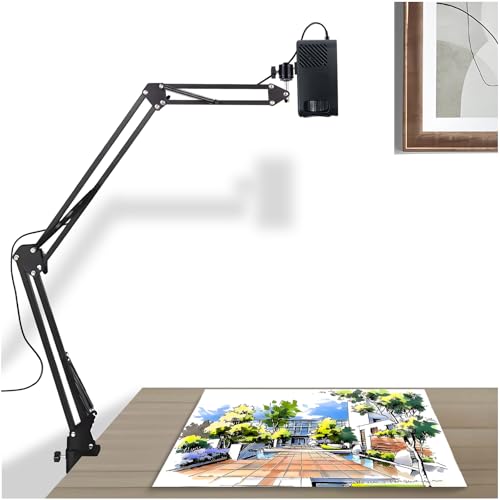
This dual-purpose projector supports tracing on canvases and desktops and can also function as a movie projector. It provides a maximum projection size of 31.4 inches, making it suitable for larger works on canvas or tables. It connects wirelessly or via wired options with smartphones, tablets, and laptops. Best for artists who want a larger tracing area and occasional media projection, but the larger size may require more space and a stable mounting area.
Magcubic HY300Pro Mini Projector

The HY300Pro emphasizes portability with a 30% smaller body and a 60% smaller footprint than competitors, plus 180° rotation for flexible projection angles. It includes a compact power approach and external power supply for cooler operation. Suitable for travelers and outdoor projects, it supports HDMI/USB for easy connections. Caution: Some users may prefer higher brightness for bright rooms or detailed text work; consider environment when choosing this model.
GIKUCNZL Drawing Projector (Repeated Spotlight)
This model repeats here to emphasize its suitability for adults working on cake toppers, cookies, and larger canvas projects. It offers a large projection area and easy device connectivity. Best for artists seeking versatility in both tracing and display-projection tasks on a shared work surface. Limitation involves potential bulk; ensure you have space for the setup and stand height when tracing on large surfaces.
Buying Guide: Key Considerations For Selecting An Image Projector For Tracing
- Projection size and distance: How large of an image do you need, and how much wall or desk space is available?
- Image clarity: Do you need 720p, 1080p, or higher? Consider brightness (ANSI lumens) and contrast for your environment.
- Ease of use: Do you prefer optical magnification with no bulbs, or a more feature-rich unit with rotating bases and drawing apps?
- Connectivity: Will you connect via USB, HDMI, wireless screen mirroring, or AirPlay? Check compatibility with devices you own.
- Portability vs. stability: Do you need a compact model for travel, or a larger projector with a stable stand for stationary studios?
- Reliability and maintenance: LED life, fan noise, and dimming issues are practical factors for long sessions.
Common Scenarios And Recommendations
- Simple tracing on desk or small canvases: Caydo S1 is ideal for quick, quiet tracing with no bulb replacements.
- Large murals or wall drawings: Caydo P2 and GIKUCNZL models offer larger projection areas and flexible mounting options.
- Travel or outdoor projects: Magcubic HY300Pro’s compact design and dual connectivity suit mobile work.
- Mobile phone-centric projection: AKIYO’s WiFi and AirPlay-ready setup helps on-the-go tracing from a phone or tablet.
FAQ
- What should I consider first when buying a tracing projector?
Answer: The intended workspace size and projection distance determine whether a compact model or a larger, desktop-focused projector is best. - Is a bulb-free projector better for tracing?
Answer: Generally yes, as LED units offer longer lifespans and less maintenance than bulb-based models. - Can these projectors connect to iPhones or Android devices?
Answer: Many support wireless mirroring or wired connections; check each model’s compatibility and required apps. - Do all tracing projectors require a dark room?
Answer: Not necessarily; higher brightness helps in lighter rooms, but the best results come from controlled lighting. - Which model is best for beginners?
Answer: The Caydo S1 is often recommended for its simplicity and straightforward tracing workflow. - Are there any safety concerns with large projection sizes?
Answer: Ensure the projector is securely placed and the projection surface is clean to avoid eye strain and noise from reflections.