Best USB Cable for Audio: Clear, High-Fidelity Connections for Every Setup
When selecting a USB cable for audio, the goal is reliable signal transfer, minimal noise, and broad compatibility. This guide highlights five solid options for different needs, from basic plug-and-play headphones to studio-grade interfaces. The top picks are suited for: daily listening on computers and laptops, external sound cards, MIDI/audio equipment, and multi-platform gaming setups. Below is a quick summary of the featured products to help you compare at a glance.
| Product | Brand | Best For |
|---|---|---|
| USB to 3.5mm Audio Cable 3FT | AILKIN | Casual listening on PC, laptop, or console with USB audio output |
| 6Ft USB 2.0 Type-A to Type-B Cable | PWR+ | Connecting audio interfaces, MIDI keyboards, or DACs to computer or Mac/PC |
| Tertullus HiFi USB 2.0 Cable A to B | Tertullus | Audiophile-grade USB audio links for DACs and USB devices |
| MOSWAG USB to 3.5mm Jack Adapter | MOSWAG | USB external sound card with mic support for PCs, consoles, and laptops |
Best USB to 3.5mm Audio Cable For Simple Setups

This AILKIN USB-A to 3.5mm TRS adapter is designed for simple listening needs. It uses a DAC chip that supports up to 24-bit/96kHz, delivering clear audio without noticeable distortion. It is ideal for personal listening on computers or laptops where a traditional 3.5mm jack is not readily available or preferred. The cable is plug-and-play with no software required, making it a straightforward choice for dorm rooms, home offices, or traveling between devices.
- Best for: users needing a compact, easy-to-use USB to 3.5mm connection for headphones or speakers.
- Why chosen: solid DAC performance in a portable form factor.
- Caution: Not suitable for microphone input or charging-related tasks; only supports audio playback.
Best Long USB-B to USB-A Cable For Interfaces

This 6-foot USB 2.0 A-to-B cable is built for longer runs between audio interfaces, MIDI controllers, mixers, and USB-enabled gear and a computer. It supports high-speed transfer up to 480 Mbps and uses multiple conductors to help reduce interference. The longer reach is convenient in studio setups or desks where the computer and gear sit apart.
- Best for: connecting USB-B devices like audio interfaces, MIDI controllers, or DACs to a computer or Mac.
- Why chosen: durable, longer-length cable reduces clutter and keeps signal clean.
- Caution: Not ideal for short desk setups where excess length could introduce minor tangling; ensure cable management.
Best Audiophile USB-A to USB-B Cable
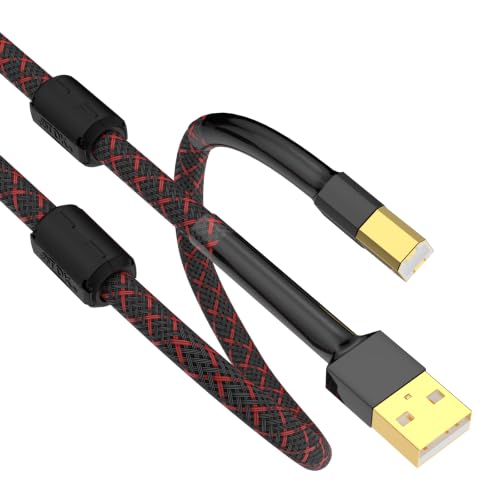
The Tertullus HiFi USB 2.0 cable is aimed at audiophiles seeking high-fidelity USB connections. Its oxygen-free copper construction and gold-plated connectors are designed to minimize signal loss and corrosion, promoting stable, clean sound transmission. It’s compatible with DAC decoders and USB sound cards, and can work with various USB-B devices beyond audio gear.
- Best for: audiophile listeners and professionals requiring pure signal transfer between USB-B devices and hosts.
- Why chosen: premium materials and connector design emphasize fidelity and durability.
- Caution: Some users may not notice significant gains unless paired with high-quality DACs or interfaces.
Best USB To 3.5mm Adapter With Mic Support

The MOSWAG USB to 3.5mm adapter functions as an external sound card, adding a USB audio output and a mic-enabled TRRS port. It supports 16-bit/48kHz audio and is compatible with Windows, macOS, Linux, and various gaming consoles. It’s a practical upgrade for laptops or desktops lacking a robust built-in sound card or when an external mic is needed for calls or streaming.
- Best for: users needing both audio output and microphone input via a USB external sound card.
- Why chosen: broad compatibility and built-in DAC offer noticeable improvement over basic laptop audio.
- Caution: The mic input may not support some TS/TRS wiring on certain headsets; verify headset compatibility.
Buying Guide
- What to consider: mounting length, compatibility with your devices (USB-A vs USB-C adapters), and whether you need a pure audio path or an external mic input.
- Signal quality: look for DAC capability, bit-depth, sample rate support, and grounding to minimize hum and interference.
- Connector types: USB-A is common on older PCs, while USB-C is standard on newer devices. For USB-B cables, ensure compatibility with audio interfaces and DACs.
- Durability vs. portability: braided cables tend to last longer in daily use; consider metal connector shells for added resilience in travel.
- Ease of use: plug-and-play options are best for quick setups; avoid drivers or software where possible to simplify troubleshooting.
FAQ
- What is a USB audio cable best used for?
USB audio cables are primarily used to deliver digital audio signals from a computer or USB audio device to DACs, sound cards, or speakers. They can also connect to USB-based audio interfaces and MIDI equipment.
- Do USB to 3.5mm adapters support microphones?
Some adapters provide a combined mic and audio output (TRRS). Check the product features to confirm mic support and compatibility with your headset.
- Can I use these cables with gaming consoles?
Yes, many adapters support PS4/PS5 and other consoles, but compatibility varies. Verify specific console support in the product description.
- Will a longer USB cable degrade audio quality?
Generally, USB cables up to a few meters maintain signal integrity for standard audio tasks. Extremely long runs may introduce minor latency or jitter; choose a length that suits your setup.
- Do these cables require drivers?
Most USB audio cables are plug-and-play and do not require drivers. Some devices or DACs may use drivers, but that is device-specific rather than the cable.