Best Internet Monitoring for Parents: Top Monitors and Safe Family Phones
When searching for internet-based monitoring, the goal is reliable, real-time insight into your child’s environment without sacrificing privacy or ease of use. This guide highlights five products designed for different family needs—whether you want high-definition video, local and remote viewing, or safer mobile options for kids. It covers who each device suits best and why. Use the quick product table below to compare at a glance, then dive into detailed sections to see how each option fits your family’s monitoring style.
| Product | Best For | Key Benefit |
|---|---|---|
| Motorola MBP854CONNECT | Tech-savvy households needing remote viewing | Wi‑Fi viewing with 4.3″ LCD and 720p remote stream |
| SEENZEEN Smart Baby Monitor | High-definition video and flexible monitoring | 1080p HD video, 5″ parent unit, app access |
| Motorola MBP853CONNECT | Budget-friendly remote monitoring | Wi‑Fi viewing with 3.5″ LCD and 720p remote stream |
| Troomi Safe Phone for Kids | Safer first smartphone for kids | Parent-managed apps, GPS, and text monitoring |
| All products | Family safety and peace of mind | Remote alerts, motion and temperature notifications |
Motorola MBP854CONNECT Dual Mode Monitor
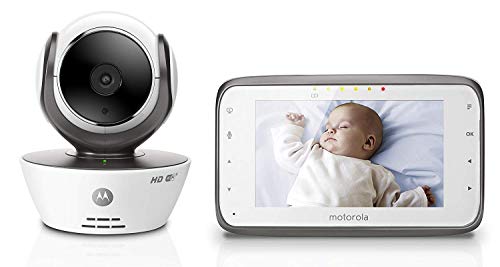
- 4.3-inch LCD handheld parent monitor with touch controls.
- Remote viewing on compatible smartphones, tablets, and computers via the Hubble app.
- Remote HD 720p video streaming on devices capable of 720p.
- Free sound, motion, and temperature notifications.
Best for: Parents who want a robust local monitor with optional remote viewing on multiple devices. This model excels for households that value a larger built-in display while keeping the option to check in via mobile devices. Limitations include reliance on the Hubble app for remote viewing, which may require setup and ongoing app support.
SEENZEEN Smart Baby Monitor with 1080P

- 1080P HD video with full-glass lens, 4x zoom, 355° pan, and 45° tilt.
- Night vision for day and night monitoring.
- WiFi app plus a dedicated 5″ parent unit for local or remote viewing.
- Real-time cry, motion, and temperature alerts with LED and vibration.
Best for: Families needing crisp, full-room coverage and flexible monitoring options. Choose this if you want high-quality video and robust alerts that work whether you’re home or away. Caution: 1080p video requires compatible devices and stable bandwidth for smooth streaming.
Motorola MBP853CONNECT Dual Mode Monitor

- 3.5-inch LCD parent monitor; also viewable on selected devices via Wi‑Fi Hubble app.
- Remote HD 720p video streaming on capable displays.
- Free firmware upgrades may be available to enhance viewing experience.
Best for: Families seeking a budget-friendly option with reliable remote viewing. The smaller screen is balanced by good video quality and compatibility with the Hubble app. Limitation: newer firmware requirements may affect compatibility with older devices.
Troomi Safe Phone for Kids

- Kid-safe smartphone designed for parental controls via the Parent Portal.
- GPS and text monitoring are available with the service plan.
- Includes one month of service; activation required through Troomi.
Best for: Families seeking a safer first smartphone option with managed apps and location controls. Choose this if you want to gradually introduce technology and maintain oversight. Limitation: Requires ongoing Troomi service plan and activation beyond the included month.
Buying Guide
- Monitoring style: Do you prefer local viewing only, or is remote access via an app essential?
- Video quality: Is 1080p or 720p sufficient for your space and bandwidth?
- Alerts and automation: Do you need motion, cry, or temperature alerts with push notifications?
- Device integration: Will you use smartphones, tablets, or dedicated parent units?
- Safety and privacy: Consider data security, app trust, and how often firmware updates occur.
Frequently Asked Questions
- What is the main difference between local and remote monitoring?
Local monitoring uses a parent unit or a nearby device on your home network. Remote monitoring uses mobile apps to view video from anywhere. - Do these monitors require ongoing subscriptions?
Some models offer basic app viewing with no ongoing fee, while others include optional service plans for expanded features. - Is 1080p video always best?
1080p provides clearer detail, but it requires stronger bandwidth. In busy networks, 720p can offer smoother streaming. - Can I monitor multiple cameras with these products?
Many monitors support additional cameras via the same app or system; verify compatibility before purchasing. - How do alerts help with baby safety?
Real-time cry, motion, and temperature alerts ensure you can respond quickly to potential needs or changes in the environment.