Best Large Button Phones for Visually Impaired American Seniors
If you’re shopping for a large-button phone for someone with visual impairment, these models prioritize oversized keys, high-contrast displays, and loud volumes. This guide highlights five top options, explaining who they’re best for and why they stand out. Ideal buyers include seniors living independently, caregivers seeking quick-dial safety, and visually or hearing-impaired users needing reliable landline access. A quick at-a-glance summary follows the introduction to help you compare features quickly.
| Product | Key Benefit | Best For |
|---|---|---|
| HSCY Large Button Phone | Extra-large buttons, Emergency 911 key | Seniors needing quick emergency access |
| Swissvoice 3355 | Photo memory buttons, adjustable 90 dB ringer | Visually impaired or memory-impaired users |
| ZAMQIU Large Number Phone | Three one-touch keys, SOS, high volume | Independent living with memory/vision challenges |
| Sacumea Large Button Phone | 110 dB ringer, flashing light, SOS | Hearing-impaired households |
| Uvital Big Button Phone | Nine one-touch keys, SOS, hands-free option | Memory aids and easy calling |
HSCY Large Button Phone for Seniors

This model emphasizes oversized buttons and an extra-loud ringer, designed for users with low vision or hearing impairment. It includes two memory buttons for quick dialing and a dedicated 911 emergency button, enabling rapid access to help. Best for seniors who prioritize simple operation and safety in daily use.
Who this is best for: Seniors who need large, tactile keys and clear emergency access. Caregivers seeking a straightforward device with pre-programmed numbers will also benefit.
Why chosen: Combines critical accessibility features—large keys, high-contrast display, and emergency dialing—in a compact package. A potential limitation is the lack of hands-free functionality and no stated speakerphone option.
Swissvoice 3355 DECT 6.0 Big Button Phone

This DECT phone features large photo memory buttons, including an SOS button, to help users recognize contacts visually. It offers an adjustable ringer up to 90 dB and hearing aid compatibility. It also includes an answering machine and an additional cordless handset for flexibility. Best for visually impaired users who benefit from photo dialing and a strong audible alert.
Who this is best for: Visually impaired seniors who respond to photo-based dialing and loud alerts. Those needing a secondary handset will find the cordless option helpful.
Limitations: No hands-free mode noted; some users may prefer a dedicated speakerphone for easy conversation.
ZAMQIU Large Number Phones for Seniors
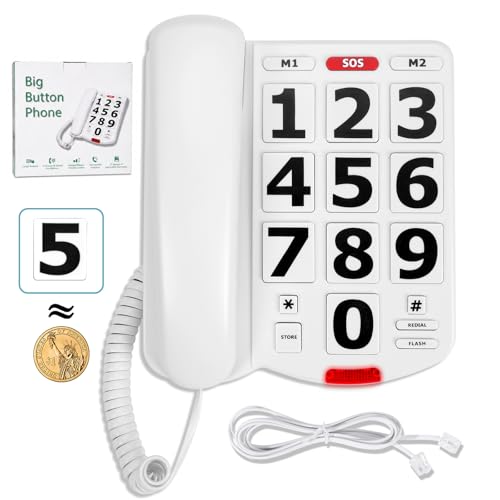
This large-button landline focuses on elderly-friendly dialing with 1.06″ x 1.18″ keys and high-contrast numbers. It supports one-touch speed-dial keys (M1/M2/SOS) to keep important contacts within quick reach. The device offers adjustable handset and ringer volumes with visual call indicators, aiding those with hearing challenges.
Who this is best for: Seniors who value quick access to family and emergency contacts and who need adjustable audio levels. Suitable for independent living with a focus on safety.
Limitations: No hands-free feature; no speakerphone mentioned, so some users may prefer a model with a louder speaker or more multimedia options.
Sacumea Large Button Phone for Seniors

This model uses extra-large 1.06″ x 1.18″ buttons with high-contrast digits for easy dialing and reduced misdials. It includes M1/M2 quick-dial keys and a red SOS button for fast emergency access. A bright ringer and flashing light help users with hearing loss detect incoming calls. Best for hearing-impaired households needing clear alerts.
Who this is best for: Seniors with hearing impairment who rely on both audible and visual call alerts. Caregivers seeking a robust SOS workflow will appreciate the quick-dial setup.
Limitations: No speakerphone function; ringing adjustments may be needed in very noisy environments.
Uvital Big Button Phone for Seniors

This corded desk phone provides nine one-touch memory buttons plus an SOS button, with adjustable ringer and handset volumes. It supports hands-free operation and can be tailored to individual hearing and vision needs. It’s well-suited for users who benefit from multiple quick-dial options and hands-free calling.
Who this is best for: Seniors who want extensive one-touch dialing and a hands-free option for easier conversations. Ideal for those who live with memory challenges and need reliable quick access to contacts and caregivers.
Limitations: Some users may prefer a speakerphone with brighter display features; corded design may limit placement flexibility.
Buying Guide
What to look for in large-button phones for visual impairment
- Button size and tactile feedback: Prefer keys that are clearly separated and easy to press with minimal finger precision.
- Display and contrast: High-contrast numbers and large font improve readability for fading vision.
- Sound and alert levels: Adjustable ringer volume and handset volume help overcome background noise and hearing loss.
- Emergency features: SOS buttons or dedicated emergency dialing enhance safety for lone users.
- Memory and speed dialing: Over 2-3 memory keys (M1/M2/SOS) reduce the need to search through a directory.
- Visual alerts: Flashing lights or indicators can assist when sound cues are insufficient.
- Additional accessibility: Photo-dial options, cordless alternatives, or hands-free capabilities can improve usability.
Which features matter most for different users
- Best for independence: Large, clear keys plus 1-2 quick-dial keys and strong ringer.
- Best for memory support: Photo buttons or multiple memory keys for easy contact access.
- Best for hearing loss: Loud ringer, high handset volume, and optional visual alerts.
- Best for safety focus: Dedicated SOS button with fast-dial capability and clear visual indicators.
How to choose between corded and cordless models
- Corded phones: Usually simpler and more reliable; ideal for stationary use near the main living areas.
- Cordless options: Offer mobility around the home but may require charging and pairing considerations.
Important installation tips
- Place the phone in a central, easy-to-reach location near seating areas or bedrooms.
- Test the ringer and volume settings with real ambient noise to ensure readability.
- Label memory buttons with large, visible stickers or photos for quick recognition.
FAQ
- Q: Are these phones compatible with standard landlines? A: Most listed models are designed for home landline use or specific networks; verify compatibility with your service provider before purchasing.
- Q: Do they support hands-free calling? A: Some models offer hands-free or speakerphone options; check each product’s features for confirmation.
- Q: Can I customize the SOS numbers? A: Yes, most units allow single-touch or quick-dial SOS numbers to be pre-programmed.
- Q: Do these phones require a high-tech setup? A: These are designed for simplicity; many use straightforward memory keys and one-touch programming.
- Q: Which model is best for a visually impaired user with moderate hearing loss? A: Look for models with large, high-contrast displays and adjustable ringer/handset volumes, such as the options highlighted above.
- Q: Is there a model with photo-based dialing? A: Yes, some versions include photo memory buttons to aid recognition and dialing.