Best Micro SD for Nintendo Switch and Switch 2: Fast, Reliable Storage
Answer: The right microSD card for Nintendo Switch or Switch 2 depends on your model and performance needs. This guide highlights five top options, explaining who they’re best for and why. If you own a Switch 2, prioritize microSD Express cards for the fastest access speeds. For classic Switch models, look for high read/write speeds and reliable capacity. The options below are chosen for clear compatibility, speed, and practical use for gaming libraries, save data, and in-game content. The buyer table summarizes key details to compare at a glance.
| Product | Best For | Key Benefit | Limitations |
|---|---|---|---|
| Samsung microSD Express Card – 256GB for Nintendo Switch 2 | Switch 2 owners | Express standard for faster access and smooth gameplay | Switch 2 only; express standard required |
| SanDisk 256GB microSDXC – Licensed for Nintendo Switch | Switch (not Switch 2) fans | High speed read/write for Switch ecosystem | Not compatible with Switch 2 |
| Amazon Basics microSDXC 128GB | Budget-conscious Switch players | Reliable capacity with adapter for broader use | Not Switch 2 compatible |
| TEKNOSTONE 128GB MicroSDXC – Gaming Speed | Gamers on Switch (not 2) and handhelds | Up to 100MB/s read, A1 rated for better app performance | Not compatible with Switch 2 |
| SANDISK 512GB microSD Express Card | Switch 2 power users | Express performance with large capacity | Higher price may be a consideration |
Samsung MicroSD Express Card – 256GB for Nintendo Switch 2

Best for Switch 2 owners who want the official Express standard. The card supports Nintendo Switch 2’s requirement for microSD Express, delivering faster access speeds essential for large game libraries and smooth loading. Best for players who regularly install big titles and seek future-proof performance for the new console architecture.
Who it’s best for: Switch 2 users who want peak speed and compatibility with the new memory standard. Why selected: It aligns with the Switch 2 memory spec and emphasizes faster load times and game access. Caution: If you play only on older Switch models, this card offers no tangible advantage over non-Express cards.
SanDisk 256GB MicroSDXC – Licensed for Nintendo Switch

Best for classic Switch models. This card is officially licensed for Nintendo Switch systems (not Switch 2) and emphasizes solid read speeds up to 100MB/s and write speeds up to 90MB/s. It’s a reliable choice for expanding a Switch library without worrying about compatibility with the original hardware.
Who it’s best for: Switch owners seeking official licensing and dependable performance. Why selected: Strong, proven compatibility with Switch systems and straightforward use. Caution: Not compatible with Switch 2 or future models relying on microSD Express.
Amazon Basics MicroSDXC Memory Card – 128GB

Best for budget-minded Switch players upgrading storage on a budget. It’s compatible with Nintendo Switch (not Switch 2) and includes a full-size adapter for use with laptops and other devices. The capacity fits smaller libraries or save data in a compact package.
Who it’s best for: Switch owners seeking value and basic expansion. Why selected: Reliable real-world capacity and simple, accessible usage. Caution: Lacks Switch 2 compatibility; consider higher speeds for large game libraries or future needs.
TEKNOSTONE Gaming 128GB MicroSDXC
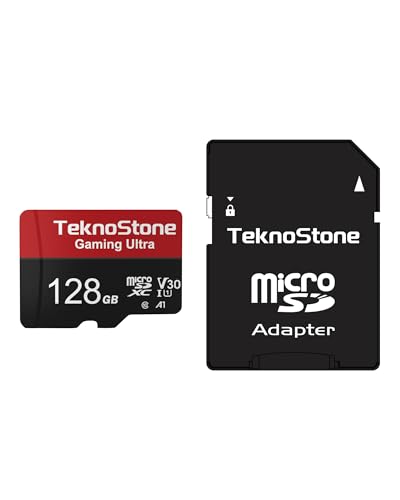
Best for handheld gaming performance on Switch (not Switch 2). Teknostone emphasizes gaming-focused speed with up to 100MB/s read and A1 rating for smoother app performance. The included full-size SD adapter adds flexibility for use with PCs and laptops.
Who it’s best for: Switch users who want solid gaming performance at a reasonable price and value. Why selected: A1-rated performance helps with game launches and in-game loading. Caution: Not compatible with Switch 2; verify device compatibility before purchase.
SANDISK 512GB microSD Express Card

Best for Switch 2 power users needing large storage and Express performance. This card uses the microSD Express standard and supports PCIe-NVMe-like speeds, offering up to 4.4x faster transfers compared to the fastest microSD UHS-I cards. Ideal for large game libraries and 4K content capture for Switch 2 workflows.
Who it’s best for: Switch 2 players who want maximum capacity with Express speed. Why selected: Combines high capacity with the latest Express interface. Caution: The card’s advantages are most noticeable on Switch 2 or devices supporting PCIe-NVMe-like microSD Express.
Buying Guide
What to look for when choosing a microSD card for Switch or Switch 2:
- Device compatibility: Switch 2 requires microSD Express; older Switch models use microSD or microSDXC without Express. Confirm your console model before buying.
- Speed class and performance: For smooth gameplay, prefer UHS-I with high read/write speeds. For Switch 2, Express cards offer the best future-proof performance.
- Capacity needs: If you install many AAA titles, opt for 256GB or 512GB. Balance capacity with budget and manageability of game libraries.
- Price vs. value: Higher capacities or Express standards cost more. Weigh current library size against expected future needs.
- Brand and licensing: Officially licensed cards can provide guaranteed compatibility with the target system and avoid formatting surprises.
- Adapter considerations: Some cards come with full-size adapters. This increases usability with laptops and cameras but isn’t necessary for Switch use.
Frequently Asked Questions
- Can I use any microSD card on Nintendo Switch 2? Some older microSD cards are not compatible with the Switch 2, which requires microSD Express cards for optimal performance.
- What does microSD Express mean for Switch 2? It refers to a newer standard with faster transfer speeds, designed to improve loading times and game access on the Switch 2.
- Is a larger capacity card always better for Switch? Not always. Consider your game library size and how often you install new titles. Higher capacity helps long-term storage but costs more upfront.
- Should I buy a licensed Nintendo card? Licensed cards are designed for compatibility with Nintendo systems and can reduce surprises related to formatting and performance.
- Do these cards work with other devices? Many are compatible with other devices (laptops, cameras, phones) via adapters, but performance and compatibility vary by device and card class.
- Is performance important for retro emulation or non-Switch devices? For non-Switch devices, higher read/write speeds can improve file transfers and loading times, but verify device support before purchasing.