Best Mini Tripods for Webcams: Desk Solutions for Clear, Stable Video
If you’re looking for a compact, desktop-friendly solution to stabilize a webcam, a mini tripod is often the right choice. These small stands are ideal for home offices, remote work, and streaming setups where space is limited. The top options below are chosen for stability, compatibility with common webcams, and ease of use. They’re best for: budget-friendly desk setups, vloggers needing flexible angles, and users who want a portable, lightweight stand. The following quick table highlights five strong contenders and how they’re best used.
| Product | Best For | Key Benefit |
|---|---|---|
| Amazon Basics Lightweight Portable Mini Travel Tripod | Budget desk setups | Low-cost, stable desktop use with 360° head |
| JCWINY Webcam Tripod Stand Extendable | Flexible angles & heavy devices | Two-height levels, 360° rotation, strong build |
| UURIG TP05 Extendable Mini Camera Tripod | Compact, versatile vlogging | 2-in-1 as selfie stick and tabletop tripod |
| NEEWER Entry Level Mini Desk Tripod | Beginner setups | Simple, light, portable, supports multiple devices |
| TIGAYAN Mini Tripod for Webcam and Phone | Ultra-light travel-ready option | Very light with solid stability and phone compatibility |
Amazon Basics Lightweight Portable Mini Travel Tripod
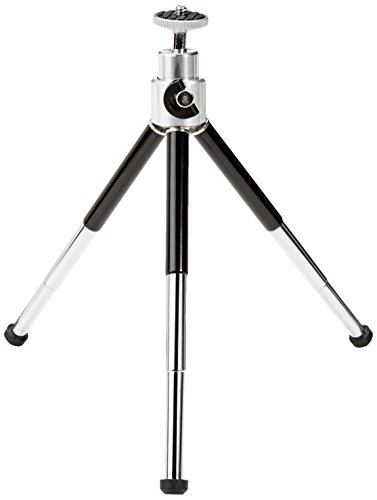
Best for budget-minded desks, this mini tripod offers adjustable-height metal legs and rubber feet for stability. It’s compatible with small digital cameras, GoPro devices, and smartphone adapters (not included). For webcam use, its lightweight build is adequate when the load remains under the recommended 1.1 lbs (0.5 kg). This makes it a solid choice for simple desk setups and casual streams. Caution: it is not designed for DSLRs or heavier cameras, and the webcam adapter is not included.
JCWINY Webcam Tripod Stand Extendable Desktops Tripod
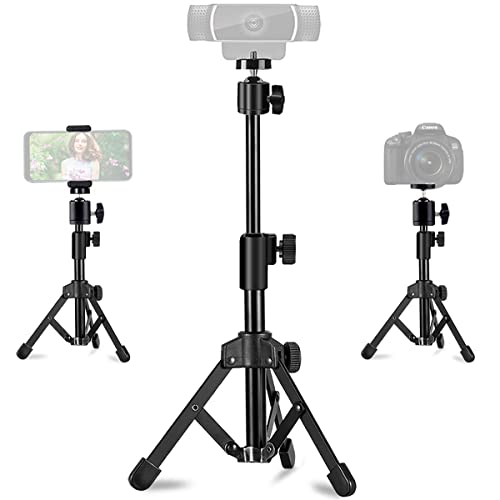
Best for users needing strong stability and flexible height, this desk tripod uses a metal body with non-slip pads to prevent bouncing. It supports 360° rotation and up to a 90° tilt, with two height levels (11.5 to 18 inches). It’s suitable for Logitech webcams and similar devices. Best to avoid if you require heavier cameras beyond its 3.2 lb maximum load. Caution: ensure your webcam weight stays within the listed limit to avoid tipping.
UURIG TP05 Extendable Mini Camera Tripod

This compact unit doubles as a selfie stick and tabletop tripod, offering a 1/4″ screw for easy mounting on cameras, gimbals, and phone holders. Its extendable 5.1–7.5 inch design suits close-range desk filming and mobile vlogging. Best for light cameras and smartphones; not ideal for heavier DSLRs. Caution: the 2-in-1 design may feel less rigid at maximum extension for heavy gear.
NEEWER Entry Level Version Mini Desk Tripod

Best for absolute beginners, this entry-level option emphasizes simplicity and portability. It weighs about 1.25 lbs (569 g) and folds down to a compact 12.2 inches. It supports smaller DSLRs, camcorders, webcams, and phones (phone holder included). Best for light, on-the-go use; avoid if you need heavy-duty support or advanced pan-tilt controls. Caution: fewer advanced features may limit future expansion of your setup.
TIGAYAN Mini Tripod For Webcam And Phone

Best for ultra-light travel or compact desk setups, this aluminum tripod weighs just 0.15 lbs (70 g). It has a 1/4-inch screw and a phone holder, with a load capacity around 2.2 lbs (1 kg). The two-stage height extension (4.9″ to 6.9″) and 360° head deliver flexible angles. Choose this if portability is your top priority; avoid if you need bulkier camera systems or heavier load handling.
ULANZI MT-16 Extendable Mini Camera Tripod
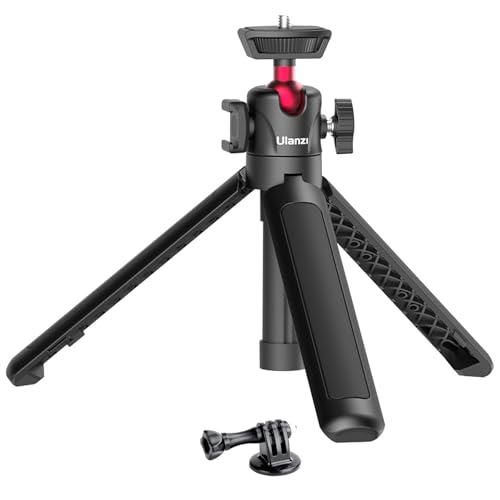
Best for vlog-style setups, the MT-16 adds a cold shoe for mics or LED lights and offers a 360° ball head. It’s especially suitable for smartphones and compact cameras where a light footprint and improved audio/lighting make a difference. Best for content creators who want better front-facing video quality; consider its heavier base if you primarily need a purely desk-mounted option. Caution: the included phone holder is not part of the standard package in some variants.
Buying Guide
What to look for when choosing a mini webcam tripod
- Weight capacity: Match the tripod’s rated load to your webcam or compact camera. Heavier devices require sturdier builds.
- Mounting compatibility: Ensure a standard 1/4″ screw fits your device and any accessories (lights, mics) you plan to use.
- Height and reach: Consider whether you need a fixed desk height or extendable options for eye-level framing.
- Rotation and tilt: A 360° head helps with flexible framing. Look for tilt angles to adjust vertical framing easily.
- Portability: For frequent moves, choose lighter materials with a compact fold or extendable grip features.
- Stability features: Rubber feet, non-slip pads, and metal construction improve stability and reduce wobble.
Frequently Asked Questions
- What is a mini tripod best used for with a webcam? — It stabilizes the camera, reduces shake, and enables precise angle control for desk setups, streams, and video calls.
- Do these mini tripods support smartphones? — Many models include phone holders or are compatible with standard mounting systems for light devices.
- Is a higher price a guarantee of better quality? — Not always. Look for build materials, load capacity, and compatibility rather than price alone.
- Can I use these with a DSLR? — Some models support small cameras and action cams; heavier DSLRs typically require larger tripods.
- Which features matter most for webcam use? — Stability, height adjustability, 360° rotation, and a reliable mount are the most impactful features.
- Should I avoid extendable selfie-stick designs for webcams? — Use extendable sticks if you need versatile angles, but beware potential stability issues at maximum length.