Best Wall Mounts for a 70 Inch TV: Space-Saving or Full Motion Options
If you’re looking to mount a 70 inch TV, you want a sturdy, Adjustable wall mount that fits VESA patterns up to 600x400mm and offers solid tilt and swivel options. This guide highlights five dependable options ideal for large screens, focusing on safety, easy installation, and flexible viewing angles. Each pick suits different installation environments and user needs—from deep room seating to space-saving walls. The buyer’s intent is clear: find a reliable, easy-to-positions wall mount for a 70″ or larger TV without sacrificing space or viewing comfort.
| Product | Best For | VESA Range | Weight Capacity | Notes |
|---|---|---|---|---|
| USX MOUNT Full Motion TV Wall Mount (32-70″, up to 99 lbs) | Balanced performance for many 70″ TVs | 75x75mm to 400x400mm | 99 lbs | Dual articulating arms; 13.89″ extension |
| USX Mount Full Motion TV Wall Mount (42-90″, up to 132 lbs) | Large screens with strong support | 200x100mm to 600x400mm | 132 lbs | ±45° swivel; +5°/-15° tilt |
| IWORKBOARD Tilting Wall Mount (55-85/75-86″, up to 132 lbs) | Slim profile with robust build | Up to 600x400mm | 132 lbs | UL-certified; quick release |
| IWORKBOARD Full Motion (50-70″, up to 110 lbs) | Flexible mounting for mid-to-large TVs | Up to 400x400mm | 110 lbs | 30% thicker arms; wide tilt/swivel |
| Perlegear UL Listed Full Motion (42-90″, up to 132 lbs) | Heavy-duty, long-lasting mounting | 200x100mm to 600x400mm | 132 lbs | 30% thicker arms; tool-free tilt |
USX MOUNT Full Motion TV Wall Mount (32-70 Inch)

This universal mount fits most 32-70 inch TVs up to 99 lbs with VESA patterns from 75x75mm to 400x400mm. It supports mounting on 12″ and 16″ wood studs, concrete, or brick. It tilts -12° to +5° and swivels to the left or right for optimal viewing angles. Dual articulating arms extend up to 13.89″ and retract to 2.59″. Best for: households needing a versatile, mid-size mount that handles a common 70″ TV comfortably. Caution: verify your TV’s VESA and weight before purchase.
USX Mount Full Motion TV Wall Mount (42-90 Inch)

Designed for larger screens, this mount fits TVs from 42 to 90 inches and up to 132 lbs, with VESA patterns from 200x100mm to 600x400mm and up to 16″ wood stud spacing. It offers ±45° swivel, +5°/-15° tilt, and a ±3° post-install leveling adjustment. Best for: buyers who want strong, wide-angle flexibility and robust construction for bigger living rooms or media spaces. Caution: swivel range may be limited by some TV designs, so check your model’s clearance first.
IWORKBOARD Tilting Wall Mount (55-85/75-86″, 32-90″)

This UL-certified mount supports TVs up to 132 lbs within VESA patterns up to 600x400mm and fits 24″ studs. It features +5°/-15° tilt and ±45° swivel with a post-install leveling option. Best for: rooms requiring a low-profile, sturdy mount with strong tilt and swivel for tall or wide TVs. Limitation: ensure stud spacing and wall type match installation requirements for 24″ studs.
IWORKBOARD Full Motion (50-70″), Dual Arms
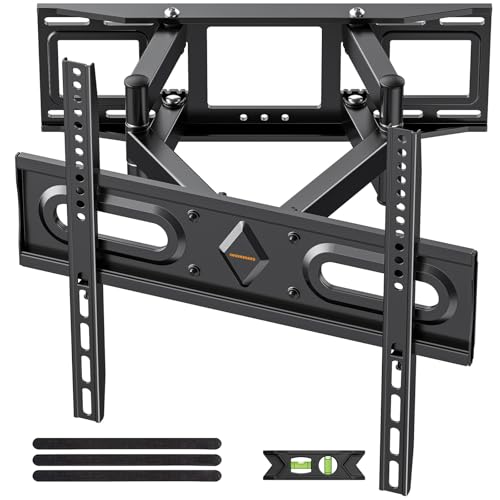
Marshall full-motion mount for 32-70 inch TVs with VESA 75x75mm to 400x400mm, extending up to 15.02″ and retracting to 2.62″. It tilts +5°/-15° and swivels ±45°, with ±4° leveling after installation. Best for: users who want a larger reach, easier access behind the TV, and solid construction. Caution: verify TV width and VESA to ensure a perfect fit for larger 70″+ sets.
Mounting Dream TV Wall Mount (37-90 Inch)

This low-profile mount sits just 1.5 inches from the wall, saving space while staying visually sleek. It tilts to reduce glare and is designed for 16″ or 24″ studs with clear installation steps. Best for: buyers prioritizing a slim profile and straightforward installation. Caution: some walls may require additional concrete anchors; check your wall type before mounting.
Perlegear UL Listed Full Motion (42-90″), 132 lbs

UL-listed mount for 42-90 inch TVs up to 132 lbs with VESA 200×100 to 600x400mm. It supports 8″, 12″, or 16″ wood studs, concrete, and brick. It offers ±50° swivel, +5°/-15° tilt, and ±3° post-install leveling. Best for: users who need robust movement and longer-term durability. Caution: heavy-duty design may require more installation effort on certain walls.
Buying Guide: Key Purchase Considerations
What size TV and VESA pattern do you have? Ensure the mount accommodates your TV’s dimensions and the wall’s stud configuration. If your TV is near the upper end of the range, choose a mount with a higher weight rating and longer extension.
Do you need full motion or a fixed/tilt-only option? Full-motion mounts offer the most flexibility for seating positions, while tilt-only can reduce glare with a slimmer profile.
What is your wall type? Wood studs, concrete, and brick require different mounting hardware. Some mounts include all necessary hardware; others may need additional anchors.
Is drywall safe? For large TVs, use studs or a mounting plate designed for heavier loads. Consider models with UL-listed safety features and reinforced hardware.
How much space do you have? Full-motion arms extend; ensure enough room behind and around the TV to avoid contact with furniture or walls.
Frequently Asked Questions
- Can I mount a 70 inch TV on drywall alone? Not safely. Use studs or a wall plate designed for heavy loads, and verify weight capacity.
- Do these mounts support curved TVs? Yes, most listed models support curved screens within their VESA ranges.
- What is the typical maximum extension? Many full-motion mounts extend around 12 to 16 inches from the wall, depending on model.
- Is post-install leveling important? Yes. A slight level adjustment ensures an even screen across seating areas.
- Should I hire a professional? If you’re unsure about stud locations or wall compatibility, professional installation is recommended.