Best POS Systems for Restaurants: Easy Choice for Modern Dining Operations
Effective restaurant POS systems streamline service, improve order accuracy, and speed up payments. This guide highlights five top options well-suited for American dining environments, from compact handheld devices to full-size kitchen-ready terminals. Each choice is evaluated for who it’s best for, reliability, and practical limitations to help you decide quickly.
| Product | Best For | Key Benefit |
|---|---|---|
| Square Terminal | Restaurants needing flexible, all-in-one payment | Accepts all major cards with one device and prints receipts |
| POS STORE M8W All-in-One | Bilingual venues and busy kitchens | Large 15.6″ touchscreen with Windows 11 |
| 21″ Touch Screen POS System (Generic) | Full-service tableside with built-in printer | Large 21″ display and complete POS package |
| Zhongji A3POS System | Restaurants needing integrated kitchen printer | 15″ touch PC with thermal printer and drawer |
| Square Handheld | Tableside service and mobile selling | Tableside ordering with durable, portable design |
Square Terminal: All-in-One Payment Terminal

Square Terminal is a compact, portable payment device designed for counter use or roaming service. It accepts all major credit and debit cards and provides a straightforward, fee-based pricing model with no long-term contracts. It processes chip cards quickly, taking only about two seconds, and can print receipts on the spot. This option is best for restaurants that want a single, easy-to-use device for sales, payments, and receipts without a full-scale POS setup.
Who it’s best for: quick-service to mid-size venues that prioritize mobility and a simple payment workflow. Why selected: its all-in-one design reduces hardware clutter and streamlines transactions at the counter or tableside. Caution: it does not replace a full POS system for inventory, staff scheduling, or advanced reporting.
Square Handheld: Tableside POS and Payments

Square Handheld is designed for on-the-spot service, allowing servers to take orders, accept payments, and scan barcodes from the table or bar area. The device offers a slim, durable design with a long-lasting battery and options for offline payments, making it suitable for venues with variable connectivity. This is best for: busier tableside service or events where staff need mobility. Why selected: it expands service capabilities without requiring customers to move to a stationary terminal. Limitation: offline functionality may require synchronization once connectivity is restored, and it does not inherently manage extensive back-office tasks.
Clover Station Duo

The Clover Station Duo combines two screens—a 14″ host display and an 8″ guest screen—for fast, multi-user order confirmation, tipping, rewards, and digital receipts. It includes a printer and cash drawer and runs software designed for mixed-use environments, including restaurants. Best for: venues that want a polished, eye-catching system with fast service flow. Choose this if you want guest-facing interactions and reliability in one package. Constraint: processing account options and integrations may require setup beyond basic POS use.
Datio POS System for Small Business

Datio POS is a compact cash register setup designed for small businesses, including restaurants and salons. It works with Datio software and offers a bundled receipt printer and cash drawer. It requires a monthly subscription for software, updates, support, and warranty, though no long-term contract is required. Best for: small operations seeking a turnkey solution with scalable software. Consideration: trial the software to ensure compatibility with your payment processor and hardware.
POS STORE M8W All-in-One POS Terminal

The POS STORE M8W All-in-One features a 15.6″ touchscreen on Windows 11, backed by an Intel Core i5 processor, 8GB RAM, and a 128GB SSD. This configuration supports fast throughput for payments, inventory, and customer management in retail and restaurant settings. Best for: mid-sized venues needing robust performance and a large display. Why chosen: strong multitasking capability and familiar Windows environment. Caution: Windows-based systems may require regular updates and security maintenance.
ZHONGJI A3POS System for Restaurants and Bars
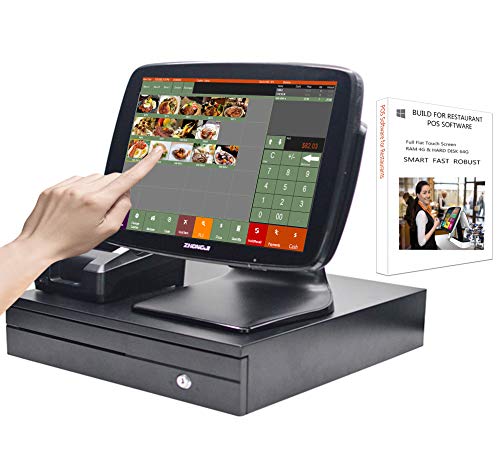
ZHONGJI A3POS System includes a 15″ touch screen PC, a thermal receipt printer, a stainless steel cash drawer, and MSJ POS software. It’s built on a multi-port motherboard with I5-level performance, 8GB RAM, and a 128GB SSD, running Windows 10. Best for: full-service restaurants that need a complete in-venue POS with kitchen printer integration. Limitation: USB-rich hardware may require careful cable management in busy kitchens.
Buying Guide: Key Considerations For Restaurant POS Selection
- Restaurant type and service model: Fast-casual vs. full-service influence whether you need tableside ordering, a kitchen printer, or a guest-facing screen.
- Hardware form factor: Handheld, all-in-one, or traditional terminal. Choose based on how staff will interact with guests and where space is available.
- Software and integrations: Check whether the POS supports your preferred payments, loyalty programs, inventory, and payroll workflows.
- Data security and compliance: Ensure the system follows PCI standards for card data and keeps transaction data protected.
- Scalability and updates: Consider future growth, cloud vs. on-premises solutions, and the ease of software updates and maintenance.
- Support and reliability: Assess how vendor support works, including response times and hardware warranties.
Frequently Asked Questions
- What is the best POS system for small restaurants?
A compact, all-in-one or handheld system with solid software support often fits small venues. Look for affordability, ease of use, and reliable payments. - Do I need kitchen printers with my POS?
A kitchen printer helps with order accuracy and workflow, but some systems support digital orders and screens for kitchen staff instead of printers. - Can a POS system handle tableside ordering?
Some systems include tableside features via handheld devices or guest-facing displays; verify with the vendor before purchase. - Is Windows-based POS better than cloud POS?
Windows-based units can offer offline flexibility and familiar software, but cloud POS can simplify maintenance and data access from anywhere. - How important is hardware durability for a restaurant POS?
Durable, splash-resistant devices reduce downtime in busy dining environments. - What should I consider about payment processing?
Look for transparent rates, compatibility with major processors, and whether the system supports offline payments if needed.