Best Small Keyboards for Laptop to Boost Portability and Productivity
Looking for a compact keyboard that pairs well with a laptop? This guide highlights five small keyboards ideal for travel, small desks, and mobile work. Each option is suited to different needs—minimalists who want pure typing, travelers needing ultra-portable kits, or users seeking a tidy desk setup with extra features. Below is a quick comparison table to help you decide at a glance.
| Product | Best For | Connectivity | |
|---|---|---|---|
| TECKNET 2.4G Wireless Keyboard | Ultra-portable typing on the go | 2.4 GHz USB receiver | Long battery life; compact design |
| TECKNET Wireless Keyboard & Mouse Combo | Balanced tiny setup with a mouse | 2.4 GHz wireless | Shared receiver; slim and travel-friendly |
| SR Mini Keyboard Wired | Budget mini wired option | Wired USB | Very compact, simple features |
| Logitech MX Keys Mini | Premium compact with backlighting | Bluetooth or USB-C | Smart illumination; comfortable layout |
| Arteck 2.4G Wireless Keyboard | Basic ultra-slim wireless typing | 2.4 GHz USB receiver | Decent battery life; practical for travel |
TECKNET 2.4G Wireless Mini Keyboard

This compact keyboard, sized about 11.5 by 4.9 inches and weighing 10.4 ounces, emphasizes portability for home, office, travel, or coffee shop use. It offers a comfortable key feel with a chocolate-style keycap design and quiet tapping. Connection is plug-and-play via a USB receiver with a stable range up to 32.8 feet. Best for: laptop users who need a tiny, reliable keyboard without extra peripherals.
Limitations: This model focuses on portability and basic typing; it does not list built-in backlighting or advanced multimedia controls, which may matter for some users.
TECKNET Wireless Keyboard And Mouse Combo

This mini 2.4GHz combo pairs a compact keyboard with a wireless mouse, designed for travel, small workspaces, and remote setups. The keyboard uses scissor-switch keys for smooth, quiet, and accurate typing, while the mouse provides silent clicks. A single nano USB receiver reduces desk clutter and supports up to 49 feet of range. Best for: users who want a complete compact setup in one package for laptops, desktops, and travel. Limitations: Some users may prefer separate pairing options or a larger mouse for precision tasks.
SR Mini Keyboard Wired 78 Keys
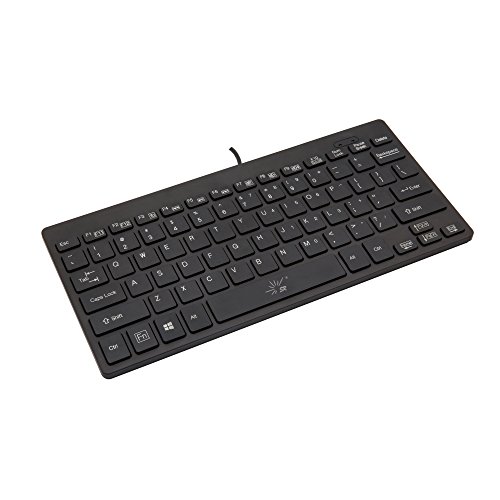
This wired mini keyboard with 78 keys is a straightforward, budget-friendly option for PC, Mac, and gaming consoles. It provides basic multimedia keys and a compact footprint for small desks or travel kits. Best for: users who want an affordable, wired option with essential multimedia controls. Caution: The wired setup lacks wireless flexibility and backlighting, which can limit usefulness in dark environments.
GEODMAER 65% Gaming Keyboard

This 65% compact wired keyboard focuses on space-saving design while keeping essential controls and 11 media buttons. It uses a detachable Type-C cable for a stable connection and ultra-low latency, making it suitable for both office work and light gaming. Best for: gamers or compact-desk users who want full functionality without a full-sized keyboard. Caution: No numeric keypad and 26-key anti-ghosting; ensure it meets your typing needs before purchase.
Logitech MX Keys Mini

The MX Keys Mini provides a premium compact experience with backlit keys, Bluetooth and USB-C connectivity, and cross-platform compatibility. Its key layout emphasizes comfortable typing with a smart illumination system that responds to hands presence. Best for: Mac and PC users who want a sleek, durable, and well-lit compact keyboard for productivity and everyday tasks. Caution: Higher price point may be a consideration for budget buyers.
Arteck 2.4G Wireless Keyboard

Arteck offers an ultra-slim wireless keyboard with media hotkeys and a long battery life. The included two AAA batteries and automatic sleep mode contribute to extended usage between changes. Best for: shoppers seeking a budget-friendly, portable wireless option with convenient media controls. Limitation: It may lack the advanced features found in premium compact keyboards.
Buying Guide: Small Keyboard Choices For Laptop Users
- What connectivity suits you best? Choose between USB receiver (2.4 GHz), Bluetooth, or USB-C wired depending on your laptop’s ports and how you use your device.
- How much desk space do you need? 60–65% keyboards save the most space but remove dedicated navigation keys; 65% and 68% designs offer a middle ground for accuracy and portability.
- Do you need backlighting or multimedia keys? Premium options like Logitech MX Keys Mini provide smart illumination; budget models often rely on basic function keys.
- Is travel frequently on the horizon? Ultra-slim and light designs, including compact wireless sets, travel best and reduce bag weight.
- What about durability and typing comfort? Look for scissor-switch or membrane keys with low travel for smooth, quiet typing and reduced fatigue on long sessions.
FAQ
Are compact keyboards compatible with laptops?
Yes. Most compact keyboards connect via USB, Bluetooth, or a wireless receiver and are designed to work with laptops running Windows, macOS, Chrome OS, or Linux.
Do I need a mouse with a mini keyboard?
Not always. If you prefer one device, choose a compact keyboard-and-mouse combo; otherwise a standalone mini keyboard can pair with a laptop’s touchpad or external mouse.
What should I consider for travel use?
Prioritize lightweight, thin profiles and reliable wireless connections. A compact layout that fits your bag and desk lets you type comfortably on the go.
Do compact keyboards support numeric entry?
Most 60–68% keyboards omit a dedicated numeric keypad. If you frequently input numbers, choose a 65% or 68% model with a secondary layout or a separate number pad.
Is backlighting essential for work in dim environments?
Backlighting improves visibility in low light and can reduce eye strain, especially for late-night work. Battery life may vary with illumination usage.
What maintenance helps extend keyboard life?
Regularly clean debris from keys, replace batteries when necessary, and store devices in a cool, dry place to maintain performance and longevity.