Best Cell Phones for Blind People: Accessible Options for Everyday Use
When choosing a phone for blind or visually impaired users, the best picks emphasize voice control, tactile or large-button interfaces, and reliable emergency features. This guide highlights five phones designed to be easy to use without sight, plus practical buying tips to help you pick the right model for your needs. Ideal buyers include seniors needing simple calling and texting, visually impaired users seeking voice-first operation, and caregivers looking for dependable SOS functions. Below is a quick table of the five selected models for fast comparison.
| Product | Key Strength | Best For |
|---|---|---|
| RealSAM Pocket | Voice-operated, 5G connectivity | Voice-first users who want modern speeds |
| BlindShell 3 Button (Blue) | Large tactile buttons, full voice control | Blind or low-vision users who prefer physical keys |
| BlindShell 3 Button (Sand) | Large tactile buttons, voice control | Travelers who want a tactile keypad with simple menus |
| LIVELY Jitterbug Smart4 | Senior-friendly interface, care support | Seniors needing dependable service and SOS |
| Easyfone A6 4G Big Button | Big buttons, simple UI, no camera | Caregivers seeking ultra-simple text/call device |
RealSAM Pocket – 5G Voice‑Operated Smartphone

The RealSAM Pocket is designed for blind and visually impaired users who want hands-free operation. Voice commands enable dialing, texting, and other tasks, reducing the need to press small buttons. This 5G unlocked smartphone works with major carriers, simplifying SIM setup by choosing a preferred carrier online. Best for users who rely on voice control and want fast mobile data. A potential limitation is compatibility with services that require app-based setup from providers outside the carrier ecosystem, so confirm your carrier’s setup options before purchase.
BlindShell 3 Button‑Operated 4G Phone – Blue

The BlindShell 3 combines large tactile buttons with full voice control and spoken menus. It guides users step-by-step, enabling independent calling and texting. An Emergency SOS Button adds peace of mind for seniors and caregivers. This model is best for users who prefer physical keys and clear audio prompts. A limitation is its 4G network support, which may be slower on areas with limited coverage or older networks, depending on the plan chosen.
BlindShell 3 Button‑Operated 4G Phone – Sand
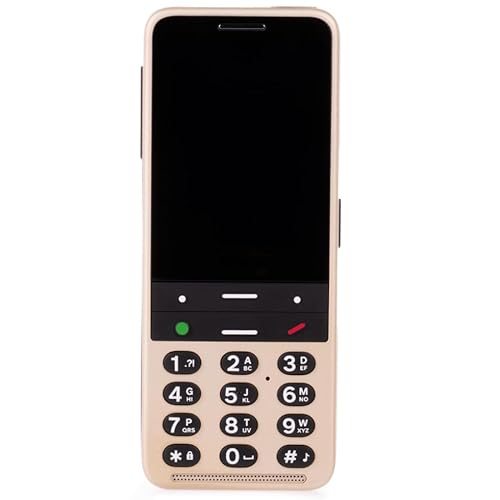
Similar to the Blue variant, this Sand version emphasizes accessibility with 100% readable design, large tactile controls, and voice-assisted menus. It suits users who want consistent accessibility across colors. Best for those who value visible, tactile keys in a straightforward, non-screen interface. A potential caveat is the reliance on spoken menus; precise voice commands may require a brief familiarization period for new users.
LIVELY Jitterbug Smart4

The Jitterbug Smart4 is designed for seniors, offering a simple menu, a pre-installed SIM, real-time call captioning, and an Urgent Response button. It emphasizes caregiver support and a straightforward user experience. Best for users who want a simple, reliable phone with easy access to help features. Limitations include its dependence on Lively’s network service plan, which may limit carrier flexibility.
Easyfone Prime-T6 4G Picture Button

The Prime-T6 focuses on large picture memory buttons and a minimalist UI, prioritizing quick access to common calls. This model is best for users who prefer a visible, image-based keypad and a simple workflow. A caution: it operates on 4G with a basic OS, so advanced apps or internet-heavy tasks are limited compared to smartphones with app ecosystems.
Easyfone A6 4G Big Button Senior Phone

The Easyfone A6 emphasizes a clear, loud sound and big physical buttons, with a simple operation system and no Internet access or camera. It includes a 1050mAh battery and a docking charger for easy charging. Best for seniors or caregivers prioritizing straightforward calling and texting without online services. A potential limitation is the lack of camera and internet features, which may limit certain tasks.
Buying Guide: How To Choose The Right Accessible Phone
- Voice-first vs. tactile-first interfaces: If you rely on speech, prioritize models with strong voice control and clear spoken prompts. For users who prefer physical buttons, look for large, well-spaced keys and tactile feedback.
- Network compatibility: Decide between 4G and 5G devices. 5G can offer faster data, but verify carrier compatibility and plan requirements before buying.
- Emergency features: An easy-access SOS or Urgent Response button is essential for seniors or caregivers. Consider where the button is located and how quickly it can be activated.
- Battery life and charging: Look for models with long standby times and simple charging solutions, like docking cradles or straightforward USB chargers.
- App ecosystem vs. dedicated interfaces: Some devices run simplified OSes with limited apps, while others provide access to standard apps with accessibility features. Decide which experience best matches daily needs.
- Durability and form factor: If the user is prone to drops or rough handling, a sturdy design with a large display and physical controls may reduce frustration.
Frequently Asked Questions
- Which phone is best for voice-controlled use? RealSAM Pocket stands out for voice-first operation and 5G connectivity.
- Do all these phones require a data plan? Some models operate on basic carriers or SIM-free setups; check the carrier requirements for each device.
- Are big-button phones safer for seniors? Yes, large tactile buttons and SOS features contribute to safer, independent use.
- Can I use these phones without a screen? Several models provide spoken menus and voice commands that do not require screen inspection.
- Is 4G enough for everyday use? For basic calling and texting, 4G models are typically sufficient; 5G is optional for faster data.
- What is the best option for travel? BlindShell devices with tactile keys and spoken menus can be easier to use without looking at the screen while on the move.